

Sage: Developing a Database for Online Resources at the University of California, San Diego
Sage: Developing a Database for Online Resources at the University of California, San Diego
Esmé Cowles and Steve Lawson
Introduction
Sage, http://libraries.ucsd.edu/sage/,is a database developed by the Libraries of the University of California, San Diego that lists Web sites, e-journals, and other resources. Designed to replace static HTML files listing resources by subject area, Sage replaces that functionality with database-generated pages. It also allows librarians to organize resources in ways that would have been very cumbersome to do manually,and reduces duplicated work by allowing records to be shared across multiple subject areas.
This article describes the strategies we have used to structure and present the resources in our database, and the history and process of developing Sage. More information about our technical infrastructure, author tools, and usability testing is available in the "About this site" section of our Web site: http://libraries.ucsd.edu/about/
History
Sage had its origins in the late 1990s in UCSD's Science and Engineering Library (S&E). The S&E librarians had created large HTML pages of links to resources such as databases, e-journals, and Web sites in their subject areas. As more and more information came online, they began to struggle to keep those links current. Often, a single resource would be shared by multiple subjects. If something about that resource changed, such as its URL or dates of coverage, a lot of redundant work had to be done to change that information on every page where the resource appeared. In 1998, the librarians teamed up with a library programmer to come up with a database solution that would allow for easier editing and maintenance of these pages.
Their solution was called the Value Added Database (VAD). The VAD had fields that identified and described each resource, such as the title, URL, and description. Each resource could then be assigned any number of subjects and types. Subjects generally corresponded to academic departments or programs at UCSD, such as "chemistry" or "aerospace engineering," while types described the format, medium, or source, such as "electronic journals"or "societies/associations." Users were generally expected to start with a subject and then explore the different types associated with that subject, but users could also choose to start with a type and, by doing so, discover all available databases or electronic texts, for example, without regard to subject.
The VAD was fully operational for Science and Engineering Library end users by the start of the 1999-2000 school year. At the same time, a redesign effort,known as the "Portal Project" was underway for the overall UCSD Libraries site and all the branch library sites. The Portal Project considered many options for building a database-driven site, such as OCLC's Cooperative Online Resource Catalog (CORC), or ROGER, the Libraries' own Innovative Interfaces OPAC. But none of these options allowed the degree of local customization in display or description of resources that was considered necessary, nor were they optimal for browsing. Accordingly, the Libraries chose to implement the VAD site-wide. With a great many changes accomplished by a large number of librarians and programmers, the VAD evolved into what became known as Sage. Sage was operational for the main UCSD Libraries site by the start of the 2000-2001 school year.
Database structure
The data for Sage is stored in an Oracle database, with tables for the basic resource information (title, URL, etc.), and separate tables for related fields(subject, type, etc.). Our database structure is relatively simple, with only two dozen tables for the core resource records. A simplified entity-relationship is shown in Figure 1.
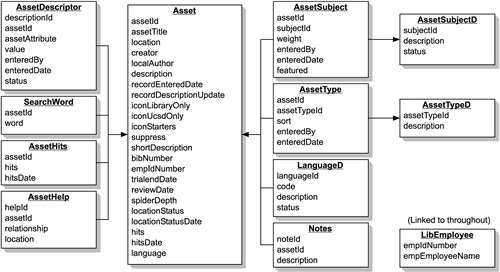
One of the key issues we tackled early on was whether to have each related field have its own table, or to have a single table with a more generic structure that would allow any number of different kinds of relationships to be entered. As it turns out, we did both.
The two fields that we use most often to categorize our resources are subjects and types, as described above. For these fields (and a handful of others), we created dedicated tables. Subjects and types are each stored in two tables: a lookup table that lists the subjects or types, and a second table that associates the values with resources (and stores some administrative metadata about who entered the subject/type association and when). This allows a resource to be assigned any number of subjects and types.
For many other kinds of relationships and added values, we decided that they did not need dedicated tables in the database. Instead we created a table that allowed librarians to associate arbitrary attribute-value pairs (which we generally call "custom fields") with a resource. Theoretically, custom fields could be used to define all the data for a resource. Instead of having a table for subjects with an entry for Chemistry, we could enter a custom field with the attribute "Subject" and the value "Chemistry." Assuming the problem of standardizing the vocabulary could be worked out, this seemed like an elegant solution that would be very flexible and extendable. We considered using this approach for all of the related fields, but worried about the performance implications of having all the fields in one table, and in free text format instead of the linked integers of the dedicated tables. In the end,we created dedicated tables for the core fields we planned to use often, but created the custom field table to experiment with.
Using custom fields
Custom fields allow for great flexibility and author-driven data definition. To group records without any obvious relationship that would be recorded in the database (e.g. the resources to be used in a library instruction class session,or the handful of resources a Sage author wants on a specific page), the custom field provides an easy way to tag the resources for later retrieval. Some of our most popular pages are generated this way. For example, our Databases A-Z page contains all the resources given a specific custom field so that it can be a more cohesive list than simply a list of all resources assigned the type Article Databases.
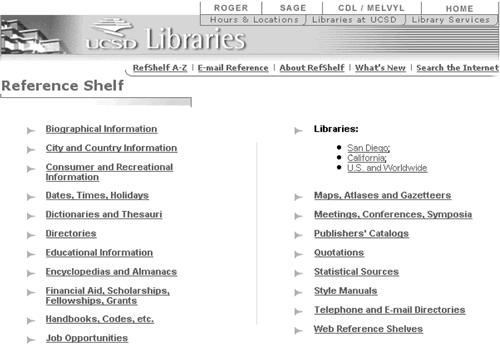
Since the custom field table has both an attribute and a value, custom fields can also be used to create simple ad hoc hierarchies, giving each resource in the overall category the same attribute, and all the resources in each subcategory the same value. The first use of this technique was our Reference Shelf (see Figure 2). Every resource is given the attribute "refshelf",and each section has its own value, such as "dictionaries," or "statistics."This technique can also be used with subject guides, where it might make sense to group the resources with more structure than a simple list.
Since we first started using Sage, another use of the custom field has emerged: identifying oversights. Since librarians can add their own fields at will, they can create custom fields for fields that should be in the database structure. For example, we did not include a language field, since virtually everything we were dealing with was in English. Once a librarian started including resources in Japanese, and including a custom field to mark them, we realized that we should have a field for the language of a resource, including a controlled vocabulary of language names.
To hierarchy or not to hierarchy
We were wary of subject hierarchies (mostly because they have been so poorly implemented by so many sites), so we initially decided on a flat subject list. As the list of subjects grew to more than 150, we reconsidered the decision. After experimenting with several levels of hierarchy and display options, we settled on a three-tier hierarchy. One of our major concerns was that, by requiring users to navigate through a hierarchy, they would be forced to guess which category we put a subject under, and be reduced to hunting for the category they wanted. To overcome this limitation that many hierarchically-organized Web sites suffer from, we allow subjects to be in multiple branches of the hierarchy – History of Medicine is in both Social Sciences/History and Area Studies, and in Biology and Medicine/Medical Sciences. We also prominently feature a search box and a single alphabetical list of all subjects, so users who are frustrated have alternatives to navigating the hierarchy (see Figure 3).
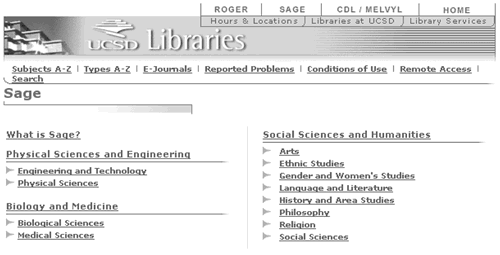
To add a hierarchy to our existing list of subjects, we created a separate table to represent the hierarchical arrangement. This table has three numbers which encode the position in the hierarchy, and a foreign key to the subject table. To make this work correctly, we needed to add the intermediary points of the hierarchy to our subject list, which did create some confusion among Sage authors, since some of the hierarchy names were similar to the regular subject names (e.g. "Art" and "Arts"). Once the display of the subjects was modified to make it clear which were which, and guidelines were written to clarify when hierarchy subjects should be used, this problem was resolved.
Social aspects
One of the keys to the success of Sage has been an attitude of collaboration across the organization. UCSD Libraries are very fortunate to have a large and well-established programming department, and Sage has been a true collaboration between librarians and programmers. In addition, librarian subject specialists who might not have been involved in the Sage project were enlisted as collaborators when they realized that Sage could save them the time and effort that they were expending on maintaining a huge number of HTML pages.
Unlike the static pages that were maintained before, records in the database are shared across multiple disciplines, so the titles and descriptions for resources that span several disciplines need to be acceptable to all of the branch libraries that are related. In the past, each branch maintained its own descriptions of the resources that were relevant to multiple branches, so these different descriptions had to be merged and reconciled. Since the database was originally developed for the Science and Engineering library, some modifications to records that were relevant to other disciplines (e.g. Academic Universe)needed to be made when other branches began using it.
In addition, since most of our pages are built with subjects, types, and custom fields (which can be added to a record by any librarian), there needs to be more communication when adding records. In the past, librarians were accustomed to having a high degree of control over the pages that they maintained. To some degree, that control has been maintained in the present environment, as specific bibliographers may "own" a Sage subject, just as they control a budget line for acquiring materials in that subject. But Sage resources are "owned" by all, and, in theory, a librarian could tag a resource with any subject. Once a page is dynamically built out of the database,new records could appear on the page if any other librarian added the subject or custom field to a record. To keep some degree of control, we encourage people to send an e-mail to the librarian who "owns" a subject if they think a record should be added, rather than just adding it to the subject themselves.
In addition to the day-to-day issues of how records display on particular pages, we feel that getting – and maintaining – buy-in from all the librarians and Webmasters who use the database to build their Web sites and subject pages is very important. When we were first developing the database and tools, we involved as many people as we possibly could in committees. We held frequent meetings that were open to all staff to give people a chance to give their input on the decisions we were making. Our first usability tests were done with staff members, giving them a chance to have hands-on experience with the site early on. Bibliographers were included early in developing both the concept of Sage subjects reflecting UCSD programs, and in approving of the subject terms used. Now that Sage is up and running, we hold meetings quarterly to report on ongoing development, give new staff an opportunity to ask questions, and discuss any issues that people want to discuss. New features and changes to our subject and type lists often come from these discussions. In the near future we hope to meet with small groups of librarians to discuss how they use Sage as bibliographers, at the reference desk, and during instruction and outreach sessions. Through these meetings, we hope we can facilitate a frank discussion of Sage's strengths and weaknesses and define areas where we can further refine display, performance, and author tools.
Record Selector
We have developed Java servlets to display the contents of the database and allow librarians to edit records and build custom pages. Initially, we made several different programs to generate the public browse pages, one for each kind of page we wanted to generate (such as e-journal "A-Z" lists, main subject pages, etc.). These programs shared many common features, and were designed in a fairly modular way that allowed us to reuse the code for many of the common tasks (such as generating headers and footers, connecting to the database, etc.). However, we quickly found that there was still a large amount of duplicated code. As new features were developed, we had to implement them multiple times, making sure that the changes were done consistently. Particularly in the parts of the code that build SQL queries, this was tedious and error-prone.
For internal use, we had developed a program called Record Selector – a tool that generates SQL queries based on parameters passed to it. Record Selector had a very different set of features – it had far more flexibility in formatting the individual resources that were displayed, but had only rudimentary options for page headers, footers, etc. In addition, some of the browse pages used hand-tuned queries that were more complicated than Record Selector could produce.
To reconcile these two tools and make the code more maintainable, all of the public browse pages were migrated to Record Selector. The first step was to enhance the page-formatting capabilities of Record Selector, which was pretty straightforward. A more complicated task was to enhance the query-building capabilities so that they could handle all the queries we were using for our public browse pages. As this development was going on, of course, there were requests for new capabilities for librarians to be able to query the database through the internal interface (for example, including multiple subject and types in one query, or including records in one subject and excluding those that were also in another subject). The end result, while not perfect, is a very flexible tool: an SQL query generator that can take arguments for virtually every field in our database, and formatting options to generate almost any page in our Web site with the resulting set of records.
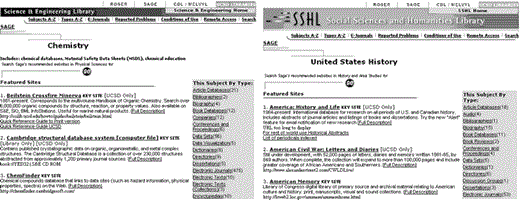
Using this tool, librarians have the capability of creating a large variety of pages on demand. Any combination of records can be retrieved from the database, and then formatted like any of the different types of pages in our Web site. Also, instead of using the standard headers and footers from our main site, the graphics of any of the branch libraries can be substituted, with the page titles and navigation customized. Virtually every part of the main resource record can be displayed or hidden, so branch libraries could easily make a set of subject pages for their disciplines, with their branch graphics to fit in with their Web site (see Figure 4).
In addition to the enhancements we made for the public displays, we also integrated some of the reporting tools we had developed for helping librarians maintain the database. Once a set of records has been retrieved with Record Selector, it can be used to generate reports such as the status of the links(from our link-checking program), or the number of times the resources were accessed (from our redirection program). Some administrative metadata can be displayed, to help reconcile records entered at different times or by different people.
Server architecture
The technical infrastructure that we use to serve Sage has continued to evolve since we first developed the site. Our database is currently Oracle on a three-node cluster of Linux servers. Our author tools are currently a mixture of JSPs and Servlets served by Tomcat on Linux. Originally, our database, author tools, and development environment were served by a single machine, running Netscape Enterprise Server, JRun, and Sybase. Our public pages are currently Java Servlets and Apache Server-Side Includes served by Apache/JServ on Solaris.
As our migration from a single Solaris machine to four Linux machines testifies, we are moving towards open-source software (Apache, Tomcat, Linux)and clusters of inexpensive Linux machines. We intend to continue this trend,replacing several Solaris servers with a cluster of inexpensive Linux machines. Apache and Tomcat both have support for load-balancing and failover, which would give our services a much higher degree of fault-tolerance and redundancy. With inexpensive server-class PCs selling for less than $1,000, this approach allows us to do much more with our IT budget.
The exception to this trend is our switch to Oracle (instead of one of the open-source databases such as PostgreSQL or MySQL). At least until this point,PostgreSQL and MySQL have not had the replication features found in the leading commercial databases, and MySQL's lack of subqueries made it unusable. Of course, this may change as active development on PostgreSQL and MySQL continues. Our overall trend is definitely away from commercial, proprietary software and expensive servers, towards open-source software and inexpensive PC servers.
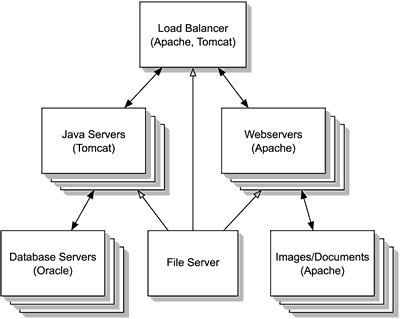
We are working towards an architecture, based on Apache, Tomcat, and Linux,where all of our production servers would be nodes in a cluster. Each server would be assigned a role (Webserver, Java application server, database server)and replicated with standardized content from a file server (see Figure 5). Adding capacity would be as simple as adding a new machine to the rack and adding it to a configuration file on the file server indicating which role it should be assigned. Individual machine failures would, at worst, interrupt a user's session and require them to log in again.
Development process
A crucial companion to developing our server architecture is improving our development infrastructure and processes. In the past, we commingled our development applications with our production applications on the same server,and ran a bunch of different services (Webserver, Java application server,database, mail server) on a single machine. More importantly, we relied very heavily on the heroic achievements of a few programmers to get our applications working. As we move to a more structured server environment, we are also working on a more structured development process.
The first step in a more organized development process was separating our development applications from our production applications. We have established dedicated development and testing servers. With PC prices as cheap as $500, it has become very economical to purchase a dozen PCs, install Linux on them, and use them to test clustering configurations. With the increased availability of applications for Linux, some of our programmers run Linux on their desktop machines, which allows them to have a personal development environment. We have also begun to move away from running multiple services on a single machine,towards running only a single service per machine. In fact, once our cluster plans are implemented, we will have turned this equation upside-down, running multiple machines per service for redundancy and load-balancing.
As our server and development infrastructure matures, our development process is maturing as well. In the initial development of Sage, programmers would routinely take input from usability testing or meeting with librarians and have a revised version of the applications done the next day. This allowed us to iterate quickly through design revisions and develop feature-rich applications. But it did not yield well-engineered code. We are now focusing on a more sustainable development model, where the most common tasks (authentication,editing a database record, HTML formatting, generating SQL, etc.) are analyzed and reusable modules are developed that will make it trivial to add a given task to an application
Authenticating a user from a Servlet or JSP should be as easy as a one-line invocation of the authentication module. Editing records in a database should be as easy as defining the database structure in an XML configuration file (and flexible enough to allow controlling the display with a customized XSL stylesheet, or overriding the default behavior with a customized Java Bean class). Many solutions (or parts of solutions) exist for these problems, like using XML for data interchange and XSL for generating HTML (or other output formats as needed). The challenge is not finding a way to solve the problem, but finding the best way, that is flexible, scalable, and robust.
New directions
In addition to the possible changes and developments already mentioned, Sage has the potential to expand in entirely new directions. The idea of a user-customizable "My Library" function for Sage has been discussed since the very beginning, but has never been implemented. It would be possible to write a new, end-user-friendly version of Record Selector that would allow users to create their own views of the database. We are taking a fresh look at this concept now, weighing the amount of development time such a project would demand against the level of user adoption we believe we could expect.
We are also considering using Sage to keep track of licensing information and other information that would be useful in collection development and administration. This idea was directly inspired by UCLA's Electronic Resources Database, which was itself influenced by Sage.
Esmé Cowles (escowles@ucsd.edu)is a Software Engineer at the UCSD Libraries and was the primary maintainer of Sage until March 2002, and is now working on an art images metadata project.
Steve Lawson (splawson@ucsd.edu)is a Reference Librarian and Webmaster in UCSD's Science and Engineering Library, and a relative newcomer to Sage.

