This article describes the process of design and development of two Web-based training templates to prompt rapid development of active learning environments. Eight designers were assigned to two design groups. Each group employed specific guidelines to design an open-ended learning template for a case study. Both design groups used metaphor in their underlying template design, indicating reduction of “cognitive load” as their primary purpose. One design group created a newspaper metaphor template and the other group created a theater metaphor template. Following completion of their metaphor templates, each design group exchanged templates to integrate the same case study content. After the design groups revised their templates, 34 learners were randomly assigned to assess the usability of one plain template and one of the two metaphor templates. Findings suggest that design elements to support limitations of short-term memory are important considerations in template design.
Today, many instructional designers create Web-based instruction (WBI) using templates. Templates are designer-friendly tools that require very little computer expertise and time involvement on the part of the instructional designer (Ganci, 1998; Loucks-Horsley, 1996). These templates provide an instructional designer with a pre-coded shell for entering instructional content. Navigation tools, glossaries, scoring devices, annotation aids, multiple choice testing tools, highlighting devices, chat rooms, bulletin boards, and journals are all typical components of a Web-based template. While these components are commonly used in distance learning environments, other tools with the potential to increase interactivity are less frequently used or explored, such as templates that prompt the development of case studies and problem-based learning.
Templates are often limited in functionality (Bell & Korcuska, 1995; Ip, 1998), particularly when designed by computer programmers who have more technical than instructional expertise. Many templates are designed using a directive or didactic approach to instruction, whereby a learner first encounters a menu, clicks on a lesson link, reads a series of linked pages, and concludes the experience by responding to several multiple choice questions. When presented with templates of this nature, instructional designers may do little more than insert pages of instructional content and design multiple choice test items. While some people might think of this as interactive, most instructional designers do not, often calling the resulting instruction a “page turner” on the Web, a product that does not actively involve or engage the learner's mind. An interactive instructional unit, on the other hand, involves a meaningful exchange between the learner and the instructional environment. While multiple choice questions might be thought of as interactive, their indiscriminant use can turn the instruction into a “page-turner” or “driller and killer” of motivation and learning. Furthermore, templates are not always designer-friendly and as easy to use as programmers who created them would like to think.
Many templates are not intuitive or learning-focused. Instructional designers often find themselves designing complex charts and tracking system that show root, directory, and subdirectory structures needed for navigation to sections where instructional content can be pasted or imported into the template. Thus, instructional designers may spend more time navigating and placing content in a template than designing the instructional content and strategies in the first place. Needed are templates designed and developed for instructional designers who have interest in creating interactive and meaningful learning experiences.
Ironically, novice instructional designers just out of school with the latest research and information on constructive, more problem-solving learning environments, often find themselves working in rapid application development settings creating passive—rather than active—instruction using templates that limit their ability to design useful instruction for interactive learning. “Computer programmers are often the decision-makers and have a strong influence on how the instruction is eventually designed” (conversation with Laura Summers, 2000). The frequent excuse of the programmers in computer-based training sessions is that richer types of learning experiences take too much time to develop.
Without experience to the contrary, novice instructional designers too often lack the confidence to stress that interactive environments may in fact be efficiently and economically created. This study is undertaken to learn more about the template development process. Although the designs of templates for instructional purposes have recently appeared in the literature (Ip, 1998; Ma, Du, Lee, Su, & Lin, 1998; Muldner, 1994), few studies have provided information on how to design templates for inquiry or problem-based learning. Therefore, many questions need to be researched, such as: What are some critical elements for active learning (problem-solving based) templates? What makes these elements effective? How is the usability of active learning environments measured?
Literature Review
Web-Based Instruction (WBI) templates are used most often in rapid application development environments where a design team of programmers, instructional designers, graphic artists, interface designers, and technical writers work together to create prototypes of instruction that gradually evolve into a final product (Vaughan, 1994). Although stressful, these development environments have some advantages because they involve the learner in the design process and allow each learning situation to be analyzed uniquely.
While older generations of instructional systems design models were based on a linear step-by-step methodology of analysis, design, development, implementation, and evaluation, these emerging design models are more dynamic and can be applied in an iterative and non-linear method (Tennyson, 1999). Quick prototypes of instruction are created and tested with learners, allowing designers to learn more about the learners, their environment, and the learning- or performance-related task. Similar to formative evaluation (Flagg, 1990), this approach can save resources in the long run by allowing the identification of problems to be spotted up front, saving many hours of rework later in the design process.
Web-Based Training Templates
Instructional authoring templates available for rapid development of computer-based training include widely distributed commercial products such as Blackboard, WebCT, eLearning and some less well known efforts of a number of developers. Muldner (1994) described a template for rapid prototyping computer-based instructional presentations using the NEAT (iNtegrated Environment for Authoring in Tool-Book). NEAT made it easy for authors to create instructional components such as highlighting, linking, annotations, and computerized drills. Ma, Du, Lee, Su, and Lin (1998) described a similar authoring tool with course layout templates allowing for different structural compositions of a Web-based learning system called Visual Constructor. Both of these reports, however, described the technical features of their authoring tool for instructors, but did not show any research related to the effectiveness of the tools, how they facilitate instructional strategies, and the decisions made during their development. Bell and Korcuska (1995) suggested that software design tools such as these are too generic to provide pedagogically sound design guidance. They consequently developed Goal-Based Scenario Builder, an authoring tool with templates specifically for prototyping goal-based instructional scenarios. Bell and Korcuska described Goal-Based Scenario Builder components (Problem, Do, Decide, Communicate, and Wrap-up) along with a very brief list of lessons created by novice instructional designers over an academic semester; however, they did not provide how the template was designed or evaluated.
Active Learning Templates
Despite the lack of detail provided by Bell and Korcuska (1995), their development of a tool for creating goal-based scenarios is closely aligned with the direction of this study, which is to create a template for design of problem-based learning environments and test its usability. Goal-based scenarios are instructional strategies that require that learners work towards a goal, and in the process learn a set of skills (Shank, 1994). Goal-based scenarios are forms of Rich Environments for Active Learning (REAL) characterized by Grabinger (1996) as settings that: provide an authentic context and type of assessment, support cooperative learning between students and teachers, and stimulate learner inquiry, responsibility, and decision making. As such, they are theoretically aligned with constructivist orientations in which learners take an active rather than passive role in constructing knowledge (Bransford & Vye, 1989; Brown, Collins, & Duiguid, 1989). Rich Environments for Active Learning are fundamentally different from learning environments based on what Grabinger calls old assumptions that influenced many instructional designs of a didactic directive nature. Where the old assumptions were based on ideas that learners can easily transfer knowledge from one setting to the next and that learners are the receivers of information (blank slates to be filled with content), the assumptions that underlie REALs are that learners need to learn in realistic contexts to construct knowledge.
Template Design for an Active Learning Environment
Lohr (2001) created an active learning template based upon Grabinger's advice for REALs by creating a matrix for interface design development (see Table 1). Based upon these criteria, four interface categories were integrated into the template:
a Get Ready section to address “What is the problem or conflict?”
a Participate section to address “What is my role? What is my strategy as a learner?”
an Assess section to address “From whom can I get information and/or help? How do I define the problem now?”
a Tools section to address “What is possible to explore? Where can I find other kinds of help? Am I on the right track? Am I solving a problem?”
Results of Lohr's study indicated that designers who used the template to create instruction and learners who used the template for learning new information were positive about the experience. Although the four prompts Get Ready, Participate, Assess, and Tools did encourage designers to insert the appropriate types of content for a case study, there appeared to be some confusion over where to put the content. Did information fall into the Get Ready section, the Participate section, the Assess section, or the Tool section? The designers of the case study expressed the need for more specific prompts in the interface to address the types of instructional support needed by both learners and designers. The designers also suggested using more categories than the four used (Get Ready, Participate, Assess, and Tools) in the study. Even though the data revealed these four categories facilitated integration of content and learner achievement of lesson objectives, designers indicated that different words might be used more effectively. Overall, designers expressed a strong preference for creating their own template using Grabinger's matrix (Table 1) to guide the process. However, designers did not want to be restricted to a shell that created space based upon another designer's labeling and conceptual vision.
Additionally, questions were posed in Lohr's study about the possibility that chunking information into a number of separate Web pages might not be as effective as simply leaving most of the information on one Web page where the learner could see the whole context of the case study. This design idea, however, contradicts with Parson's (2001) finding that students prefer reading electronic text passages spread over multiple short pages to one electronic page requiring scrolling.
The purpose of this study is to observe how students in an advanced instructional design course would apply active learning guidelines to the design and development of templates. Rather than providing designers with a template, as was done in the Lohr (2000) study, this study would instead provide designers with guidelines that were left open to their interpretation and creativity. Specific research questions include:
What would be the characteristics of designer's templates when instructed to use Table 1 (suggesting 12 categories) to design a template for active learning? What elements in Table 1 would be present or missing?
Do learners prefer an interface that presents information over multiple short Web pages to an interface that presents information in one long Web page?
Would there be any difference in the usability ratings of interfaces created by different design teams?
It is important to make a distinction between the concept of template and the concept of interface. The first research question deals with templates, and asks how different designers might create active learning or problem-based templates. A template, as previously defined, is a pre-coded shell or structure that contains space to place different categories of instructional content. The second and third research questions look at the learners' initial impressions of the product created by the template. These questions focus mostly on the part of the template that learners see—the interface. An interface is defined as the signs and signals between a product or system (the template) and the user (the learner) (Hackos & Redish, 1998; Marchionini, 1995). In this case, the interface consists of the words and graphics that signal where certain types of content are contained and how to navigate through the environment.
These research questions focus specifically on information access and not on comprehension of the instructional information. The purpose of this study is to assess the usability of the template and interface prompts for designer and learner groups when locating information.
Methods
Eight designers and 34 students took part in this study. The term “designer” designated two activities – developing a template and integrating a case study (a form of active learning) into that template. The eight designers were enrolled in an advanced instructional design class. The 34 graduate students were enrolled in either an introductory instructional design course held completely online (22 participants) or an introductory educational technology course held in a classroom (12 participants). These graduate students were considered the learners in this study and each took part in the case study experience.
Designers were provided with a Web-based case study created by the author of this article. Because the case study was in a hypertext markup language format, designers could easily cut and paste the case study into the templates created. This approach was used in part to determine if separate and accessible template sections were in fact designed into the templates to accommodate the different types of case study criteria as listed in the Matrix of Learner Questions in an Active Learning Context (see Table 1) of this article.
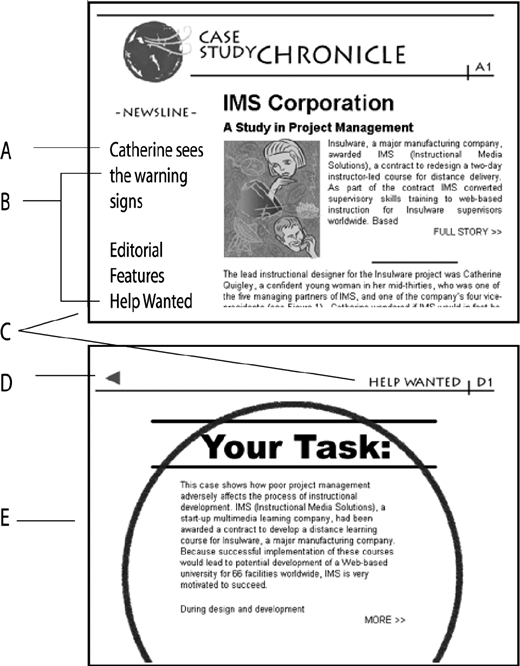
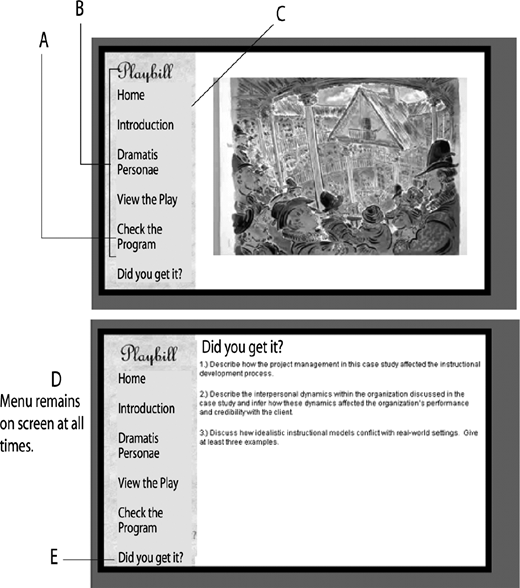
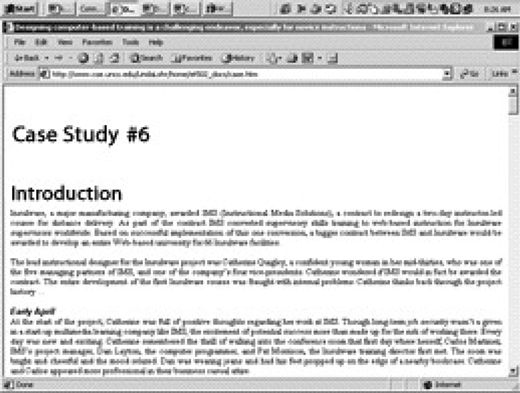
Three template designs were created and used. Team A created a newspaper metaphor template (see Figure 1). Team B created a theater metaphor template (see Figure 2). The course instructor created a plain template (see Figure 3). The plain template did not have any graphical embellishment other than typographical headings that established hierarchy of content. The plain template could be viewed on one scrolling Web page. Unlike the designer-created templates, the plain template did not contain multiple sections (links to other pages) or use a metaphor-based design.
Eight designers examined and analyzed the Active Learning template used in the original study (Lohr, 2001) and received instruction on Grabinger's (1996) description of rich environments for active learning. Designers were asked to re-create an active learning template for case studies using Table 1 and Grabinger's criteria, and were specifically requested to design a generic template that could be used for most case studies. Designers were divided into two teams (Team A and Team B) of four students each during the five-week period in which the templates were created. When the templates were completed, the two teams user-tested each other's template. For example, Team A acted as designers and integrated case study content into Team B's template while Team B observed and recorded their observations. Team A then observed Team B as they acted as designers when performing the same task. In the following two weeks, the two teams revised the templates based upon each other's feedback. Designers then posted the case studies on a Web site for student use.
When the case studies were posted on the Web, the 34 students were asked to read through the same case study but in two different formats (one plain and one metaphor). These students were randomly assigned to one of two treatment groups, X or Y. In treatment X, 19 students reviewed a plain interface (unadorned, see Figure 3) and Team A's interface. In treatment group Y, 15 students reviewed a plain interface and Team B's interface.
To address the first research question, the completed templates were analyzed for presence or absence of elements in the interface (see Table 1). To determine if multiple short Web pages were preferred over an interface that features one long Web page, students were asked to complete an evaluation form for the WBI produced using the active learning templates and an evaluation form for the WBI produced using the plain interface. Both evaluation forms were identical and were made up of a 19-item 5-point Likert scale (5 = strongly agree with positive-stated items to 1 = strongly disagree) responses and three open-ended questions asking learners to describe what they liked best and least, and what they would change in the interfaces they used in the study. Nineteen 5-point Likert scale responses were divided into effectiveness, efficiency, and appeal categories. Effectiveness questions were asked to elicit the instructional attributes of the interface—for example, “The pictures of case study characters helped me understand the case study better” and “I found information on how to work through the case study helpful.” Efficiency questions were asked to elicit how easy or intuitive the interface was to use, such as, “I understood what I was supposed to do in this online case study” and “I did not get distracted by this interface.” Appeal questions were asked to elicit motivational components of the interface—for instance: “The interface increased my desire to participate in the case study” and “I would like to do more on-line case studies in a similar environment/setting.”
Analysis of variance and Independent-Samples t tests were used to compare usability scores from Team A and Team B learners. All student comments were coded into Team A and B designer-created and plain template categories for most liked features, least liked features, and suggestions for improvement. Responses were then resorted into sub-themes and reanalyzed for themes within the sub-themes.
Results
Research Question 1
What would be the characteristics of designer's templates when instructed to use Table 1 (suggesting 12 categories) to design a template for active learning? What elements in Table 1 would be present or missing?
Teams A and B created metaphor-based templates: a newspaper metaphor interface (see Figure 1) and a theater metaphor interface (see Figure 2). Author ratings of these interfaces indicated that both teams addressed all Table 1 anticipated questions with the exception of the question “How do I define the problem now?” Additionally, Team A did not address the question “To whom or what can I compare my solution/analysis?” and Team B did not address the question “From whom can I get help? Table 2 refers to the visual representation of Table 1 questions.
Both teams created multiple template sections (links to different Web pages) to accommodate the different types of anticipated learner questions. Three template sections named Newsline, Editorials, and Help Wanted were created for the newsletter template. Five template sections named Home, Introduction, Dramatis Personae, View the Play, Program, and Did You Get It? were created for the theater template.
Designers chose metaphor formats because “they tap into familiar territory [for the designer/learner], making it easier for [for designers/learners] to navigate” (conversation with Team A and Team B designers, 2001). Team A employed a newspaper format with feature stories, editorials, help from the newspaper boy, and help wanted ads to guide the learner. Team B used a theater metaphor, with a “cast of characters,” a program guide (called Check the Program), and the actual play to share the storyline. Interestingly, based upon their comments during development, design teams seemed unaware of the limitation of metaphors (Bishop & Cates, 1996) and the idea that the metaphor might require the learner to translate the metaphor in addition to the learning task, introducing an additional cognitive layer that might impede learner access to information rather than enhance it. Both Team A and Team B learners indicated this to some extent when they made comments such as “the use of [the metaphor] in this case was a bit of a stretch.” “The [theme] and graphics of the theater play were frivolous, confusing, and detracted from the business theme of the content.” “If you are going to stay with the newspaper theme, take some design hints from actual online newspapers.”
Research Question 2
Do learners prefer an interface that presents information over multiple short Web pages to an interface that presents information in one long Web page?
The mean scores of three different interfaces (Plain, Team A, and Team B) for each of the three categories (Effectiveness, Efficiency, and Appeal) and each of the 19 survey items are reported in Table 3, Mean Ratings by Interfaces. The data reveal that the overall mean ratings by interfaces across all items were 2.45 for plain interface users in Team A, 3.56 for newspaper metaphor interface users in Team A, 2.51 for plain interface users in Team B, and 3.69 for theater metaphor interface users in Team B. Analysis of Variance results showed a significant difference among these different interfaces, F(3, 63) = 12.94, MSE = 7.25, p < .001. A post hoc Tukey HSD analysis revealed that the overall mean ratings of the metaphor template users in Team A and Team B were also not statistically significant (p = .68), the overall mean ratings of the plain interface users in Team A and Team B were not statistically significant (p = .83), whereas the overall mean ratings of the plain interface users in Team A and Team B and metaphor interface users in Team A and Team B were highly significant (p < .001). Both Team A and Team B metaphor interface users alike preferred the designer-created templates significantly to the plain template that included all text on a single Web-page with minimal graphics.
Research Question 3
Would there be any difference in the usability ratings of interfaces created by different design teams?
Several Independent-Samples t tests were conducted to compare Team A and Team B metaphor interfaces in the overall mean ratings and mean ratings in three categories (Effectiveness, Efficiency, and Appeal) and the results were not statistically significant. The overall mean ratings by two metaphor templates across all items were 3.56 for Team A and 3.69 for Team B, t(31) = .42, p = .68. In three categories, mean scores for Effectiveness were 3.79 for Team A and 3.63 for Team B, t(31) = .59, p = .56, mean scores for Efficiency were 3.24 for Team A and 3.91 for Team B, t(31) = 1.91, p = .07, and mean scores for appeal were 3.70 for Team A and 3.57 for Team B, t(31) = .37, p = .71.
In terms of the rank of the items, the three highest-rated items in the Team A metaphor template were “The graphics stimulated my interest toward the case study” (M = 4.26), “The other supporting graphics enhanced my understanding of the case study” (M = 4.21), and “The pictures of case study characters helped me understand the case study better” (M = 4.00). The three highest-rated items in Team B metaphor template were “It was easy to explore the interface” (M = 4.27), “I did not get distracted by the interface” (M = 4.13), and “I liked the layout of the interface” (M = 4.00).
Qualitative comments regarding usability (see Table 4) of metaphor templates indicated that most frequently mentioned reasons for the usability of a template related to graphical properties, the presence or absence of effective graphics, typography, and chunking.
All comments suggested the need for appropriate graphics to either signal the organization or importance of instructional content, or to act as a motivational device. For the plain interface, these comments were made “I disliked the paragraph after paragraph of information. Despite the interesting content, its presentation was long and boring. The interface made me feel that way (report like).” “There were no graphics to lure me on or a table of contents to clue me in as to what was important.” Students listed white space, wide margins, fonts, color, pictures of case study characters, and graphics as important for gaining and maintaining interest.
Team A and Team B learners equally mentioned the importance of typography—the art and science of the letterform (Carter, Day, & Meggs, 1985). “What I like best about this interface design is its message design for text. The text (e.g., structure of writing) and the typography have been manipulated purposefully to attract readers' attention … Headings are displayed in bigger italic font size to signal the change of ideas … the most important information is either in bold, italics or underlined. Moreover a list of items is indented from the left margin to signify that the items are grouped together.”
The importance of chunking was mentioned equally by both groups of learners as well. When chunking wasn't as evident (as in the case of the plain interface), learners requested it. “Information needs to be chunked together rather than laid out and waded through.” Chunking was praised when it was used; “It was user-friendly, as it chunked the case study into manageable pieces for the learner.”
Discussion
Noteworthy findings include designer preference for creating metaphor-inspired interfaces, and learner preference for multiple short Web pages, graphics, typography, and chunking. Both designer teams incorporated all but a few of the criteria from Table 1, suggesting that these criteria are reasonable design standards. The anticipated learner question “How do I define the problem now?” was not addressed in either Team A or B's template. Future inquiry into this phase of case-study learning is encouraged, as it could be an important scaffolding element to build into case studies. One idea is to build into the environment progressively more specific objectives or self-checks. Access to these objectives/self-checks might be built into the environment in a number of ways—for one, by requiring the learner to describe the problem more accurately prior to access of further information or feedback.
The need to design graphical elements to support limited information processing capacity was suggested by the strong preference for Web pages that were chunked, either through the use of graphics, white space, short Web pages, or simply typographic headings. When comparing the plain case study template/interface to the designed case study template/interface, learners were significantly more impressed with interfaces that used graphics, themes, and ample white space and chunking. These devices all serve to break information into smaller, more meaningful information units. Although there was strong preference for shorter Web pages, the sequence and hierarchical ordering of those pages were considered important. Many learners felt “lost” in the short Web-page versions, particularly in the newspaper environment that employed more links. These students suggested employing as few links away from the main pages or main menu as possible.
The usability data from open-ended comments fell into two categories: the importance of visual strategies (as mentioned above) and instructional strategies. Though questions were asked to assess the effectiveness of the interface, learners did not separate this from the importance of the content and the way it was presented. This supports the notion that to be effective, an interface should be invisible (Norman, 1988).
Conclusion
This research examined the development of Web-based training templates for active learning environments—in particular, case studies. The study identified a list of criteria or spaces needed to create active learning template designs (see Table 1). To test the effectiveness of these criteria and their relationship to the usability of the interface, students in an advanced design class were asked to create a template specifically for case studies. They in turn gave their templates to a group of instructional designers who used their templates for integrating a pre-developed case study. This was tested on students in a completely on-line classroom to measure their perceptions of how easy the information was to access and use (usability), with a focus on appeal and access. These students were also presented with the same case study in a very simple interface, consisting of a long page of case-study text broken up by headings and white space.
Results indicated learners strongly preferred the metaphor-designed to the plain case study interfaces, mentioning most often that the designed interfaces were more visually stimulating and broke up tedious text segments. Though text was helpful, a strong majority were “uninspired by boring pages that didn't have color or graphics to break them up.” Of interest, too, were the comments regarding confusion over where to start. The criteria in Table 1 include suggestions for many types of cues for template design but do not specifically recommend a “Start Here” cue. Based on learner comments, some type of sign is needed to direct learners towards introductory information needed to get going.
Based upon these data, the following design guidelines for future active-learning templates are suggested:
Design templates around questions that learners are likely to have in active learning environments. These questions include: “What is the problem or conflict? What is possible to explore? What is my role? What is my strategy for exploring? How do I explore without getting lost? What should I pay attention to and what should I ignore? From whom can I get information and/or help? Where can I find other kinds of help? Am I on the right track? Am I solving the problem? How do I define the problem now? and To whom or what can I compare my solution and/or analysis?” An additional question gleaned from this study is “Where do I start?”
Be cautious when designing metaphor-based templates. Learners in the study did not always interpret the metaphor as the designer had intended them to. Results of this study are similar to others (Bishop & Cates, 1996) that find that metaphors have the potential to impose an additional cognitive task for learners, who find themselves not only trying to understand the instructional content but the meaning of the metaphor.
Use many types of visual chunking strategies. These include graphics, white space, headings, typography, and short versus long Web pages. Learners in the study mentioned the need for chunking in the context of helping them feel less overwhelmed, and in making Web pages more attractive through the use of increased white space, typography, or graphics.
Minimize the number of links outside of the main menu. Links from individual Web pages seemed to cause more learner confusion than links from the main menu. Learners using the newspaper metaphor particularly noted this. Unlike the theater metaphor, where all links were contained on the main menu, the newspaper metaphor used links on many of the news features pages. Learners using the newspaper metaphor were more likely to make comments about their frustration over feeling lost or not knowing where they were.
Making sure the instruction and access to it is clearly organized and sequenced. Learners expressed the need for clearly stated objectives and directions when first interacting with the learning environment. For example, what was the overall goal or behavior desired? Some learners indicated that it was important to impose a linear sequence to hypertext content in order to reduce confusion.
Realize that, regardless of information access issues, the central goal for design should be a motivating instructional strategy. Many learners commented upon the case study strategy as one that was motivating and meaningful.
Create an instructional strategy where objectives would move towards increasing clarity as learners defined their learning goals more precisely. Designers in this study did not design template space for these essential questions. Perhaps a solution to this problem is to suggest that the learner directly communicate with individuals (perhaps the instructor), who would then provide students with more defined information. This design feature would help answer the anticipated learner questions: such as “How do I define the problem now? To whom or what can I compare my solution/analysis? and From whom can I get help?”
This study explored information access issues, not actual learning. Future studies might examine the influence of the interface on learning. This study also provided a completed case study that needed only to be cut and pasted into the templates. Future studies might inspect how a case study template prompts the initial design of a case study or active learning environment. This study was also limited to two design groups. Future studies might explore how more design groups interpret the active learning guidelines presented in this paper.