


Abstract:
Over the last decade, as technology has become capable of delivering text, audio, and video at a distance (Deloughry, 1998), corporations and academic institutions have investigated ways to integrate distance education into their teaching programs. As a result of an emphasis on technology, much of the instruction delivered at a distance tends to be driven more by the technology than by proven instructional principles. To realize the full potential of distance learning, designers must apply an analytical approach to the design of distance learning. This Web-based performance support system enables designers and teachers to design effective learning that incorporates proven instructional strategies and tactics.
Problem: Design of Distance Education Driven by Media
Over the last decade, as technology has become capable of delivering text, audio and video at a distance (Deloughry, 1998), corporations and academic institutions have continued to investigate ways to integrate distance education and distance learning in the design of their teaching programs. Universities have launched initiatives to deliver courses entirely via audio or video conferencing, the Internet, and the World Wide Web (Web). Corporations’ training divisions are developing their own intranets to support knowledge-sharing and internal training. With the significant increases in technological advancements, the amount of time teachers and instructional designers spend examining new technologies to understand their capabilities is substantial.
Consequently, there has been a tendency for educators and designers to focus their efforts on the technological issues associated with the delivery of such programs. As a result, much of the instruction delivered at a distance tends to be driven more by the technology than by instructional principles. Or consider the recent advent of streaming technology, which allows developers to broadcast audio and video over the Web. Some university professors became enthusiastic about the technological application, with the immediate result being the use of streaming audio on the Web to simply allow their students to hear class lectures. Similarly, when instructional designers recognized the hyperlinked capabilities of the Web, they saw direct application of the functionality; they moved their paper-based materials to the Web, maintaining the linear composition of the materials, but allowing learners to “click” to turn the pages of the lessons. We are not arguing that linear, sequential instructional delivered via the Web is ineffective, but simply that transforming paper materials to the Web (as an example of distance education) often does not involve the application of instructional theories while considering the capabilities of the Web. By this, we argue that the selection of delivery media in the development of distance education courses often involves analysis of the capabilities of the technology (e.g., computer-mediated conferencing, Web-based instruction, etc.) as opposed to the ways in which the learning outcomes and strategies can be supported by the technology.
Toward the Solution: Design of Distance Education Driven by Instructional Theory
According to Cookson (1990), “The aim of distance education programs is to engage students in effective learning so as to attain certain specified and desired outcomes.” Distance education will be more effective when developers focus on integrating instructional strategies that address learning outcomes as they consider the affordance of the delivery media. The availability and utilization of information and communication technologies alone are not enough for distance learning and distance training to succeed (Visser, 1997). To realize the full potential of distance learning, designers and developers must apply an analytical approach to the design and utilization of distance learning media and methodology (Pisel, 1995; Schreiber, 1998). As Schreiber (1998) suggested, a clear understanding of the instructional needs of the training program will drive appropriately chosen instructional methodologies, effective selection of instructional media, and ultimately successful implementation of distance learning. As Clark (1994) discusses (after reviewing decades of media-comparison studies), it is not the media that affect learning outcomes, but the instructional strategies used in combination with various media.
Introducing IDDE: Our Web-Based Performance Support Tool
Our goal was to design a solution to assist educators and designers in selecting and integrating instructional strategies into their distance education courses. Other driving objectives were to ensure that learner differences were supported within the solution and to enrich the learning environment with additional resources over time. To achieve these outcomes, we designed a Web-based electronic performance support system (EPSS). According to Gery (1989), a performance support system is:
an integrated electronic environment which is available to and easily accessed by each employee and is structured to provide immediate, individualized online access to the full range of information, software, guidance, advice and assistance, data, images, tools and assessment and monitoring systems to permit him or her to perform his or her job with a minimum of support and intervention by others (p. 12).
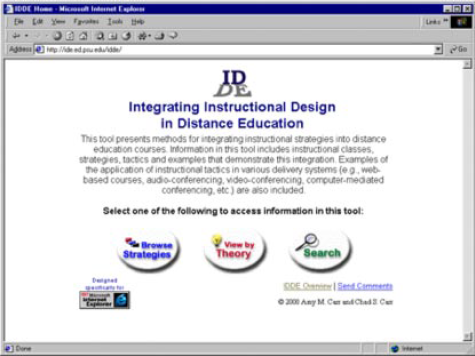
Our Web-based EPSS, Instructional Design in Distance Education (IDDE) (http://ide.ed.psu.edu/idde), provides a combination of instructional theories, strategies and tactics, examples, and images to help designers build effective distance education (DE) lessons. The tool allows users to peruse resources that demonstrate how to apply instructional strategies within a selection of delivery media. These attributes meet our main target outcome of supporting designers in the design of new solutions. Secondly, the Web was chosen as our delivery medium for the tool to facilitate ongoing maintenance and enrichments to the examples demonstrating integration of instructional strategies into DE lessons. Additionally, we wanted to target users with varying goals and perspectives. As Puterbaugh, Rosenberg, and Sofman (1989) stated, “performance support tools are designed to improve worker productivity by supplying immediate access to integrated information—with scope and sequence controlled by the user” (p. 2). The hypertext nature of the Web was a desirable environment for such a tool. The Web enabled us to design three different entry points, to allow each user to choose his or her own direction and access the specific support information he or she needs, as demonstrated in Figure 1. These doors into the tool will be described in more detail in the next section.
Theoretical Foundation for the IDDE Tool
The Instructional Design in Distance Education (IDDE) tool is a Web-based performance support tool that provides a combination of instructional theory and application for those designing distance education courses. The instructional information in the IDDE tool is adapted from the articles by Jonassen and Tessmer (1996) and Jonassen and Grabinger (1990), which provide a compendium of instructional classes, strategies, and tactics. Within the IDDE tool, these instructional elements are arranged as illustrated in Figure 2.
The specific instructional classes, strategies, and tactics that comprise the database of the IDDE tool are listed in Table 1. They are presented in the aforementioned three-level hierarchical format, although the Web-based IDDE tool also contains supplementary examples for the tactics.

As indicated in Table 1, there are five instructional classes: 1.0 contextualize instruction, 2.0 present lesson content, 3.0 activate learner processing, 4.0 assess learning, and 5.0 sequence instruction. The classes are made up of instructional strategies, which may be applied using specific instructional tactics and a variety of delivery media as demonstrated by the examples provided.
Accessing the Instructional Information in the IDDE Tool
As previously mentioned, the IDDE tool was designed to support multiple ways of accessing and conceptualizing instructional tactics. Users can access information in the tool by: (1) browsing the database for instructional classes, strategies and tactics, (2) viewing the instructional tactics, through instructional theory “lenses,” or (3) searching the database by typing in keywords, such as “advance organizer” or “audio conference.”
Navigating the Database
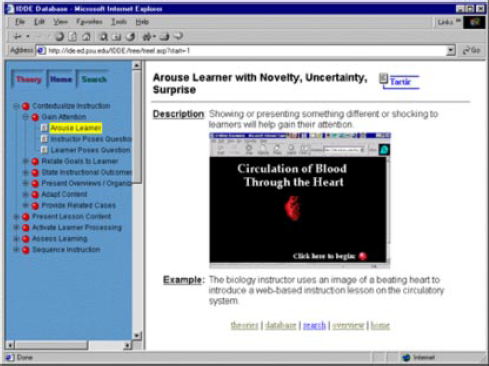
The interface of the IDDE tool allows the student to peruse the hierarchically arranged database of instructional classes, strategies, tactics, and examples. For example, the learner may select an instructional class (e.g., contextualize instruction), instructional strategy (e.g., gain attention) and tactics for implementing the strategy (e.g., arouse learner). In Figure 3, the instructional tactic, arousing the learner, includes an example in which an animated picture of a beating heart is used to introduce a Web-based lesson on the circulatory system. The examples consist of a visual representation of the tactic being carried out in a delivery medium (such as video, Web, audio, etc.) and a brief written description.
Summary of Instructional Classes, Strategies and Tactics
The following represents a summary of the Instructional Classes (x.), Strategies (x.x), and Tactics (x.x.x) that are present in the Instructional Design in Distance Education (IDDE) tool at http://ide.ed.psu.edu/idde/ and most were listed in and described by Jonassen et al. (1990).
|
Entering by Instructional Theories
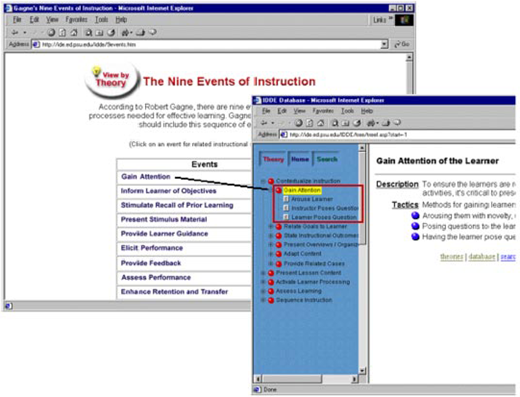
To help contextualize the learners’ understanding of the instructional strategies and tactics, we provided alternative lenses through which to enter the tool. Our lenses include familiar instructional theories (i.e., instructional recipes for success) such as Gagne’s nine events of instruction (Driscoll, 1994), Keller’s ARCS model for motivation, and Constructivist Learning Environments (CLE) (Jonassen et al., 1998). For example, a learner might decide to apply Gagne’s nine events of instruction and, by clicking on any event, will cue up the corresponding instructional class, strategies, or tactics in the database (see Figure 4).
Due to differences in the terminology that each author uses for his instructional theory, the titles used in the database are not perfect matches. However, the specific examples and instructional tactics within the cued branch of the database (see Figure 4, above) may still be applied to help support learning according to the instructional theory.
Searching the Tool
Learners can also search the database of instructional information by entering keywords (see Figure 5).
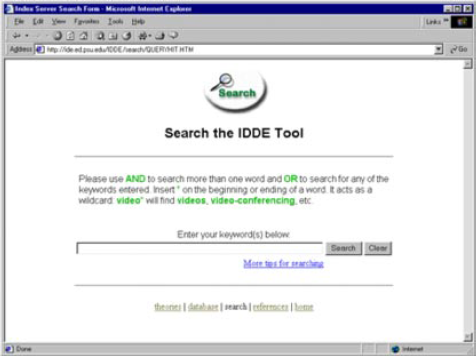
Examples of keywords may include “objectives” or “video-conferencing.” The keywords entered will access any instructional class, strategy, or tactic resources within the tool. This functionality enables users to efficiently locate resources relevant to their specific need for instructional information.
Current Applications of the IDDE Tool
Based on site usage statistics, IDDE has become a popular learning tool on the Web among users around the world. In fact, upon reviewing the site, a number of designers and educators have contacted us directly to request integration of the IDDE tool into their courses that target how to design e-learning solutions. We have learned that IDDE is currently being used as a course support tool for higher education institutions in the U.S., Canada, and Australia and serves as an electronic performance support system for instructional designers in corporate learning divisions. Thus far, the unsolicited feedback we have received has demonstrated that course designers have found substantial value in the tool. The unique attribute that has been most highly commended is the theory to practice element. We hope that designers and educators will continue to utilize this tool when designing learning solutions that are founded on sound instructional principles, while considering technological capabilities.
Summary
As distance learning continues to become more prominent in the new economy, educators and designers need to increase their innovation in distance education by designing for instructional effectiveness, as opposed to designing for media utilization. As Clark (1994) affirmed, it is not the media that affect learning outcomes, but the instructional strategies used in combination with various media. The combination of instructional theory and application in the IDDE tool provides an environment to support the successful integration of instructional design strategies in the design of distance learning solutions.

