INTRODUCTION
One of the challenges for distance educators is the need to keep up with the steady stream of technological innovations. Yet, this is also one of the great rewards of our positions as well. The fact that we are doing our teaching online means that we can implement these tools immediately and substantially with our students, if we deem them useful and fitting with our instructional goals. This is an exciting time for Internet-based technology, the era of Web 2.0, we are told, and we are provided with a wide range of new tools, tools with a user- (or student-) focused nature that fits well with the social constructivist ideals that many of us share.
DISTANCE LEARNING: FROM PRE-WEB TO WEB 2.0
The tools we use for distance learning have developed over the past decade, since I started teaching online, and they have developed in the distinct direction of student-centeredness and group collaboration. When I started in my position at Indiana University in 1994, we were still using the correspondence model, shipping out preassembled texts with articles, assignments, and course documentation. Other than a choice (sometimes) between articles selected by the instructor, or an option about how to respond to an article, the student was essentially trapped within the framework that the instructor had created. Oh, if we had a student who was especially creative, we might allow for a variation in the type of final paper for the course, but that was about it in terms of customizability. That was the pre-Web world.
Internet technologies changed distance learning to a huge degree. Instead of relying on a course packet that had been put together months or years ago, we could assign our students the most up-to-date information from the Web. Because of e-mail, listservs, and chat, we could communicate much more quickly and easily with our students, and they could now contact each other. Much greater student choice in readings and activities was now possible, and students could work together on assignments. We adopted learning management systems (LMS) like Blackboard and WebCT, which gave us communication tools, gradebooks, quizzing and testing features, and all sorts of student statistics. This, we now realize, was the Web 1.0 world. Much more flexibility, increased communication, and more student empowerment. Still, however, the structure was essentially teacher-centered. The instructor chose what content to put into the LMS and how to arrange it, which features to use, and which to ignore.
The Web 2.0 world is the one we and our students now live in. The Web in the past had been divided between authors and readers. While authorship status was fairly easy and inexpensive to obtain, that just meant another author had been created. With Web 2.0, the dividing line between the two statuses has been erased. Everyone can be an author, even on the same document. Web 2.0 tools allow everyone access to the means of knowledge production. This distinction between authors and readers is now beginning to be shown in our distance education courses, as the distinction between teacher and student is lessened.
Social constructivist theory (Vygotsky, 1970) proposes that we learn best in collaborative environments, in which students’ ideas encounter and are enriched by those of other students. This is, of course, in contrast with a traditional, teacher-led model of instruction. Instead, most of the tools provided to us in the past have been instructor-centered, top-down systems, including our much-vaunted learning management systems. O’Hear (2005) noted that
Like the web itself, the early promise of e-learning—that of empowerment—has not been fully realised. The experience of e-learning for many has been no more than a hand-out published online, coupled with a simple multiple-choice quiz. Hardly inspiring, let alone empowering. But by using these new web services, e-learning has the potential to become far more personal, social and flexible. (para. 3)
In this article, I will describe my experiences with the most popular of “these new web services”: podcasts, blogs, and wikis.
WEB 2.0 TOOLS FOR DISTANCE LEARNING
In the Web 1.0 world of distance learning, the discussion forum, and the chat room to a lesser degree, were the heart of my courses. This was a tremendous improvement over just receiving typed papers from my students in the mail, of course. But the past 2 years have seen another sea change in the way I teach. Adopting these Web 2.0 tools has made teaching online a qualitatively different experience, and reenergized me as an instructor. From podcasting to blogging to using wikis, these Web-based systems have all had a positive impact on the distance learning experience for both teacher and students.
PODCASTING
Podcasting is the Web 2.0 technology that has gotten the most press. Podcasts are digital audio files, usually MP3s or MP4s, that are made available online, often by free subscription. Despite their name, they do not require an Apple iPod to be received; they can be played on almost all computers and portable digital audio players, and many cell phones and PDAs. For most instructors, a quick look through Apple’s iTunes podcast directory (part of the iTunes Store in the iTunes program) will be enough to discover a large number of educational podcasts that could be incorporated into one’s course. For those wishing to look further afield, Podcast Alley’s directory (http://www.podcastalley.com/podcast_genres.php?pod_genre_id=7) lists 1,320 education-related podcast series, such as “12 Byzantine Rulers,” “Grammar Girl’s Quick and Dirty Tips for Better Writing” and “ShakespeareCast.”
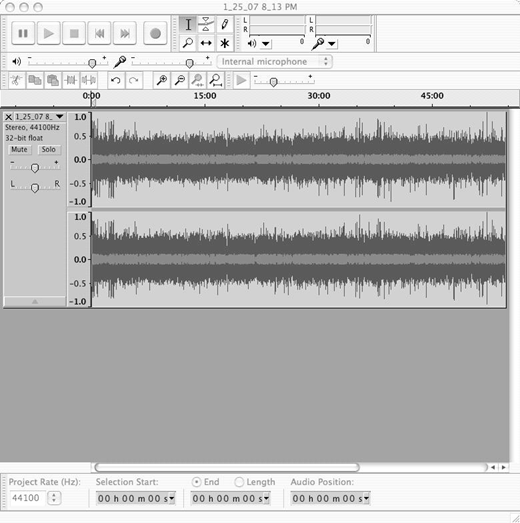
Even with all these existing podcasts, you may not find exactly the content you are looking for. Fortunately, podcasts are easy and inexpensive to make. Free software such as Audacity (for Windows, Mac, and other platforms; http://audacity.sourceforge.net/) can be used to create the audio files, and the RSS (Really Simple Syndication) file necessary for subscription service can be created with any text editor. Many laptop computers now have microphones built in, but if you need one, a quality microphone such as Blue Microphones’ Snowball (http://www.bluemic.com), my personal choice for its sound and retro-cool design, can be found for around a hundred dollars. You undoubtedly already have headphones and speakers.
“Coursecasting,” the recording of lectures and making them available in audio form online, is being implemented at many colleges and universities (Read, 2005). My university supplies the iStream service (http://www.indiana.edu/~video/stream/is.php) which, despite its name, also supports downloadable podcasts. Our rival, Purdue, has its Boilercast system (http://www.itap.purdue.edu/tlt/BoilerCast/). Coursecasts provide raw, unedited documentation of what happened during the class session, from the perspective of the microphone at the front of the room. If they watched a movie, you hear the soundtrack; if they had small-group discussions, you hear distant mumbles. As a distance educator, you can record lectures to be uploaded into these systems for your students. This just one way of using podcasts, though. I’ve used digital audio files to supplement or enrich course material, to capture interviews with guest experts, and to provide feedback to students. The latter has been particularly well-received by my distance students. They like actually hearing my voice as I comment on their work, and it allows me to provide them with fuller responses to their work, as I am freed from the tedium and effort of typing it. Also, the danger of being misunderstood is lessened, as the full intonations of my voice are captured. No more emoticons (smiley faces)!
BLOGGING
Blogs (archaically called Web-logs) are a specific kind of Web site. They are designed for putting up content quickly, easily, and regularly—posting on the go. If I have to update my regular Web sites, I have to fire up Dreamweaver (a slow process in itself), find the file, make the changes, then preview the changes to make sure I didn’t mess something up, then use the FTP functionality to upload the changed pages. And I had to learn Dreamweaver’s complicated interface (and HTML) in the first place to do that. With a blog, you log in, type, and click submit. Not much different than making a forum posting, no knowledge of coding required, and it’s free! I use Blogger (Figure 1 [sic]; http://www.blogger.com), but there are other blogging sites, too, like LiveJournal (http://www.livejournal.com) and WordPress (http://www.wordpress.com). All are easy to set up and get started with. Class Blogmeister (http://classblogmeister.com/) is specifically developed for educational use, “explicitly designed with teachers and students in mind, where the teacher can evaluate, comment on, and finally publish students’ blog articles in a controlled environment”(Warlick, n.d., para. 4). I haven’t tried it out, but it seems promising.
My experience in podcasting led naturally to blogging. By this, I mean I needed some place to put the citations mentioned in my podcasts, citations both to print and to online sources. I expect that my distance students are listening to the podcasts in many places where they may not be able to stop and take note of a citation; the car on the ride home from work, the treadmill, the kitchen. Any information that needs to be written down, I provide to them in the blog; it’s an important companion to the podcast. I can also provide extra information and additional resources that I didn’t include in the podcast, for time or forgetfulness or whatever reason.
You can choose whether or not you want to allow comments on your blog, and (sometimes, depending on the system) who is allowed access to it; just your students—or the world? Blogs are organized in reverse chronological order, with your latest postings always up front. And, like podcasts, students can subscribe to the blog, so that it is delivered regularly to an RSS-capable Web browser, such as Internet Explorer 7 or Firefox. A new development, microblogs, such as Twitter (http://www.twitter.com), allow users to post up-to-the-minute updates as to what conference presentation they are attending, or which Starbucks they are at. Literally not much more than a sentence or two.
Student-created blogs have the possibility of changing the distance learning classroom dynamic, and can help to create an authentic learning community. The fact that the majority of blogs are essentially online journals or diaries, and often revolve around the personal issues of the blogger’s life, has influenced how they are used in courses. As Downes (2006) has noted,
Blogging is very different from traditionally assigned learning content. It is much less formal. It is written from a personal point of view, in a personal voice. Students’ blog posts are often about something from their own range of interests, rather than on a course topic or assigned project. More importantly, what happens when students blog, and read reach [sic] others’ blogs, is that a network of interactions forms—much like a social network, and much like Wenger’s [Wenger, n.d.] community of practice. (para. 30)
For example, one of my online students, an American teaching at a school in Japan, would post about the course topics and readings, but also, and even more importantly, he shared photos and stories about his experiences being a teacher in a very different type of school culture than he had experienced in the United States. The other students, most of them Hoosiers teaching in local schools, learned a lot through his blog—as did I. Another, a reading teacher, discussed early childhood writing through examples of her students’ writing both through photographs of the students at work and of the work itself. It was a glimpse inside her classroom for those of us who couldn’t physically be there, a much richer experience than simply reading a paper from her would have been.
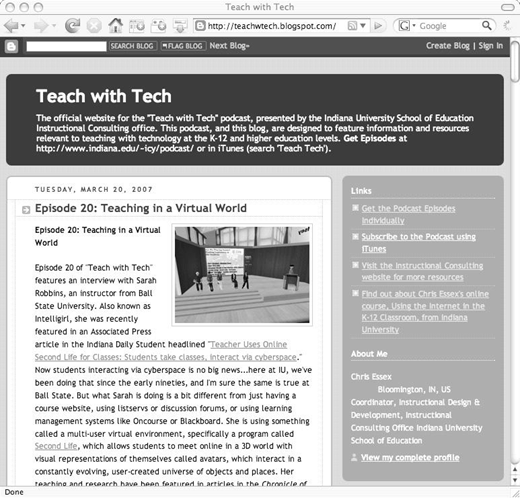
As for my own blog, “Teach with Tech,” (Figure 2; http://teachwtech.blogspot.com) it plays an important role in my online courses. I frequently point my students towards it, either to the current entry or an archived posting. I have a number of blog entries that provide links to resources and my commentary. In the past, I would have just posted this information in our learning management system, but why not share it with the rest of the world? I am also hoping, perhaps idealistically, that the students will get in the habit of visiting my blog and will continue to do so even after the course is over, so that it will continue to be a professional development resource to them. I am also inviting others into our classroom in this way, and I’ll admit it, it functions as a bit of advertising for this elective course—I have a prominent link to the course Web site on the blog.
Of course, I’m not the only academic with a publicly available blog. Back in 2003, the Chronicle of Higher Education had an article, “Scholars Who Blog” (Glenn, 2003), which cited 93 such blogs. A look today at the blog directory Technorati (http://www.technorati.com) finds 256 blogs with the tag “university professor” and undoubtedly this is not a complete list. Besides being a resource for students and others interested in the subject being discussed, a blog becomes another way to network, to communicate with colleagues.
WIKIS
Wikis perhaps best exemplify the social constructivist nature of Web 2.0 programs. Named after a moderately quick mode of bus transportation in Hawaii (wiki meaning “fast” in the local language) (Wiki, 2007), wikis are collaborative environments by definition, allowing multiple users to work on the same documents, though not at precisely the same time (the pages are locked when they are being edited by another user). The most famous example of this is, of course, Wikipedia (http://www.wikipedia.org), a collaboratively created encyclopedia, but there are many others, including Wiktionary (http://en.wiktionary.org/wiki/Main_Page), and Wikia (http://www.wikia.com), which provides a site for self-proposed “subject matter experts” on a given topic, such as Hogan’s Heroes or breastfeeding, to create collaborative documents on the area of their special interest. You can also start a wiki from scratch using free tools such as PBwiki (http://www.pbwiki.com) and WikiDot (http://www.wikidot.com/).
Many people, I’ve found, when they first hear of a system that allows for anyone to write on a document, recoil in fear. “My document! My precious document!” But the fact that each individual’s contribution is kept track of, and that it is so easy to compare versions and revert to previous versions of wiki documents, usually quickly helps to calm instructor worries about vandalism and inappropriate content.
Educational uses for wikis include: providing a place for brainstorming, deciding on a schedule of activities, or developing definitions of roles and/or terms. I have used wikis to write conference proposals and journal articles with colleagues. A colleague of mine, Faridah Pawan, uses the wiki tool in our LMS to provide a consensus-based record of each class discussion in her course. The advantage of using a wiki for this sort of activity is that any student can help to flesh out the record, or to provide a different perspective on what occurred. I’m seriously considering doing this next semester—assigning one student to start a summary of our Sunday night chat each week, and inviting in the rest of the students to contribute.
THE FUTURE
Speaking of the future, the next step in my distance teaching will involve taking my online classroom into a virtual world. Virtual online worlds have been around for decades, and remain extremely popular in the gaming world. You may have heard of the massively multiplayer online role-playing game World of Warcraft (WoW), a huge online world, open 24/7, in which players see themselves as avatars, 3D representations of themselves within the game, who can interact with others and work collaboratively on missions. The system has 8.5 million registered members worldwide (World of Warcraft, 2007). But WoW is distinctly Web 1.0 in that everything in the world is created by the authors of the game. Second Life (http://www.secondlife.com), on the other hand, is a multiuser virtual environment (MUVE), which is at first very similar to WoW, but with an important difference—players can modify their avatars and bring new objects into the world. There is also no game format to structure their activities. They are free to roam and explore this new world, to interact with people and to see how things work, much as they did when they were crawling along the floor as babies in the real world.
My colleague, Sarah Robbins (http://en.wikipedia.org/wiki/Sarah_Robbins), teaches freshman composition at Ball State within the Second Life environment, but it’s a very different experience from the book-bound freshman comp I once taught. As the New York Times (Lagorio, 2007) explained, “Ms. Robbins doesn’t use Second Life to impart textbook knowledge; she sends her students out to interact with other inhabitants to get them thinking and writing ‘about our own identity, and respecting the identities of others, and exploring the look of our own avatar.’ A 500-word blog is due weekly.” As a distance educator, I look forward to exploring these virtual environments with my students. I see immediate possibilities for using a virtual landscape. I might have my education students create their ideal technology-enhanced classroom in the world. Then we could all walk around in each one of them and discuss how they would be utilized. Also, the common complaint of distance students—that they don’t get to “know each other” as well as in a face-to-face classroom—might be answered in an important way through the use of avatars. It might even tell us more about each other, to see how we have chosen to present ourselves, than just seeing our flesh-and-blood faces would. Fascinating possibilities!
CONCLUSION
Even though it has taken extra time and effort, the incorporation of Web 2.0 technologies into my teaching has been very beneficial. It has allowed for more student input and greater options for activities. While I don’t claim to have exhausted the possibilities for integrating Web 2.0 into my teaching (there are many other Web 2.0 applications than I have mentioned here), I hope that reading about my “baby steps” into these new technologies will be of use to others.
Christopher Essex, frequent contributor to Distance Learning and to the Quarterly Review of Distance Education, passed away on April 17, 2007. He is memorialized at: http://site.educ.indiana.edu/ChrisEssex/tabid/5390/Default.aspx