BACKGROUND
In February 2008, Potomac Falls High School in Loudoun County, Virginia had 72 Promethean Interactive Whiteboards installed–part of the county's $3.6 million dollar technology initiative to improve technology use in the classroom. In most cases, teachers came to their classroom the following day and found that the new boards had been placed over the chalkboard they and the students were so accustomed to using on a daily basis. Although all faculty members attended two 1-hour workshops within days of the installation, these workshops did not allow time for sufficient training on designing, developing, and integrating activities using the boards and the accompanying software, ActivStudio.
In an attempt to increase the skill level and expand the use of the boards by both students and teachers in the classroom, I facilitated three 4-hour workshops (one "basic skills" and two "intermediate/advanced skills" sessions) in September and October 2008.
The basic skills workshop introduced teachers to inserting text and images, converting previously made files into a flipchart file, and inserting links to other files and Web sites, as well as several activities that can be quickly and easily created in only a few steps using the main tools in ActivStudio such as the spotlight, eraser, and camera tools.
The intermediate/advanced skills workshop introduced teachers to “layering" and "stacking." These advanced concepts were used to demonstrate several activities that can be created stacking and layering images/text, although they typically involve more time and preplanning. These activities included hiding text using color blending, creating “restrictors," using the transparency tool to hide text and/or objects, creating a rotation point on an object, assigning objects as "containers," and assigning “actions.”
Each training session included at least 2 hours for teachers to develop activities that integrated some of the features discussed in each of the workshops. Although the training sessions were open to all 150+ staff members at Potomac Falls High School, only 10 teachers, most of whom were from the foreign language and special education departments, attended one or more of the workshops (see Table 1).
The purpose of this study was to determine the effect training had on teacher skill development and understanding with regards to the interactive whiteboard and ActivStudio. Additionally, this study addresses teacher and student attitudes towards the use of the board as a teaching/learning tool.
LITERATURE REVIEW
As educational institutions attempt to keep up with twenty-first century technology, the traditional classroom continues to evolve into a multimedia-rich environment that combines multiple technologies. Interactive whiteboards (IWBs), a technology that was once only found in corporate offices and higher education, have begun to make their way into many elementary and secondary classrooms, both in the private and public sectors, as their overall cost and size have been reduced. Their versatility and functionality with multiple applications make them an appealing addition to the classroom, as they present more opportunities for educators to design and conduct various forms of lessons and assessments. This ability makes them a powerful tool in meeting the diverse needs of the auditory, kinesthetic, and visual learner because they can be used to design and conduct lessons that involve "teacher modeling and demonstration, prompting, probing, and promoting questioning, managed whole-class discussion, review of work in progress,” as well as formative and summative assessments (British Educational Communications and Technology Agency, 2004, p. 2). Black and Wiliam (1998) concluded that "formative assessment is an essential component of classroom work and that its development can raise standards of achievement" (p. 147).
What are INTERACTIVE WHITEBOARDS?
While several models of interactive whiteboards are available, each has the potential to be a robust, media-rich teaching tool. The boards are used in conjunction with a computer (desktop or laptop) and a projector, and although various board sizes exist (as much as 88" diagonally), they can be permanently mounted on a wall or installed on a mobile stand. Many of the newer whiteboard systems are also equipped with audio systems and short throw projectors, which help minimize shadows and allow the boards to be installed in smaller spaces. Essentially, the boards, when used with the interactive board software, are large electronic platforms that allow users to manipulate text, images, files, and other programs with the use of an electronic pen or simply by the touch of a finger. Although manufacturers market their own proprietary software with each model of board, the software provides users with several interactive tools such as electronic highlighters and pens, countdown clocks, calculators, and rulers, in addition to functions that make it possible to link and embed other file types. The range of possible activities and uses is immeasurable, as the board's full potential has yet to be realized in educational settings.
The distance between users and the board can also be extended with the use of "wands," wireless slates, or tablets, which allow the user to move around the classroom while still having the ability to interact with the board. In addition to these "add-ons," various types of handheld individual response systems allow teachers to poll and assess students through varying types of assessment and game-related activities.
INTERACTIVE WHITEBOARD USE
The capacity of interactive whiteboards to incorporate a wide range of media and produce student-centered activities seems to be the driving force behind their increased popularity in educational institutions. Web sites, video, audio, and other types of files can be used in conjunction with the board as well as be embedded into the files created with the whiteboard software. Because of the boards' large display surface and ability to connect to devices such as digital cameras, microscopes, and media players, the board makes viewing and listening to various forms of media feasible for the whole class.
This capability also allows teachers to conduct real-time or recorded demonstrations where space and easy-viewing may be a hindrance.
Glover, Miller, Averis, and Door (2007) indentified three teaching approaches in classrooms equipped with an interactive whiteboard. Of the 50 observed lessons, Glover et al. (2007) found that teachers used a "supported didactic" approach (i.e., using the board as a visual aid) in 14 lessons, an "interactive" approach (i.e., using the board as a visual, verbal, and kinesthetic aid) in 15 lessons, and an “enhanced interactivity" approach (i.e., using the board to elicit student discussion and the use of higher order thinking skills) approach in 21 of the lessons (p. 12). Wood and Ashfield (2008) point out that IWBs promote more direct teaching techniques such as "explaining, modeling, directing, and instructing" (p. 94). While the boards can promote new teaching and learning opportunities, Wood and Ashfield (2008) also point out that a teacher's perception, understanding, and interpretation of teaching and learning have a more significant impact on student learning, rather than the tools being used (or not used). "As with any resource, it is perhaps the context and the purpose that remain the most influential factors with regard to developing children's learning" (Wood & Ashfield, 2008, p. 94). Other research has concluded that "the most effective designs for learning adapt to include a variety of media, combinations of modalities, levels of interactivity, learner characteristics, and pedagogy based on a complex set of circumstances" (Metiri Group, 2008, p. 14).
BENEFITS FOR TEACHING AND LEARNING
Several studies have found there is often a high level of enthusiasm amongst students and teachers when IWBs are used in the classroom. Bell (1998) found that students "were more involved, attentive, and motivated when lessons were offered using the board rather than using other teaching methods" (Chapter 5: Conclusion, para. 1). Although the boards may not be used for every lesson or activity, they give educators the ability to be flexible and spontaneous in their instruction. Spur-of-the-moment text and image creation/manipulation, references to previous material, and access to Web sites can quickly and easily be displayed on the board or printed within moments, maximizing instructional time and capitalizing on "teachable moments." Glover et al. (2007) determined teachers who regularly use the board tended to organize lessons that involved board use into three categories: by topic, by lesson or by grade/subject level. Consequently, revising and sharing lesson plans that integrate use of the interactive whiteboard is more likely to occur as educators realize the efficiency such a technology can offer.
Research also indicates there is an increase in teacher preparedness prior to conducting lesson using the boards. Glover et al. (2007) wrote that "tighter pre-planning encouraged teachers to design activities involving all pupils and building on the use of verbal, visual, and kinaesthetic approaches" (p. 13). Furthermore, teachers who created more structured lessons, often incorporating various board features, tended to keep students on-task and maintaining interest.
The British Educational Communications and Technology Agency (BECTA) highlights the ability of IWBs to allow teachers to illustrate abstract ideas and concepts through a variety of nonlinguistic representations such as graphic organizers, concept maps, process/cause-effect pattern organizers, and physical models. As Williams, Lock, Crisp, & Longstaffe (1995) noted, "Images are generally more evocative than words and more precise in triggering a wide range of associations, enhancing creative thinking and memory" (p. 4). These diagrams, along with other variations, are typically included in the whiteboard software and can be added to files by dragging and dropping the image onto the screen. Furthermore, these images are often editable, allowing educators to customize them as needed.
OBSTACLES FOR TEACHING AND LEARNING
Despite the many benefits of using an interactive whiteboard in educational settings, there has been little research demonstrating their effect on test scores and student learning. A 2-year study conducted for the United Kingdom's Primary National Strategy pilot program "Embedding ICT" did not find any significant differences in test scores between schools with IWBs and those without IWBs (Higgins, Beauchamp, & Miller, 2007, p. 221). Glover et al. (2007) argue that "it is still the quality of the teaching that ensures progress; the IWB alone does not guarantee it" (p. 17).
For educators who may be uncomfortable or lack basic technology skills, the IWB can be a hindrance to their teaching and classroom management. Policymakers and other stakeholders must realize, however, that is a long-term process in which users need time to reflect on, experiment, and produce lessons that incorporate even the most basic functions of interactive whiteboards. However, in order for technology in general to become an integral part of education, "there may need to be a new wave of professional development in ICT [information and communications technology] which takes account of the extended list of ICT's features and the need to embed them in teachers' pedagogical knowledge and reasoning" (Kennewell & Beauchamp, 2007, p. 240).
As with many new technologies, there is an initial period of excitement that can quickly disappear unless both policymakers and educators invest in professional development so users are technologically and pedagogically proficient so that learning and teaching goals are more likely to be achieved. Higgins et al. (2007) stated, “as teachers become more fluent in their use of IWB and as they recognise the link to pedagogical change, the IWB becomes a potential catalyst for further change" (p. 000).
PURPOSE OF STUDY
The purpose of this study was to analyze the level of interactive board use and how it correlated with the comfort levels of teacher prior to and after training. (In 2008, Loudoun County Public Schools installed over 400 78-inch Promethean Interactive Whiteboards in all high school classrooms around the county. The installations included a short-throw LCD projector and audio system. Over the next 2 to 3 years, all elementary and middle school classrooms in the county will have these same systems installed.) Although each workshop included opportunities for teachers to practice using several interactive features, it was hoped the planning time provided (approximately 2.5 hours) allowed teachers to design a lesson or activity that integrated several interactive features, which could then be used in the classroom. Additionally, the study intended to document the various types of activities teachers used both before and after attending the training workshops.
While a majority of teachers and students still appear to be enthusiastic about the boards, this study also anticipated that those in attendance would use the board more effectively and purposefully in their lessons, which, in tandem with good pedagogical practice, could increase student participation and achievement.
METHODOLOGY
Since the interactive whiteboards are a relatively new technology at Potomac Falls High School, a mixed method research study was used in data collection due to varying levels of technology use and skill level of those who attended the workshop. To obtain a holistic view of how and why the boards are used (or not used) in the classroom, surveys and one-on-one interviews provided relevant data for this study.
During each workshop, three short assessments were conducted to determine understanding of each topic after it was covered (e.g., transparency tool, magic revealers). Answers to each question were submitted using the Activoters, Promethean's handheld electronic voting system. There was a 100% pass rate for every question in both levels of workshops, with the exception of one question in the intermediate/advanced workshops. When asked whether an object's properties and behavior would change when its (a) order or (b) layer was also changed, the incorrect answer was always chosen by one person. After moving back to image that showed a three-dimensional view of a flipchart page and reviewing how to change the order and layer for an object, teachers stated they better understood the differences between the two terms.
Teacher attitude toward the use of the whiteboard and software, as well as their understanding of both, were measured using several instruments, including a six-question pre- and posttraining survey, and a five-question structured interview. Teachers completed the six-question survey prior to the training by submitting answers with the Activoters. To provide teachers time to implement the activities they created during the workshop, as well as develop additional lessons, the posttraining survey, which was identical to the pretraining survey, was given approximately three weeks after attendance to a workshop. The survey was posted using the school Web page software, Schoolwires, and attendees were e-mailed a link to the survey. Interview responses were collected on paper by the researcher as they were conducted. A total of 13 teachers were surveyed and six were interviewed in this study.
Within this same time frame, students of the teachers who attended one or more workshops were also surveyed and interviewed using a three-question survey and a four-question structured interview. Because of varying class sizes and content areas, the number of surveys and interviews varied by teacher. A total of 248 students were surveyed and six students were interviewed in various classes. The interviews provided more detailed information regarding how the students perceived the board and how it was being used in their class.
Both student and teacher interviews provided more specific insights about what types of activities the boards are being used for in the classroom. Many activities involved having students come to the board and fill in blank spaces with words or numbers, manipulate text and/or images, or keep track of team scores during review games.
DATA ANALYSIS AND FINDINGS
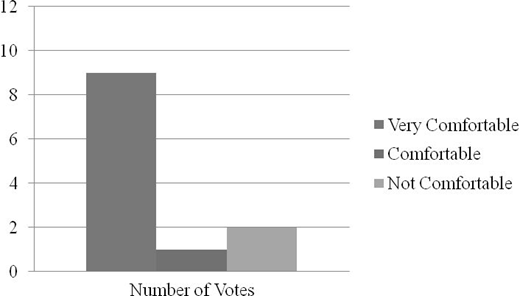
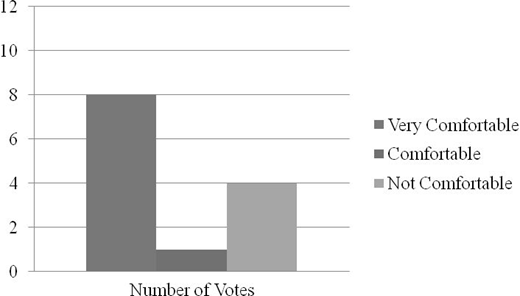
The pretraining survey responses were compared to the post-training survey responses from each teacher to determine what differences, if any, exist. Survey questions focused on teacher understanding and "level of comfort" with using the board and the accompanying software to develop interactive lessons. The survey results indicated that teacher comfort level tended to increase after attending one or more of the workshops (see Figures 1 and 2).
It should be noted that despite two teachers indicated they were still "not comfortable" with the software after attending training, the board one teacher's classroom was not installed until September 2008. The other teacher is a learning specialist who rotates between several classrooms and content areas each instructional period, typically working with only one or two mainstreamed students. Like many of the learning specialists at the school, this teacher has few opportunities to interact with the board since they are not the lead instructor in the class.
Teacher usage went up slightly as well, according to the posttraining surveys. Six teachers indicated they use the board "daily with every class” as opposed to only five teachers prior to training. However, one teacher indicated he or she still rarely used the board after attending the workshop, because it is a drama course and a majority of the class takes place on the stage in the auditorium, rather than in the classroom where the board is located. The interviews revealed that those who attended a workshop tend to use fewer handouts and maximize instructional time because they now can post documents, warm-up activities, and agendas on the board. In addition, students are able come to the board to complete these activities and then review them as a class. Some teachers also commented that they are spending more time with preplanning lessons that integrate the board. Although this may be a hindrance to some based on their technology skills, the impression from the interviews was that these teachers are taking time to create thoughtful and purposeful activities that focus on the needs of all students.
Although seven teachers who attended one or more workshops still found the ActivStudio software to be "somewhat difficult/easy" to use, only one teacher indicated the software was still "difficult" to use after training, while two other teachers thought it was now much more "easy" to use after attending the workshops because "it gave [them] an opportunity to get some questions answered” and “have time to sit down and think about how to create a lesson using ActivStudio." Teachers also pointed out that they are regularly incorporating several of the features that were covered at the workshops in their lessons (e.g., magic revealers, color blending). Instead of using the board simply as a large monitor to post daily agendas and write notes, teachers appear to be exploring the many interactive features of the boards through varied instructional activities.
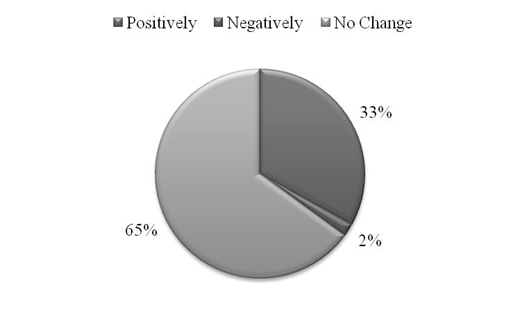
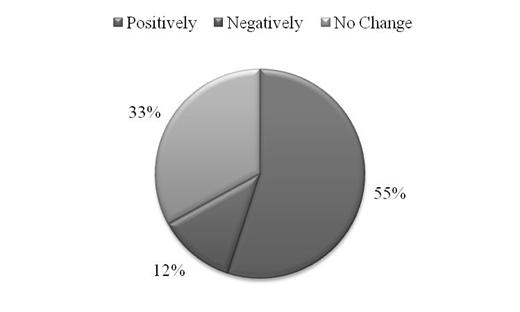
It was also evident from the survey results that teachers believe the boards not only have a positive impact on student learning, but also on their own teaching. One teacher explained that "it is not just multiple-choice anymore. Students have the ability to add text to their answers to better explain them." Another stated that although it takes more time, they are “creating more meaningful lessons" with ActivStudio. The student surveys gathered data that focused on students' perceptions of how the board has affected teaching and learning in that particular class. Results from the student surveys were collected using a standardized questionnaire form (see Figures 3 and 4).
It is apparent that a majority of the students believe that the boards have had a positive impact on both learning and teaching in each of these classes. According to one student, "the different colors, graphics, and images help the 'visual' students like me … you can easily start from scratch if you mess up." Two teachers stated that since having the board installed they take the time to type up their notes ahead of time instead of writing them down on a transparency each class, saving them time. Levy (2002, Conclusions and Directions for Further Action/Research section), writes "both learners and teachers perceive a significant role for the IW in helping to motivate students, focus their attention, and stimulate involvement in whole-class learning.”
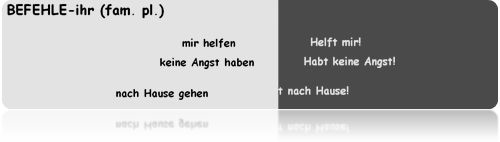
A foreign language teacher, now in her 33rd year of teaching, noted that the pass rate for a quiz on commands significantly increased when she used the color-blending feature to present the conjugations of the verbs (see Figure 5).
The teacher estimated that in the past, only about 40% of the students passed this quiz. However, after using this activity she created at the intermediate/advanced workshop as part of a review, nearly 95% of the students passed the quiz this year. “I believe students enjoy it [the board] more because they think of it as a video game. They are able to easily manipulate words and images, like they are playing a game." Hodge and Anderson (2007) concluded that the subject in their study "reminded herself of the need to integrate visual material with active learning activities that optimize the power of the IWB to engage the learners yet retain pedagogical approaches that facilitate learning" (p. 280).
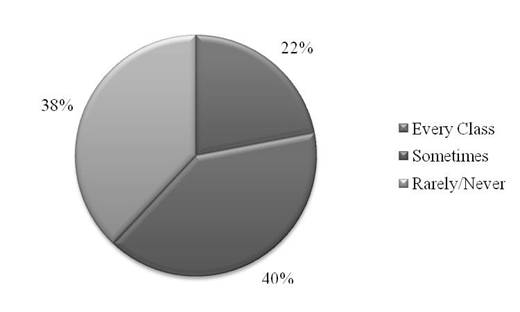
Additionally, students were asked how often they use the board in their class (see Figure 6).
The one area that both teachers and students agree most is that there needs to be a multi-user option. Although the teachers who were interviewed indicated they have students at the board every day, not every student gets to come to the board every day. Currently, only one ActivPen can be used to manipulate objects and text on the board, limiting the variety of activities as well as the number of students who can go to the board. “I'd like to have them play more games like Jeopardy and have races," stated one teacher. While a multi-user ActivPen is still in development by the Promethean Corporation, it appears teachers will continue to be limited to single-user activities at the board. As a result, some activities will take more time to complete if several students are required to go to the board.
CONCLUSION
This study suggests that teachers are using the boards as a teaching tool in several ways as the board helps to create a flexible learning environment. While faculty members possess varying levels of technology skills and use a variety of interactive features, overall, both teachers and students view the boards as an asset to the classroom. Teachers commented that their students are more likely to take notes and pay attention when the board is used as a presentation device. Interviewed students mentioned that students often help teachers to use the boards when they get "stuck." "We help [teachers] at least once a week," said one foreign language student, "because we're not afraid to mess with things.”
Findings from this study also point out that there is a need for a multiuser pen to be developed and included with the interactive whiteboard so the board can facilitate more pair and group activities to increase board use.
Although all staff members at Potomac Falls High School had the opportunity to attend one or more of the workshops, only ten teachers participated, with most being from the foreign language and special education departments. As a result, it is unclear how other departments and teachers use the boards for instruction, how often they use the board, and how this usage relates to the teachers' understanding of the software. In addition, teachers came to the workshops with varying technology skills, which most likely had a significant influence on their ability to interact with fairly sophisticated software. Having time to develop more interactive lessons as well as gain a better understanding of the software is an issue many teachers are facing. Levy (2002) concludes:
significant early investment of resources is an important success factor in the development and acceptance of IW-based teaching. This applies to provision of technical and physical resources (e.g. installation of IWs in enough classrooms, installation of classroom blinds) as well as to provision of sufficient time and support for staff training and development.
With increased class loads, class size, and extra duties, most planning periods are, unfortunately, spent making copies and grading papers, rather than collaborating, developing technology-rich lessons, or attending training opportunities offered by the technology resource teacher. It is recommended that a regular and convenient training schedule be implemented at both the school and county level to provide teachers with more opportunities to develop and enhance their technology skills, in addition to provide students with twenty-first century learning skills.
Future studies should continue to conduct research the impact of interactive whiteboards on teaching and learning, specifically how it relates to student achievement and changing teacher pedagogy. Because most research on interactive whiteboards has been qualitative in nature, more quantitative research involving longitudinal studies between content areas would produce data that may also be useful for educational institutions that are considering purchasing interactive whiteboards.
About the author