The need for effective communication and organization has always been a priority in the business world as well as in the field of education. The use of the Novell GroupWise Collaboration and Productivity Software in the workplace promotes efficiency in day-to-day communication and organization for all personnel. Communication and organization are the foundation for success therefore training personnel to utilize the communication software in order to acquire all its benefits will increase levels of productivity.
It is common practice for professionals to carry an agenda with scheduled appointments and notes of upcoming events and tasks, and it is becoming more commonplace for professionals to keep electronic records that can be accessed through some type of device such as a computer, Blackberry, or other form with access to the Internet. These records are readily available and accessible keeping the busy professional organized and productive.
Making Connections
In the field of education, connecting with administration, colleagues, parents, and professional resources outside of the district is common practice. The task of communicating regularly is simplified, direct, and prompt when using e-mail. Each category of communication holds its own value and purpose.
Administration. Communicating with administration is vital and good leaders will promote frequent, meaningful communication. Scheduling staff and private meetings with staff as well as keeping staff updated is a daily task. Keeping an electronic file of upcoming events is streamlined in using Novell GroupWise software. According to Tallerico (2005), maintaining an open line of communication enables the principal to stay current in order to provide and obtain feedback:
information forwarded to you should influence your decisions about when to attend a particular group’s meetings, what kind of clarification or motivation might be needed to keep the group’s work on track, and how to modify the balance of leadership pressure and support for each group’s efforts. (p. 86)
Colleagues: Sharing instructional strategies through collaboration provides a framework of support. As Fogarty and Pete (2007) noted, “it provides the emotional support for change as well as the expertise for developing skills” (p. 42). Collaboration between colleagues offers encouragement and knowledge for assistance in ease of transitioning when needed and day-to-day experiences. For an instructor, making quick connections throughout the day during planning periods or between classes can be easily achieved with the use of e-mail. Sending documents and resource attachments via e-mail brings focus to face-to-face meetings utilizing time during the meeting in a productive and efficient manner.
Parents: A top priority for teachers and administration is communicating with parents. Parents would like to be informed about the progress of their child. Using e-mail in promoting generalized communication with parents is important. Although personal issues regarding student behavior or academic progress should not be published online in e-mail format, setting up conference times or clarifying assignment requirements is easily accomplished through e-mail. Personal issues are best addressed in phone conversation or in face-to-face meetings. E-mail can be a vital tool in basic and necessary parent communication when used for suitable purposes.
Professional Resources: On a larger scale professionally, e-mail is an essential tool in networking and, for instance, acquiring up-to-date information from professional organizations. Most professionals belong to one or more professional organizations that provide newsletters, articles, and other types of information such as workshops or conferences related to the designated field. The majority of organizations use e-mail in updating members of the latest innovations in the given field as well as scheduled events.
E-mail communication provides an array of benefits for professionals in sharing information and providing support. The same is true when conversing online with administration and parents. Professional development offers a critical link to national and international resources in the field enabling the receiver to benefit from increased exposure to articles, newsletters, and other types of information and innovations in the specified field.
Basic Use
Most of us have had experience in using e-mail of some sort, whether for business or personal purposes. E-mail is a common way to stay in touch with friends and communicate short messages to business associates. Novell GroupWise communication system, when employing all the features, is a tool that saves time and provides organization. The basic features of the program are not unlike that of a personal e-mail system but it offers much in the way of organization and time management for the busy professional.
Basic elements of the system include sending and receiving e-mail and a compilation or running record of each. The running record should be kept to a minimum, however, in order to save space on the server. Organizing required e-mail in file folders will allow quick retrieval, and removing those that are low priority or unnecessary to file will eliminate electronic clutter and free up wasted space. A large electronic e-mail system with many users will quickly accumulate unneeded e-mails both received and sent if the user does not delete them and empty the trash.
The system provides for sending direct messages in the body of the e-mail and of course allows for attachments. The e-mail component also offers spell check for use when composing e-mail. The attachment feature provides ease of sending documents across the building as well as across the district. It is useful to provide materials beforehand, for instance to those that will be attending an upcoming meeting. Using the attachment feature to send files or notes allows the receiver to print necessary items and also keep an electronic copy of the material in their personal file for future use.
Organizing E-Mail
Organization in the workplace can be challenging and time consuming. For instance, sorting, documenting, labeling, and filing hard copy papers comprised of multiple topics and used for various purposes is time consuming and a lot of physical space is needed. These filing tasks can be done easily by using the e-mail software. Staying organized is uncomplicated with the use of e-mail. Using the cabinet, calendar, and checklist functions of e-mail eliminates the need for physical space required for filing hard copy documents, correspondence, and notes in filing cabinets in an office or classroom. The convenience of storing information in one area electronically for quick retrieval saves time and in turn increases the level of staff productivity.
Cabinet: The filing cabinet feature provides the use of file folders for ease of categorizing and streamlining e-mail. Retrieval of e-mail when consolidating items in the filing system or cabinet using the software program is efficient and effortless. Items retrieved electronically can be printed, sent, deleted, or prioritized using the checklist feature.
Checklist: Using the checklist feature allows the user to prioritize e-mail for ease of keeping track of tasks and follow up on correspondence. This is easily accomplished using the arrow buttons by clicking and relocating the e-mail. Items are categorized by subject; due date and name of the sender are also displayed.
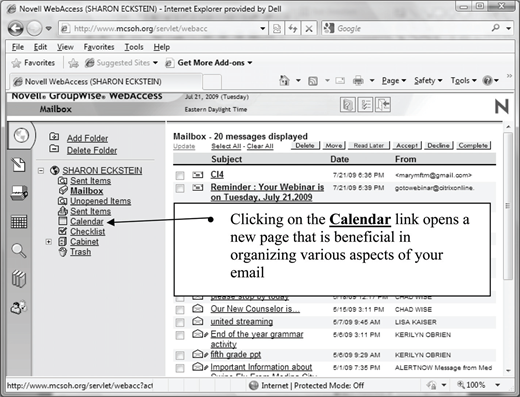
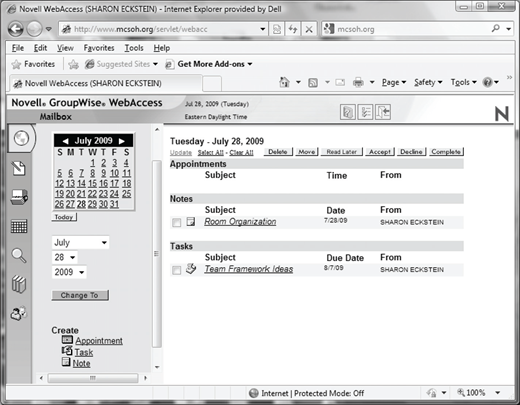
Calendar: Time management is vital for busy professionals. As Kouzes and Posner (2007) urged, “spend your time and attention wisely. Spend this precious nonrenewable resource on the most important values” (p. 78). Staying organized using the electronic calendar feature daily will save time, money, and frustration. Easy access to the calendar option in the menu bar is shown in Figure 1. Being organized in this way allows more time and direction in completing top priority tasks. Calendar functions in the e-mail system provide a systematic way of keeping track of appointments, notes, and tasks. Appointments can easily be organized and accessed from various forms of online technology when using this function. Figure 2 displays how notes and tasks are also readily displayed and available for use. Making use of the calendar options will simplify daily scheduling and create conscientious, organized, and productive staff.
Training
The goal of establishing a proficient workplace is reached with the involvement and contributions of all stakeholders. Providing asynchronous training to new employees as well as established employees who may not be utilizing the communication software program to attain its full benefits will be advantageous for staff as well as administration. There are several choices in achieving an effective training program. Considerations would be time, cost, topic, and usefulness to the organization as well as staff members. Instruction related to concrete topics such as using a software program such as Novell GroupWise can be accomplished through use of an instructional video. Creating a video for this reason may require time but the longevity of its uses far outweighs the initial cost.
Depending on the size of the organization and locations of staff, the instructional video may be accessed online. In having the video retrievable in this way a userfriendly environment and an asynchronous method of training is created. This may be a productive first step; Ko and Rossen (2004) suggested that “the tools an institution uses and the support it offers very much influence the choices you’ll need to make” (p. 18). Considering available resources first will help in determining how best to proceed with training. When first working with e-mail and its related organization system, staff may need to revisit portions of the video in order to become proficient in using the system. Thus, having the video available will remove pressure from the employee to remember everything learned in one sitting. Providing access to the video eliminates the need for the trainee to ask for assistance. Thus, the trainees will feel more confident in keeping themselves organized. The final outcome of a well-planned and accessible training program will bring about well-organized and productive employees.
New employees may also be involved with training related to the structure of the organization, its policies, and procedures; thus, a mentor or coach may be assigned. This is an effective way of new staff members becoming accustomed to the organization as well as providing much needed support in assisting new staff. In discussing the issue of support, Kouzes and Posner (2007) stated, “strengthening others is essentially the process of turning constituents into leaders—making people capable of acting on their own initiative” (p. 269). With proper and accessible training resources staff will be confident in making contributions individually as well as collaboratively to the organization. Communication is a critical component in the training process as well as once new staff is acclimated and working at full capacity in their new position. Therefore, accessibility to training resources provided for the e-mail communication system need be available and implemented at the onset of employment.
Conclusion
Communication is the foundation for a productive organization, whether in a business or academic setting. Communication must engage administration, staff, parents, networking, and those with opportunities for professional development; simply stated, all stakeholders must communicate effectively. Prompt and frequent communication in responding and initiating conversation through e-mail offers colleagues the opportunity to communicate in an informal, meaningful, and timely fashion.
E-mail is recognized as a mainstay of communication and not difficult to navigate for the user. However, training is important for new staff or those that may be having problems with organization. Training will affirm the user is aware of the organizational features of the software that may otherwise not be used effectively. Time and money are a minimal investment for an organization in the long run when using an asynchronous style of training for software programs or concrete topics. Providing a concise video that clearly shows how to use the e-mail system simplifies the process for the administration as well as the staff concerned. The cost in producing a training video for the Novell GroupWise Collaboration and Productivity Software program far outweighs the opportunity cost involved of failing to properly train staff in the fundamental workings of the communication system utilized by the organization.
E-mail is one of the major forms of communication used worldwide. It is used on a daily basis and is less time-consuming and costly than making long distance phone calls. E-mail must, however, not be substituted for making more personal connections with administrators, colleagues, and parents through phone calls or face-to-face meetings. E-mail serves a great purpose when used in the proper circumstances and with generalized issues. All stakeholders utilizing the Novell GroupWise Collaboration and Productivity software program effectively will strengthen the foundation of the institution, keep the lines of communication consistent and open, and assist with staff organization in a productive and efficient way.
About the author