Motivated by projected enrollment growth, decreasing public funding, student demand, and a need to reach traditionally underserved populations and non-traditional students, institutions of higher education are turning to distance education and increasingly providing full courses/programs online. The number of institutions standardizing online course by using a course management system (CMS) continues to grow. The high cost and restrictive environment of CMS may prevent some institutions from developing online courses. You do have another option. There are many effective alternatives to using a CMS. This article will discuss some of the relative advantages and disadvantages of using a CMS and provide an overview of application alternatives for both course development and interaction.
Literature Review
Web-based instruction (WBI) has led to the popular use of Course Management Systems (CMS), such as WebCT, Blackboard, Learning-Space, and so on. According to a survey from The Campus Computing Project (2002), approximately one-fifth (20.6 percent) of all college courses now use a CMS. Furthermore, roughly three-fourths (73.2 percent) of the institutions participating in the survey have already established a single product CMS as the standard for online classes at their institution.
CMS provide instructors with a ramework and tools that are rela-ively easy to use for creating and managing online courses. Instruc-ors, even without technological xpertise, can put their courses online with the help of these eady-made programs. On the other hand, the proliferation of CMS on campus has resulted in concerns from educators and researchers about whether these tools can really facilitate quality online education. The debate on the limitations of CMS, in summary, focuses on issues such as compatibility, cost, and pedagogical restrictions (American Federation of Teachers, 2003).
CMS users are concerned about the issue of compatibility because software produced by different companies makes it difficult or impossible to switch content among these different systems. A set of standards will allow for communication among different databases. Though there is a world-wide effort to establish standards for software providers, it will take years to develop these standards (Arnone, 2002).
Cost-effectiveness has been one of the main factors in evaluating and selecting CMS. The licensing costs of CMS were regarded as comparatively modest until Blackboard and WebCT changed their pricing options for their updated products, respectively, in 2001 and 2002 (Young, 2002). The cost issue raised more concern because budget cuts had affected over half of the public universities and one-third of the survey respondents reported a decline in their academic computing budget (The Campus Computing Project, 2001). Twelve individuals representing various institutions across the United States participated in a roundtable discussion on coping with price increases of CMS at the 2002 Educause Conference. The discussion focused on seeking cost-saving strategies. However, no single correct direction was determined (Biesinger, 2002).
Online courses developed by utilizing CMS conform to the same structure and thus have the same look, the same feel. This standardization has led to concerns about pedagogical restrictions (Firdyiwek, 1999; Foreman, 2001; Kuriloff, 2001). Under a uniform pedagogy, instructors lose their individual identity and freedom of expression. Students, therefore, are inhibited from being exposed to the diversity of views and perspectives from different instructors (American Federation of Teachers, 2001; Kuriloff, 2001).
The debate on the benefits and limitations of CMS in online education is ongoing. Green (2002) predicts that this debate will continue for a long time on campuses and at academic conferences. Educators and researchers are seeking solutions addressing the limitations of CMS. On the one hand, they are expecting that the developers of CMS will move their products into the stage of maturity by including more advanced capabilities that can satisfy the needs of instructors and students (Boettcher, 2001; Carmean & Haefner, 2003). However, it is obvious that the improvement in CMS functionality will consequently lead to increased cost. In this case, it is suggested that, instead of depending on CMS, instructors develop their own course structure and materials by using the resources that work best for their subject matter and teaching style (Kuriloff, 2001).
A review of the major CMS shows their common features as: course management (content areas and student tracking), communication (e-mail, threaded discussion or bulletin board, real-time chat, whiteboard, personal Web pages), online quizzing, and grading (grade book). As a matter of fact, many of the tools and features offered by CMS are available online free of charge. What instructors need to do is select those tools that meet and support their instructional goals, and scaffold and integrate them into their courses. From our experience of teaching two online graduate courses, we find that this could be a feasible alternative when CMS are not available because of budget constraints or when instructors want to retain their academic freedom.
Though educators and researchers put forward a variety of strategies for designing online courses based on their own experience, there is no single set of standards that are able to fit online courses with different content areas, different learners, and different learning environments. We suggest that instructors follow some guidelines for the best practice of online teaching. A list of learner-centered pedagogical practices has been developed by a team from Indiana University’s Center for Research on Learning and Technology (Graham, et al., 2001). These principles can be used as guidelines when instructors are selecting instruction technologies and resources in conjunction with their instructional methods and activities:
Principle 1: Good practice encourages student-faculty contact
Principle 2: Good practice encourages cooperation among students
Principle 3: Good practice encourages active learning
Principle 4: Good practice gives prompt feedback
Principle 5: Good practice emphasizes time on task
Principle 6: Good practice communicates high expectations
Principle 7: Good practice respects diverse talents and ways of learning
Application/Alternatives
Instead of using WebCT, Blackboard, LearningSpace, TopClass, or one of many other commercially packaged CMS, what can an interested instructor or teacher use to create his or her own Web-based courses? This section will describe the alternatives that are available for educators to create a Web-based environment. These options give instructors freedom to create courses based on their own preferences and match personal pedagogical philosophies. Categories included are Web design, interactions, and course materials/resources.
Web Design
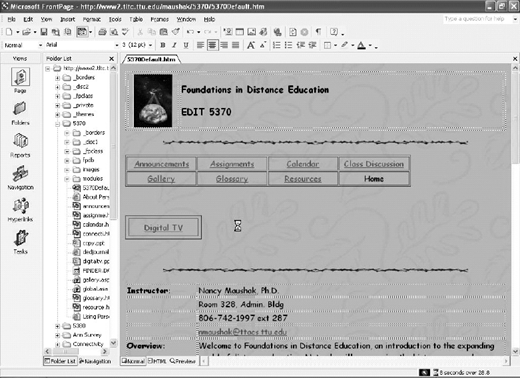
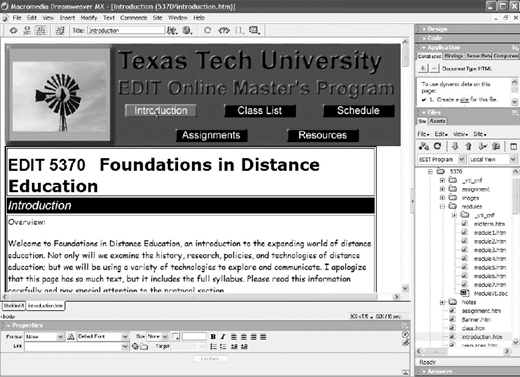
The two top Web-authoring software packages are Microsoft FrontPage and Macromedia Dreamweaver. Either of these packages are a good alternative to using a CMS and both are relatively easy to use. However, when you design a Web site, you will need to follow some basic Web-design principles: create Web pages that are relevant, easy to read and navigate, and consistent with other pages on the same site.
FrontPage is a Web-authoring software package that is fairly inexpensive for educators (less than $80), and is easy to use. As long as you know how to use a word processor, you can probably create a Web page—or even a Web site—in a matter of hours. FrontPage also possesses some powerful features, including the capability to create a threaded discussion board and to create forms that can collect student information and assess student learning.
Dreamweaver is also a powerful Web designing tool for educators, and it costs about the same as FrontPage. Because Dreamweaver has a different interface than FrontPage, it is not easy for FrontPage users to transfer their knowledge of Web design to Dreamweaver. Dreamweaver has a steeper learning curve, but it provides more features than FrontPage. The most current version of Dreamweaver has a function to help Web designers meet Americans with Disabilities Act standards. It also works in both PC and Macintosh environments, while FrontPage works only in the
PC environment. Combined with server technology, Dreamweaver can create a more advanced database than FrontPage.
FrontPage and Dreamweaver are just two of many Web designing tools that educators can acquire for relatively low prices. With appropriate designing principles, the Web sites or pages created can serve the same function as commercially produced CMS that costs far too much for everyday practitioners to acquire.
Interaction
Interaction is a vital part of an online course. Students do not have the opportunity to interact with their fellow students, as in a face-to-face classroom. It is important to make students feel like they are in a community, and that they are learning together with a group of people rather than struggling through the learning process by themselves.
There are many ways to create interaction for a Web-based course. One way is to include interactive components, such as quizzes, surveys, applications, or tutorials created utilizing programming languages, into the course Web site. Another way to create interactivity for the course is through interaction among students, and between students and the instructor. WebCT, Blackboard, LearningSpace, Top-Class, and other commercially produced CMS incorporate these interactive components, such as chat rooms and discussion board, into their environments. For people who cannot afford this type of service, there are other low-priced or free options.
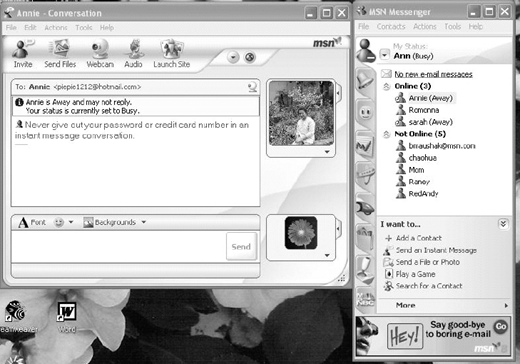
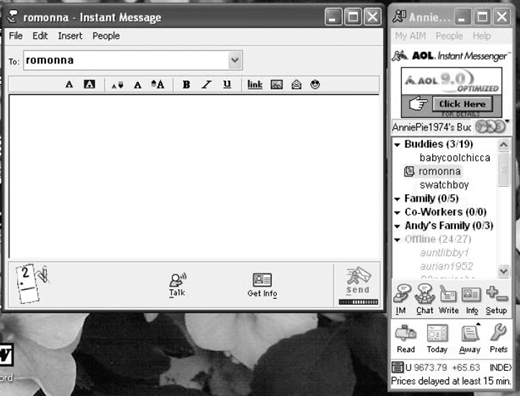
There are many free interactive services available on the Internet. MSN, Yahoo!, and AOL all have an instant messenger service free of additional charge for people who have access to the Internet. The functions may differ based on the messenger applications, but they serve the same purpose: to offer real-time interaction between or among users. Students can also save the conversation for later reference. Some applications even offer a message-taking function for people to leave messages on the messenger server for the offline user to retrieve at a later time. This is an ideal environment when students are geographically dispersed. Newest versions of MSN, Yahoo!, and AOL instant messengers have an audio conferencing feature, and allow users to talk to each other via the Internet. MSN and Yahoo! Messengers also have video conferencing capability for users to see each other if they have Web cameras. However, when the server is busy or dial-up speed on the user end is slow, the audio and video feeds quality can be below optimum. The delay time for the sound and picture can be too long for users to have coherent conversation. Whether to use the audio and video conferencing features of these instant messaging packages requires careful consideration.
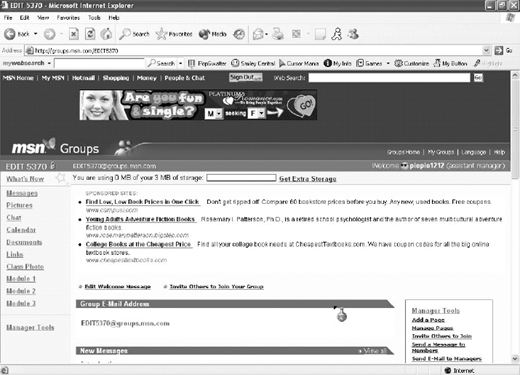
MSN, Yahoo!, and AOL also
offer a group service, in which members can set up groups of interests (either public or private). For the purpose of a course, a private group provides a secure environment for students in the course because only invited members can join. Within this secure environment, students can post discussion messages, or upload photographs, documents, or assignments to share with the rest of the class. It is also encouraged that students sign up or join the listserv or discussion forum of their specific profession because it provides an environment for them to have interaction with other professionals and exchange experiences, information, and expertise.
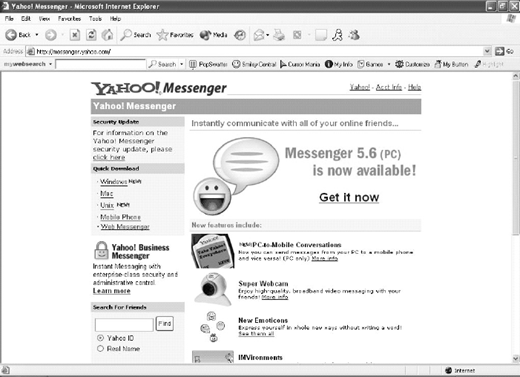
Yahoo! Messenger Download Screen Shot
Yahoo! Messenger Download Screen Shot
E-mail is probably the most common communication tool for students and instructors. Course Management Systems usually have an e-mail application built into their systems. However, it is not very convenient for students and instructors to communicate with each other. Usually, students and instructors already have e-mail accounts they are accustomed to using. Students usually check their e-mail when they try to access other components of the CMS. Utilizing students’ most frequently used e-mail account will help instructors to contact students in a timely fashion.
Course Materials and Resources
How course materials are presented really depends on individual instructors. There is not a standard for the way course materials should look in a Web-based environment. Some instructors convert their lecture notes into digital forms, and post the notes onto their Web sites, and they consider the work done. Multiple-choice quizzes are usually the assessment tools that this type of instructor utilizes. Some instructors employ more constructivist methods of teaching. They use a print textbook or electronic textbook, and create activities that require learners to think, compile and evaluate the information, reorganize it, and present the new information in different ways. This type of assessment actually encourages students to use higher levels of thinking, and can better assess their learning.
Dividing the course materials into modules or units is a great way for instructors to organize the course structure and to manage student progress. It also makes it easier for students to manage the content. WebCT, Blackboard, LearningSpace, and TopClass all allow instructors to do this, and instructors can also use regular Web authoring applications such as the tools mentioned above to modularize the course materials.
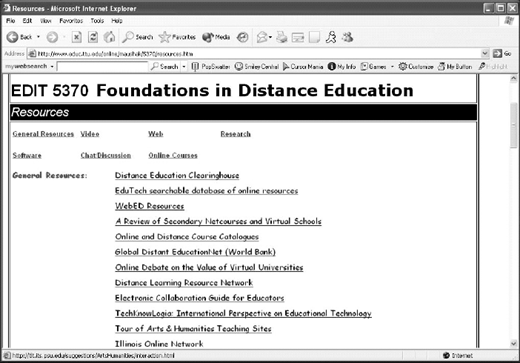
There is so much information available on the Internet, and it can be overwhelming for students to explore. One way of making it easy for them to get to the information you want them to get is to compile a resource list yourself. This way you will know where they get the information. Students do not have to spend more time looking from scratch, and they can spend the time evaluating, organizing, and synthesizing the information. Students can also be encouraged to share resources they find, to be added into your list so they will know that they are contributors to the course and their efforts are valued by students and instructors alike.
It may not be a common practice for instructors to post students’ assignments on the Web for the whole world to see. However, informing students ahead of time that their assignment will be shown to the class or other people usually encourages them to create better products. Each student is unique, and so is the product each student produces. Assignment sharing does not mean a competition, but is a chance for students to challenge themselves to perform better. Students should be allowed the choice of not sharing their assignments if they do not think it is appropriate. Personal information and emotional reflection pieces should not be posted, to protect students’ privacy.
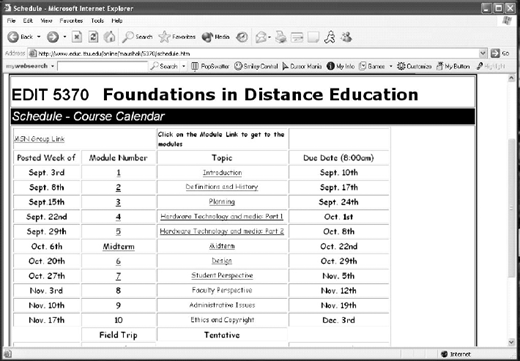
Course Schedule/Modules Screen Shot
Course Schedule/Modules Screen Shot
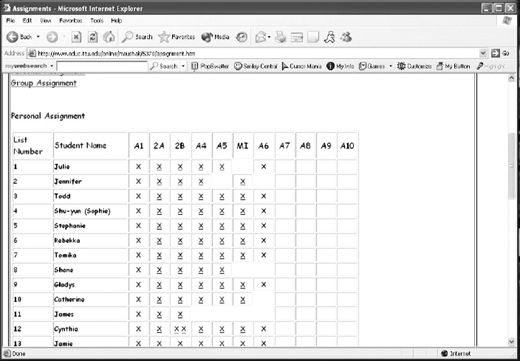
In CMS, there is usually a Grade Book option for instructors to inform students of their performance in the course, and additional information on the distribution of grades amongst the students. There is not an individual grade sheet for each module to individual students in our courses. We utilize e-mail to send out information on students’ grade. It is more personal and we can provide personal feedback rather than simply a number or grade.
Considerations
There are several issues that need to be considered when putting up a generic online course Web site. In the last year and half, we learned from our experience creating and modifying our course Web sites that the following issues will need to be addressed before, during, and after you publish your Web site on the Internet.
Password Protection: who will have Access to the Web Site?
One concern that instructors might have is whether to protect the course Web site and limit its access to students who registered in the course. Opinions vary on this matter. Some people believe that course
Web sites should be password-protected because they think that, because students pay to take the course, no one else should have access to the site. Others believe that there is no need to protect the Web site because only students registered in the course can participate in all the activities planned for the course, and that other people who come across the site only will get half of the picture. However, some information probably does need to be better protected to avoid danger to the students. Students’ personal information should be kept in safe places rather than displayed for the world to see. Especially for minor students, course Web sites definitely need to be password-protected so the environment is safe without any potential threats to students’ safety.
Some Materials may not be Appropriate for Students
The Internet is like a vault that contains many treasures. It contains valuable resources and useful information. However, the process of finding appropriate resources and information is also like hunting for the treasures; there can be danger and traps on the way. Not all materials on the Internet are relevant or appropriate for students, whatever age group they are. For younger students, filtering software on the Internet Service Provider (ISP) server, school district server, or installed on their personal computers is appropriate to monitor and control the Web sites they visit. Creating a resource list is also a way to limit students’ access to designated Web sites and prevent them from wandering in cyberspace.
Resource Reliability
Students should also be taught to evaluate information they acquire from the Internet. Not all materials available on the Internet or even the esource list are reliable. Students eed to learn how to distinguish reli-ble from unreliable information.
Orientation
One advantage that CMS have is hat every component of the course in one place. Students can access verything within a course in the MS environment. A generic eb-based course that utilizes stant messenger and a discussion roup lacks that advantage. We arned from students’ feedback that his open environment can be con-using. A well-thought-out, orga-ized, and planned orientation ession can help students enter the ew environment quickly and moothly. Students need clear struction and guidance in eb-based courses because there ill not be a teacher next to them to old their hands.
Summary
hile we do have the option of sing a CMS at our institution, we ave found the above applications n effective alternative. They allow he instructor to personalize the arning environment and have the dded advantage of the development f technology skills in both the structor and the students. Our Web site (http://www.educ.ttu.edu/nline/maushak/5370/introduction.htm) is open to anyone with Internet ccess, so feel free to browse. Web Site any comments and sugges-ons.
About the authors