Arecent e-mail from a colleague in eastern Europe initiated a discussion about what goes into a Web course and prompted the writing of this article. Each person’s experience with teaching online is unique. This article will share our experiences in creating, implementing, and managing an online course including things to consider such as software, policies, and course components.
Background
Institutions have varied reasons for offering distance education courses. Top among these reasons is access.
From a student point of view, access “anytime, anywhere” is becoming a necessity. Family situations and workforce demands make removal of the traditional time constraints of attending face-to-face an important goal of distance education programs. Students desire and need access from convenient locations, including home or work. While the students are looking for access “anytime, anywhere,” universities are hoping that offering distance education courses will allow them to access new audiences, which will result in increased student enrollment.
Many institutions offer distance education courses with the goal of making education more affordable for students and reducing an institution’s per-student costs. However, in many cases, this does not occur. The up-front costs of program development and technology infrastructure can greatly impede return on investment. At many institutions, a reduction in normal fees is offset by the assessment of a technology fee, making the cost to distant students the same or greater than to on-campus students.
The National Center for Educational Statistics (NCES, 2002) estimated that 1.6 million students enrolled in distance education courses during the academic year 1997-1998. Three years later, this had grown to an estimated 2.8 million students and an estimated 118,100 different college-level, credit-granting distance education courses. Approximately one third of these courses were part of a degree program designed to be completed totally via distance education (NCES, 2003)
If you are thinking about developing an online course, there are several factors you need to consider before really getting started. These factors include: software options; interaction; support issues; content and format issues; institutional policies; and time. While we cannot provide you with more time, we can offer a framework to assist you in making a decision related to the other factors.
Software Considerations
In general, there are two ways to go in developing an online course: a course management system (CMS) or WYSIWYG Web-development software. Best-known examples of CMSs are Blackboard and WebCT. Major WYSIWYG Web-development packages include Microsoft Frontpage and Macromedia Dreamweaver.
In simplest terms, a CMS provides the tools and a framework to assist instructors in the creation, teaching, and management of an online course. Your institution may have already made the decision to standardize online courses with a particular CMS. In fact, in the 2002 academic year, 30% of online courses offered by 4-year institutions used a CMS (Meerts, 2003). Typical tools and features found in a CMS include class rosters, grade book, quizzes, interaction tools, and, of course, course content. An excellent source of information about course management systems is http://www.edutools.info/course/index.jsp. At this website, you can review product specifications and compare products in order to make an informed decision when selecting a CMS.
Using a CMS has several advantages and, unfortunately, some disadvantages. In general, a CMS is relatively easy to use. Everything is included in a safe, secure environment. An instructor can choose to use all or only a few of the available tools, which usually include content management, student management, communication, assessment, and grade book. When all courses are standardized by using a CMS, students become comfortable with the environment and come to rely on the standardization. However, the setup of a CMS can somewhat restrict pedagogical decisions. This pedagogical restriction and the degree of standardization can impact students by not allowing them to experience the diversity of faculty perspectives in alternative environments.
WYSIWYG is an acronym for “what you see is what you get.” These programs allow the user to develop a Web site or interface without the need to use codes (markup) such as HTML. As you create, you can see what the result will be. Examples of true WYSIWYG editors include Microsoft’s Frontpage or Adobe’s PageMill. Macromedia’s Dreamweaver works like a true WYSIWYG editor, but makes it easy to view code and fine-tune the results (if you have skills in HTML).
Microsoft’s Frontpage is perhaps one of the easiest editors to use. At Texas Tech University, we have pre-service students use Frontpage to set up online portfolios. In less than an hour, students create a four-page website, complete with graphics and hyperlinks. Adding and fine-tuning the content takes a little longer, but that is really nothing but word processing.
Those more comfortable with technology will find Macromedia’s Dreamweaver fairly easy to use. It has a higher learning curve than Frontpage, but is a more powerful application. The most current version of Dreamweaver has a function to help the Web designer meet Americans with Disabilities Act guidelines. It also works in both PC and Macintosh environments while FrontPage only works in the PC environment. If databases are your thing, Dreamweaver, along with the server technology, should be your choice.
The advantages of using a Web development tool include low cost, ease of use, and freedom to “do your own thing.” While both of us have chosen to use software instead of a CMS, we recognize that there is a downside. The website you create will not be a secure environment and will be accessible to anyone with an internet connection. To create interaction among students and between students and instructor, you will need to look for alternatives available on the Web.
Interaction Alternatives
An online course can be an isolating environment for both the instructor and the students. “The most important challenge facing distance education is the need to develop a rich level of personal interchange between professor and student and among students themselves” (American Federation of Teachers, 2001, p. 10). The good thing is, there are many ways to accomplish this interaction: e-mail, listservs, instant messaging (IM), discussion groups, desktop conferencing (both audio and video), fax, and even phone.
E-mail is something that most students are already familiar with and is easy to use. However, you can quickly become overwhelmed with e-mail unless you set up some guidelines. You can have Outlook filter e-mail from a class into a special folder by requiring your students to use the course number in the subject line. While this does not reduce the number of e-mails you have to deal with, it does make managing them much easier. Students seem to expect an immediate response to their e-mail (even if it is sent at 2 in the morning!). Letting them know up front to expect a response within a certain time frame can help ease some of their anxiety. Turning in assignments by attaching them to an e-mail works well, but you may need to provide a tutorial on working with attachments for your students.
Instant messaging works great for synchronous communication. Students seem to like this real-time discussion; however, you should not require large work groups to get together this way because scheduling conflicts quickly arise. Requiring students to add you to their list of contacts for IM is a great way to have one-on-one conversations with your students. IM allows users to see when their contacts are online, so IM becomes a way of “running into your students in the hallway” and is a great way to add a more personal touch.
Discussion groups or threaded discussions work well if you provide specific discussion topics and monitor the posts. This can be a great way to allow students to think about their response before posting it, but be cautious of requiring a certain number of posts, as students quickly fall back on saying such things as “I agree” or “Good idea” without putting any thought into responses.
Sometimes it is just necessary to fall back on older technologies. A simple phone call can quickly clarify any misunderstandings and provide a real personal touch. Fax and mail work great for students who are not comfortable sending attachments. Mail can be used to send CD-ROMs with additional readings, presentations, videos, and so forth to students.
Support
The level and type of support provided to faculty in the developmental phase and the initial offering of an online course are important. Three types of support that may or may not be available at your institution are technical support, professional development, and course development assistance.
Technical support is crucial to the success of an online class. Our server crashed a month after the start of the semester and was down for several days. Students were unable to access the website and, to make matters worse, no one from technical support had been backing up the server. Although this is a rare occurrence, you should be prepared for these types of technical probems and know from whom and where you can get help.
We have been lucky at our institution to have a Technology Learn-ng and Teaching Center that provides a broad range of professional development. Many short courses are offered, including pedagogical concerns in moving a traditional class to the online environment, as well as courses on using the variety of software discussed previously. However, this evel of assistance is not available everywhere. In reality, most nstructors that teach online have spent time on their own to learn hardware and software in addition to new pedagogy crucial to the quality of an online course.
As you review websites of institutions offering online courses and programs, you will notice that, at many, course development is done by a team and not solely by the nstructor. This team may include a technology professional, an instructional designer, and a course expert (you!). If this type of support is available at your institution, take advantage of it. For the most part, we design, implement, deliver, and manage our own courses. Luckily, the time requirements for course design, implementation, and delivery decrease over time. However, there are always management ssues connected to the course, ncluding maintaining the most up-to-date content and checking links.
Policy
Policies vary among institutions. Institutional policies that can affect your decision to teach online nclude faculty incentives for development and delivery of online lasses, class size limits, and intelectual property.
Incentives offered by many institutions include release time, stiends, assistance such as a research ssistant assigned to help with the lass, and recognition toward promotion and tenure. Pachnowski md Jurczyk (2003) studied motivating factors and found that administrators feel that faculty aremotivated by these types of incentives. However, the same study ound that faculty who decide to each an online course are usually ntrinsically motivated. They want to utilize technology, try new methods, diversify program offerings, and reach a more diverse student population. Our personal experiance supports this view. Incentives ffered by the administration have een few and far between. If we ad waited for policies to be in lace to support online teaching, we would still be waiting. Hope-ully, you will find that while you're personally motivated for teachingonline, there are institutional ncentives to support your efforts.
There is no answer to the question of what is the ideal class size or an online course. Class size hould be set through normal channels and may vary widely, dependingon the subject. Factors to onsider include: the subject matter, he students, the types of assignments, and the types of feedback equired for the course. The American Federation of Teachers (AFT, 001) indicates that good distance ducation “generally requires more eacher preparation time than a traditional class as well as more time devoted to interacting with stuments” (p. 21). Students may need more interaction than in traditional lasses to compensate for the lack of ace-to-face interaction.
Several issues arise in regard to ntellectual property when discussingonline courses. Our university is till struggling with these issues, including who owns what part or all of an online course. Check with your university to see if such a policy has been developed and what it contains. For lack of institutional policy, we currently operate on the plan that if we leave the university, the university keeps a copy of the course, but we are allowed to take a copy with us.
Content and Format
Course development can be easier if you have a plan for the format and composition of the website. This format can provide a template for future course development. Remember, this is your primary communication with your students, therefore you need to include all the information you would share during a face-to-face introduction (office hours, course objectives, class policies). Class policies and protocols should be included in this section (e.g., your name must be on the assignment, penalties for late submission, a statement about accommodations for students with disabilities, possibilities for remediation of assignments, grading, and academic policies).
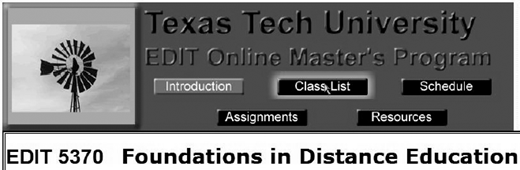
There are some parts that need to be included in every course and do not vary greatly from course to course, then there are parts that should be included in each course that are specific to that subject and, finally, there are optional parts that may be included in some courses— or not. The same navigation links to major portions of the course should be included on each page. The image in Figure 1 shows the banner and navigation bar from one of our online classes.
Information that should be included in every course may fall into three categories: general information, course modules (or lessons), and tools and options. General information that needs to be included are the course title and number, course syllabus/outline, course schedule, course requirements, an introduction to the course and instructor, textbooks and required readings, and a copyright statement. A START HERE type of page which gives basic instructions on registering and distance education at the university is always useful.
The course module/lesson section would include links to each of the lessons for the course. This section is the “meat” of your course. You will need to decide if you want to post (or activate) all of the lessons at one time or if you want to space them out and link them to a schedule. A separate page which lists all of the assignments and their point values could be included in this section. It is useful to have a set format for each lesson or module, a template for you to fill in the blanks. We generally include the following:
Introduction
Objectives
Step-by-step procedure
Resources (text, hyperlinks, additional readings, etc.)
Evaluation
Due date
The tools and options sections should include: information on viewing options (for individuals with disabilities); information about university e-mail; a tutorial on attaching documents; using interaction tools (listservs, threaded discussions, instant messages); a link to university resources (calendars, library, registration); e-mail link to the instructor; directions for submitting assignments and checking grades; and protocols for naming assignment files.
Random Thoughts
The following suggestions do not fall into any category, but we think they provide useful information and are things that we have learned as we have taught courses via the Internet.
It is important that your courses are accessible to as many students as possible, including individuals with disabilities. Bear in mind that many students connect to the Internet on a dial-up system. Try to keep the course simple; “bells and whistles” can significantly lengthen download times, and should be added only when they make a significant contribution to the course. For example, streaming video is very useful for demonstrations, but a streaming video that is just a “talking head” is an inefficient use of technology. For students with disabilities, information on enlarging print or speech access is necessary in order to access the course. For these students, all illustrations should include “alt” tags that describe the illustration, and tables should have a text format option.
There are several suggestions related to assignments, due dates, and submissions. We have found that due dates are necessary. If you do not set due dates, you are swamped at the end of the semester with assignments to be graded. This also does not allow time for students to remediate their work. In planning your assignment schedule, it is helpful to have a separate page that indicates due dates and assignment descriptions which is then linked to the various lessons. This allows you to update each semester on one page and eliminates the need to go back each semester to each lesson module. Maintaining the integrity of tests is also an issue. You need to decide the function of the test; as a learning experience or as confirmation of knowledge. The tests or quizzes we use as a learning experience are written as if they were open-book tests. For tests that you feel are necessary as a confirmation of knowledge, you will need to set up a system that identifies a proctor (located near the student) who will administer the test.
Students feel more comfortable if they feel they know the instructor and the instructor knows them. A short page that introduces the instructor, preferably with a photograph, allows the students to connect with the instructor. The introduction can include a professional history, research interests, and may also include personal information. We find it useful to have an e-mail or submission of a self-introduction as the first assignment. This allows the students and instructor to become familiar with each other and the submission system.
Summary
It is difficult to address all of the issues related to online instruction in one short article. Creating, implementing, and teaching an online course is a unique and ongoing experience. As with most things related to technology, change and development are rapid and continuous. Software options are constantly evolving and becoming easier and more accessible. Institutional policies and support are gradually being developed and provided. As with any course delivery option, content and format are being updated as the field develops. The basic framework can help you adjust as these changes are being made.
About the authors