Introduction
In K–12 and higher education settings alike, pure face-to-face courses are becoming less common. As digital technology’s role in education rises and hybrid and online courses become the norm, educators look for online delivery methods that are both cutting edge and cost effective. By the same token, educators need online delivery methods to be workable. Educators are experts in their chosen fields, and they are teachers. But they are not always technocrats. As Grady and Davis point out (2005), online courses, in particular, can require a steep technological learning curve, as the instructor develops the entire online learning environment. “Teaching online requires course designers to implement a much more rigorous instructional design process than is required for face-to-face instruction” (p. 108).
To complicate the matter further, it is a given that not all technologies are equal. Therefore, with the growing array of available products, all educators, but especially online educators, need reliable reviews of technologies. Further, even the best technologies are not suited to every educational environment. Consequently, educators need reviews that speak to the applicability of a product to their teaching needs.
One educational technology that is worth a look is Google’s G-Suite for Education (GS-E). Google has invested a great deal in GS-E and publicizes it as a full-fledged member of Google’s family of suites. Released in 2016 as a part of Google’s G-Suite family, GS-E integrates all of Google’s previous education products, Google Apps for Education, into one system (Google, 2016a). As Google points out, this cohesive suite of products can scale. Indeed, GS-E has features that can support one class, multiple classes taught by one instructor, or larger administrative units such as schools and school systems (Google, 2016b). GS-E comprises Classroom, which acts as the course hub, while the entire suite of other Google products such as Docs, Calendar, Sheets, Hangouts, Chat, and Gmail, support and amplify Google Classroom, as needed. As one review puts it, “Classroom is, in essence, the service that ties all of Google’s tools together for teachers” (TechCrunch, 2017). This flexibility allows GS-E to be used to different degrees. Given the publicity surrounding this product, it is worth considering as an online teaching tool.
To assess GS-E’s merits as a tool for an online course, I created a module for an introductory online technical communication course. Creating a course module provides a representative experience in course design, which, in turn, can be scaled to include an entire course. Further, because Google Classroom sits at the center of the suite and the other Google tools are pulled into it as needed, using Classroom to create a course module can serve as good litmus test for the entire suite.
Getting Started
This product is free to educators, and there are no advertisements. Additionally, both instructors and learners have unlimited data storage. It should be noted that while this is indeed generous, it also assumes that many learners will get “hooked into the Google ecosystem and cloud storage services” and become lifelong habitués (TechCrunch, 2014).
Google products tend to have their own look and feel. With 1.2 billion active Google accounts (DMR Stats and Gadgets, 2017), Google’s ubiquitousness makes it likely that many instructors and learners have had some exposure to Google products. Further, Google Classroom is intuitive. Indeed, after “playing” with this product for an hour, I felt very comfortable with it. The steps for getting started are exactly what one would expect when creating any new project, big or small. Therefore, there is not a steep learning curve to get the ball rolling.
Using Google Classroom to Create an Online Course
Not only is Classroom easy to get up and running, its uncomplicated design makes it easy to use to create a course. Classroom has three parts or tabs (see Figure 1): ABOUT, STUDENTS, and STREAM. That’s it. In the next sections, I review the functionality of these tabs.
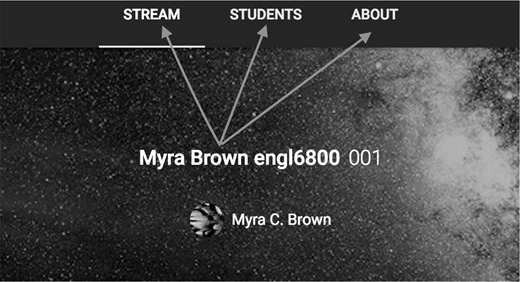
Screenshot of Classroom’s three tabs.
Screenshot of Classroom’s three tabs.
The ABOUT Tab
I found using the ABOUT tab to be very straightforward. One key feature of interest to online instructors is the way course materials are added to Classroom. As the portal for adding materials to Classroom, ABOUT opens to a menu of storage venues. Along with selecting files from the computer’s hard drive and Google Drive, users can search for files using Recent and Starred options, which are timesavers. Further, it is drag-and-drop, so no uploading is required. This is a very fluid, easy-to-use system, which is very helpful for a busy online instructor.
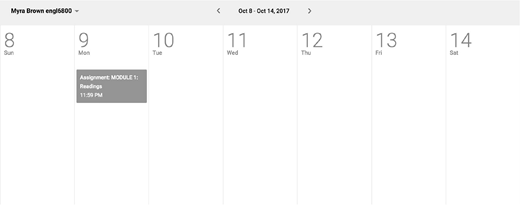
Additionally, the ABOUT tab houses the Classroom Calendar, which includes assignment due dates and times, as well as course announcements. Classroom Calendar automatically syncs with created assignments and announcements. Whatever the format of a course, a strong, clear calendaring system is essential. This is particularly so in an online setting. While Classroom already has due dates on the assignment descriptions themselves, Classroom Calendar reinforces those dates clearly. Figure 2 provides a screenshot of Classroom Calendar.
The STUDENTS Tab
Like the ABOUT tab, the STUDENTS tab set up is easy to grasp, and it has some time-saving features for instructors. Student information is easy to see and track. One vital functionality that Classroom handles well is how grading and commenting on student work is done. The STUDENTS tab allows instructors to open any submitted assignment within a student’s account, correct and comment on it, and assign a grade. Everything happens within the system, so, again, no downloading and uploading are required. Besides supporting Google products, such as Docs and Charts, the system supports Microsoft office, and some Adobe products, including PDFs.
The STREAM Tab
Up to this point, I have given Classroom a favorable review as a viable product for an online course. Like the other two tabs, the STREAM tab has much to offer online instructors. Unfortunately, the STREAM tab disappoints in a key area.
Let’s start with the positives. I found the STREAM tab to be straightforward. Its uncomplicated, almost aerodynamic design makes figuring out functionality painless. Aptly named, STREAM is the course stream. STREAM supports the same products that STUDENT does, so users do not need to tailor their preferences to it.
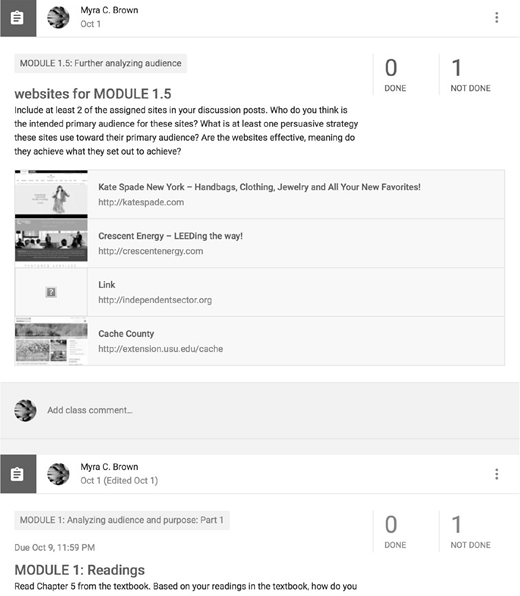
With the exception of Classroom Calendar, the features of the other two tabs are for instructor use and view only. STREAM, on the other hand, is what students see. This is where students access pretty much everything to do with the course, including assignment descriptions, and supporting materials. Discussions take place here, too. STREAM is chronological, so course modules, assignments, and the like, move through time, an important unifying property of any course. As Fielding’s (2016) research suggests, “[Online students] sense that they are moving through time together,” and this journey together can bolster a learning community (p. 109). Important information such as assignment titles and due dates are posted clearly, making it very readable. Figure 3 is a screenshot illustrating STREAM’s chronological set up and readability.
Now for the negatives. The characteristic that makes Classroom so doable can almost be viewed as STREAM’s undoing. STREAM’s nonfussy, streamlined design means there are few components. On the other hand, by its nature, an online course requires the entire structure of the course be present on the course site (Grady & Davis, 2005). Such a complex, multifaceted endeavor needs a multifaceted tool. Of particular importance to an online course is the course overview or syllabus. As Grady and Davis (2005) point out, a “syllabus [provides] the framework or scaffolding for the entire course” (p. 109).
STREAM’s design lacks a natural, intuitive place for a course overview or syllabus. A course overview needs to be easily accessible, and visibly separate from the chronological flow of the course. STREAM does not provide this. Certainly, an instructor can create a course overview and post it to STREAM. However, because STREAM holds only chronological items, the course overview is merely one of many chronological items. It does not hold pride of place, thus weakening its stabilizing role. One workaround might be to make the syllabus the first post and reference it specifically in the title of each module or assignment. Additionally, because Classroom as a whole is well organized, an instructor might initially post the syllabus to STREAM; then, rely on the flow of the class to hold things together. Obviously, these are not ideal solutions.
Of specific concern is the potential for a diminished teaching presence, as defined by constructivist pedagogical theory. Garrison (2007) notes that “teaching presence is a significant determinate of student satisfaction, perceived learning, and sense of community” in an online learning community (p. 67). Garrison further observes that while “interaction and discourse” are key components to higher order learning, higher order learning also requires “structure (design) and leadership (facilitation and direction),” in other words, teaching presence (p. 67). A visible, standalone course overview can significantly contribute to the structure and leadership that feed into teaching presence.
I would not say that Classroom’s inability to handle a course overview or syllabus well is a deal breaker for online instruction, but it is perilously close to being one. Before rejecting GS-E out of hand, one would need to weigh its cost (nothing) and what it does deliver against what it does not deliver. The fact that GS-E is free is not trivial, and it has some wonderful features. Are those factors enough?
Delivery Platforms
The last feature I review is delivery platforms. GS-E delivers well to the range of devices out there. It scales smoothly to phones, tablets, laptops, and desktops. Androids, iPhones, PCs, Macs: they all work equally well. Additionally, it does not prefer Chrome over other web browsers.
Future Directions for Inquiry
This paper addresses Classroom from the instructor’s perspective. A similar paper from the learner’s perspective would be informative.
Conclusion
Google has thrown its entire weight behind GS-E, and it shows. This is a well-thought-out, elegantly designed product. Its inherent structure allows for more features to be easily added down the road. Further, Google offers this suite to schools at no cost. This product can scale to large and small educational courses and systems. Unfortunately, its streamlined design limits creating a visible, centralized course overview or syllabus. This missing functionality is problematic for online instruction. Instructors can create workarounds to compensate, but doing so is less than ideal. Online instructors and administrators considering implementing GS-E would need to carefully weigh the pros and cons.
Teaching online requires course designers to implement a much more rigorous instructional design process than is required for face-to-face instruction.
About the author