The office is brightly lit by a full wall of windows facing west. Natural light pours in but the noise, hustle, and bustle of the rest of the world is held at bay. Besides the occasional chimes my computer produces, it’s quiet, permitting me to concentrate on my projects. Personal productivity is in my control. I’m not spending hours each day in traffic and I continue to maintain routine interactions with colleagues, team members, and clients across town and around the world. In fact, we are life-sized and just about at arms’ length from one another whenever we want to communicate. All that’s missing is the proverbial water cooler between us!
Why is my work life so tranquil? I now share my office with two new videoconference systems from Polycom: the VSX 3000 and the V500.
Before selecting the worlds’ best office companions, I took them for careful test drives.
Get Connected— Completely and Properly
Less than 2 minutes elapsed between when the V500 box was opened and the system powered up and connected to the 19-inch display, a no-frills television set purchased at a local home electronics retailer for under $200. The cables to connect the monitor to the appliance are all clearly color-coded. Looking back in the box, all I found was the remote control, batteries and the manual on CD. Another 15 seconds to pop in the AA batteries. I left the manual where I found it.
With the VSX 3000, unpacking and connecting was even faster because the display has the appliance, camera, and speakers built in, and the only cables provided are to the network and power outlet. In this case, I took the extra 30 seconds to attach the 15-pin (DB15HD) interface coming from a Windows PC to the display. The VSX 3000 is designed to serve as either a videoconferencing system or a 17-inch flat panel SXGA display for any personal computer. If space is in short supply and you are using a tower PC, the VSX 3000 is a very attractive solution.
The only ingredients the user needs to add to complete the solution and begin conferencing are the network and a well-lit subject.
Networking is absolutely paramount to any knowledge worker with a virtual office, or for that matter, anyone in any office. You don’t need to be a network engineer to set up and configure Polycom small office systems. For these tests, Internet access is via an ADSL router providing 200kbps up and 1200kbps down. The VSX 3000 supports data rates of up to 2Mbps. On the local area side of the ADSL router, several personal computers, a VoIP (voice over Internet protocol) phone and the systems I’m testing are connected and share access to the Internet. They receive their internal IP addresses by way of DHCP in the router but I have specified a static internal address for the videoconferencing system.
Using the remote control to advance through the screens, following the setup wizard was a breeze. Name? Country? Network type and speed? Do you want to register with a gatekeeper? The key, I learned, is actually not to be in too much of a hurry. If, once it has booted up, the system “talks” to the local network for a few minutes, the two come to a convenient agreement. Technically referred to as the “discovery process,” the network communicates its options and details, such as the fixed IP address, and the videoconferencing system adapts itself to the best settings based on the information it receives from the router. When I saw the external IP address appear on the screen under my picture (my IP address: 194.158.241.231), I held my breath and entered the IP address of the person waiting for my call.
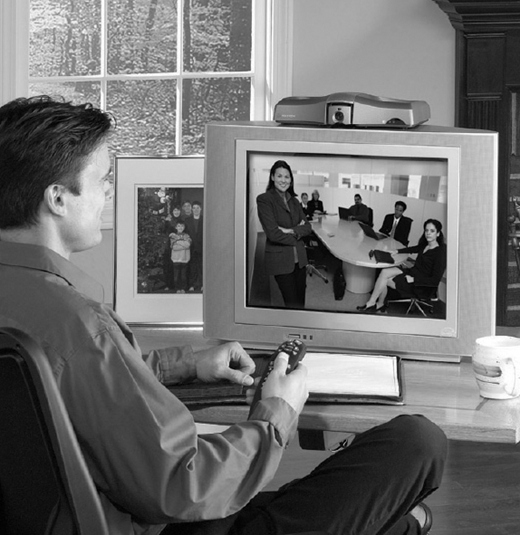
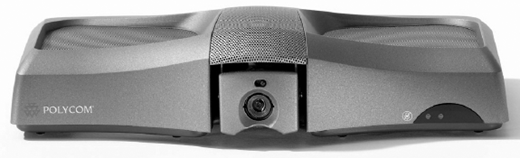
Both the V500 and VSX3000 model running version support two communications standards (H.323 and SIP) for placing and receiving video calls. Both systems also support the latest video compression codec, H.264 for higher video quality at lower bandwidths, during a call with another system which also has the ability to encode and decode a H.264 video stream.
Get Into Focus
If you don’t want to focus on a user manual, these systems are perfect. Polycom has kept the same sleek and intuitive design on the remote control and in the on-screen user interface, so if you have used other Polycom videoconferencing systems, everything will look and feel familiar. If you have never used a Polycom-brand videoconferencing system, the ease of use (even for a total beginner) is one of the most important reasons the company dominates the group system category in terms of units sold annually.
Using dual microphones and speakers designed for the solution and the company’s award-winning Siren 14 technology, Polycom VSX 3000 can offer a very high quality audio experience. VSX 3000’s dual speaker design also supports a stereo-based conference call experience: StereoSurround. The superior audio fidelity provided by the unique compression algorithm is available only when the far end point also supports Siren 14.
Sharing the Screen
Seeing other people’s faces and gestures is much better than only hearing their voices during a teleconference, but these are rarely enough in today’s business meetings. Frequently, we focus at least some of our attention on a computer file such as slides or a document. Over the past 3 years, Polycom has optimized the integration of data and video in their conferencing systems. The video is optimized with video-specific algorithms, while the data side of the screen is treated separately during the decoding and display.
Both the systems tested for this review support Polycom’s People + Content technology for combining a video window of the person at another location while also seeing a document or PowerPoint slide. The V500 has the ability to start/send as well as to receive properly formatted People + Content from a remote location using Polycom People + Content. With version 7.5 of the software, the VSX 3000 will send and receive slides and simultaneous video as well (prior to 7.5, VSX 3000 could only receive People + Content). The VSX 3000 does an excellent job of emulating a dual-monitor scenario in which the local and far video windows appear side by side. Many people who are accustomed to group videoconferencing systems rely on dual monitors to see how they look to the far end.
One option that is available on the VSX 3000 (but not on V500) is the ability to host a multipoint call and send mixed video and audio to two other systems. By virtue of standards, V500 and VSX 3000 users can join a multipoint call hosted on an H.323 multipoint server or by another H.323-compliant end point.
When Designs Count
Adding a videoconferencing system to a small office makes a statement not only to those who can reach you by way of this technology, but also to those who enter the office in person. A videoconferencing system should fit in with the other equipment and furnishings in an office. The V500’s flat silver finish and domed shape fits in with most office settings without really making a fashion statement. Flat panel displays are increasingly common, but the VSX 3000’s black color, integrated speakers and microphone covers and stylish pedestal base give it a little more sophisticated and decorative look.
Choosing a System
A person equipping a small office or meeting room won’t go wrong with either of these products. They both earn four out of five stars (very good product, but some room for improvement remains). Since their features are relatively similar and both will amply meet the needs of the office occupant, the choice should be made based on which is in shortest supply: space or money. If you have more space than money and a television or monitor (NTSC or PAL) handy, the V500 is a compact and easy-to-use appliance that is sure to bring many years of virtual meetings to any office. For approximately twice the price, if space is a premium, the VSX 3000 provides a tightly-integrated and well-designed solution for both video meetings and as a monitor for general purpose computing.
In my airy yet compact office, the VSX 3000 is in daily use and when I go to my client facilities, I can carry the V500 with me to quickly and easily enhance our meetings with remote team members. After 3 months of use, I can say with confidence that these are the best companions with which I’ve had the pleasure to share my office.
“BEFORE SELECTING THE WORLD'S BEST OFFICE COMPANIONS, I TOOK THEM FOR CAREFUL TEST DRIVES.”
—CHRISTINE PEREY
About the author