

College and university faculty face many demands on their time: research, teaching, service, committees, family, and other obligations. One of the major challenges encountered by instructional support personnel at colleges and universities is to get their training efforts entered into the faculty members’ busy calendars. This article looks at a new option for delivering training in technology and pedagogy through streaming video and synchronized slides. The project described involves faculty members sharing their technology-related projects and instructional strategies with other faculty through online video, which could be viewed either live or at other times convenient to faculty members. Faculty response to the program is described.
Introduction
Instructional support staff at postsecondary institutions confront challenges in their efforts to deliver training to faculty members. The faculty members that they support face numerous demands on their time: teaching, research, conferences, office hours, and a seemingly endless number of meetings; not to mention family and social obligations. With each of these areas taking time out of faculty members’ schedules, little is left for developing new technical and pedagogical skills and strategies.
At our university, we have a large number of faculty in this situation. They are generally positive and enthusiastic about professional development, but find it difficult to find the time in their overextended calendars to attend workshops or even to come to our office for individual consultations. Instructional support staff constantly meet instructors in the halls who say, “I’ve been meaning to come to you to talk about a certain project, but I just haven’t had the time.” Because of this, staff members in our instructional support office have long been looking for new ways to deliver training to our faculty.
One day at noontime, I noted the large number of faculty members lined up in front of the snack cart in our building’s atrium, purchasing their lunches. These faculty members were going to take a chicken sandwich or a salad back to their office to eat while sorting through e-mail, surfing the Web, or listening to online radio. It struck me that this might be an ideal opportunity to deliver some training to the faculty members.
A New Way to Reach Overextended Faculty
From this insight, I developed the idea for a series of workshops delivered through online streaming video. I envisioned faculty members watching short, targeted video presentations while eating their lunches at their desks. The faculty all had Ethernet connections to their computers, along with sound cards and speakers, and Realvideo installed by default, so hardware and software on the receiving end would not be a problem. Regarding the broadcast side, there was a distance education room already set up with cameras and microphones, and a call to the streaming media people at our university computing services department was all that it took to arrange for the first video session.
What would the content of these streaming video broadcasts consist of? From past experience, I knew that faculty members often felt somewhat isolated, in that they seldom had the opportunity to learn about what other faculty members, especially outside of their departments, were doing in terms of pedagogical and technological innovations. I identified a number of faculty members that our staff had worked with and who were doing exciting things in their on-campus and online classrooms, and arranged a schedule of video sessions with them.
I chose every other Wednesday at noon for the live broadcast, with an archived version of the sessions available almost immediately afterwards. This way, if faculty members could not watch the live broadcast on Wednesday, it would still be available for them to view at a later time.
The upcoming broadcasts were advertised through our school’s list-serv, which went out to all faculty members. I also invited associate instructors (graduate students with teaching positions) through e-mail to tune in to the sessions. Also, individual faculty presenters notified their students and colleagues about the presentations, which gave us, at times, an international audience.
Presentation Format
The sessions were 30 to 45 minutes in length, so that the faculty member viewing the program would not have to devote his or her entire lunch hour to the session. I wanted to incorporate interaction from our faculty viewers, so I had an Internet-connected laptop operating at the site, so that a staff member could collect e-mailed questions as they came in. Instant messaging was considered as an option, also, but since many faculty members were unfamiliar with this type of software and would not have it on their desktops, I decided to go with e-mail, a delivery method that they were comfortable with and that did not require any new software. To encourage e-mail participation, free coffee mugs were given to anyone whose question was read on the air. On a couple of occasions, we had a live audience in the distance education studio, but most of the time, it was just the presenter, the host, and the technical support personnel.
The director of our office and the head of training for our school, both of whom have extensive experience in giving workshops and training sessions, alternated in the role of host for the broadcasts. The faculty members were encouraged to engage with the host in an informal discussion about their topic, rather than give a typical dry conference presentation. We encouraged them to use Powerpoint slides, but told them to limit the number that they presented. We didn’t want the content of these presentations to be bound to getting through a large number of slides.
Presentation Content
One of the primary goals in developing this video series was to provide faculty with a venue in which they could share their pedagogical and technological skills and practices with each other. This sort of collegial discourse is often lacking at our universities, especially across departments, for several reasons. First, most of our faculty have little time, except for events like the yearly faculty retreat, to reflect on and share what they are doing in their classrooms. Another reason is that, in academia, this sort of discussion is often not considered scholarly activity, and thus is not as highly valued as it should be. Finally, some faculty may find it awkward to seek assistance in their teaching efforts, especially if they are, like our professors, in a school of education. Doesn’t having a PhD in education make you an expert in teaching? They may feel that they shouldn’t need any additional development in this area, and may be hesitant to appear in public, in front of their peers, at a face-to-face session. This new delivery method allows instructors to lurk—getting the information that they need without having to be seen doing so.
The tone of these online video broadcasts was collegial and informal, less like a lecture and more like the conversation that might happen between sessions at a professional conference, in which a faculty member shares his or her best practices with a colleague in a friendly manner. The host engaged the guest faculty member in conversation about his or her experiences related to the topic, and questions from the audience, either online or in person, were answered.
The topics of our initial series of online streaming video talk shows were:
Web-based search strategies;
Designing online course components;
Creativity and technology in education;
Plagiarism;
Teaching with Web-based discussion forums;
Web accessibility;
Blended learning options; and
Using simulations in teaching.
These topics were chosen both to highlight the research and teaching experiences of the faculty members being showcased, and to provide a range of topics that would be of interest to faculty members across departments in the school.
Technology Choices and Developments
I had the benefit of previous university investment in Internet and distance education technology when I planned the technical side of these presentations. When the new School of Education building was built, in 1998, distance education rooms were created with the latest in video networking technology, and the university has continued to upgrade the facilities. We were able to use one of the distance education rooms as the studio for our live Webcasts. This room had numerous microphones, video cameras, and large-screen monitors. There was a touch screen control panel for switching between cameras, the computer with the Powerpoint slides, a VHS tape player, and the document camera. During the live broadcast, the signal went out over a high-speed Polycom video network, and was captured by a downstream streaming server, which sent the program over the Internet for anyone with a current RealVideo player to access.
For the archived version of the sessions, at first I provided interested faculty with a Web page that included links to the Realvideo file and the related Powerpoint file. Faculty could view the video file using Realplayer and see the accompanying slides using Powerpoint. However, the lack of synchronization between the two programs made for a less-than-ideal replication of the presentation experience. I researched various options for presenting the two media together. There are any number of commercial systems, most of them targeting business clients, that offer this sort of online lecture hall or meeting room, among them Microsoft Presentation Broadcast, Real Presenter-One, Macromedia Breeze, Jet Stream Jet Manager, Intercall MShow, and sofTV.presenter. However, for technical and/or cost reasons, none met our needs. We were locked into two technical choices: Microsoft Powerpoint, as that was the presentation format familiar to faculty, and Realvideo, as that was the format supported by our university’s streaming servers. We also had the additional constraint of minimal-to-no budget for the project. For these reasons, we chose to develop our own system, which we christened the Virtual Internet Presenter (VIP).
The VIP system is a frames-based system, with the Realvideo plug-in embedded in the top left frame, and the Powerpoint slides (converted to JPEG images) in the larger, right frame, covering roughly 75% of the window. The space under the video display is used to provide a listing of the slides. Clicking on any of the items on the listing will take you to that slide and move to that point in the Realvideo presentation. Similarly, as the presentation progresses, the current slide is designated by a triangle next to the slide name.
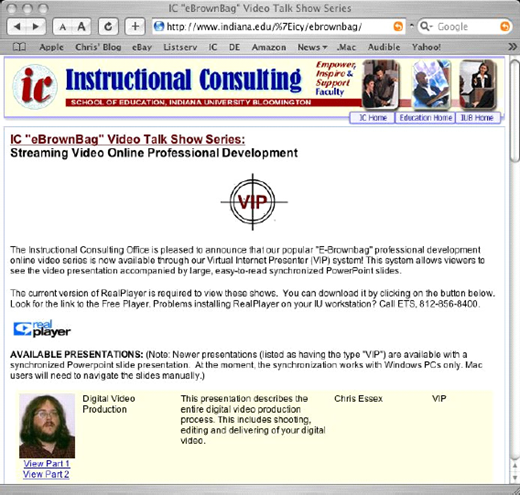
VIP was written by one of our programmers, Larry Campbell, using Perl (mod-Perl to be specific), Javascript, and VBScript. The program went through many iterations as we continually tested it and suggested refinements and additional features. We developed an administrative interface (Figure 1) for the system that allowed us to input the video files and Powerpoint slides easily, and to synchronize them. The interface was connected to a Web-enabled database that created an attractive and informative menu page (Figure 2) that listed the available videos and provided information about the topic and the presenter, including a thumbnail photograph. The system was built on the underpinnings of a Linux operating system, Apache Web server software, and a MySQL database. We chose this setup for security and reliability reasons, as well as the fact that the open-source software was free to use.
One major challenge in the development of the tool was to get it to work with the majority of Web browsers, including the various releases of Internet Explorer and Netscape. A further difficulty was getting the system to work with Apple Macintosh browsers, including Apple’s own Safari. To date, this has not been fully accomplished. It is possible to view the presentations on Apple Macintosh computers running Safari, Internet Explorer, or Netscape, but the synchronization between the video and the Powerpoint presentation does not work, and it is necessary for the viewer to navigate through the slides manually. We hope to eventually fix this challenging problem.
The VIP logo was designed, in Flash and Realvideo versions, by Jung Won Hur, one of our office’s graduate assistants. It is based on the countdown leader that is traditionally shown before 16mm and 35mm films are projected. Other than that, the graphic interface of the system is plain but functional. While no formal usability testing was conducted, the system is so simple that the end users have not had any complaints. The ease of use of the user interface is based on the fact that it relies on familiar technology—the Web browser and the Realvideo player. The vast majority of our faculty are comfortable with both.
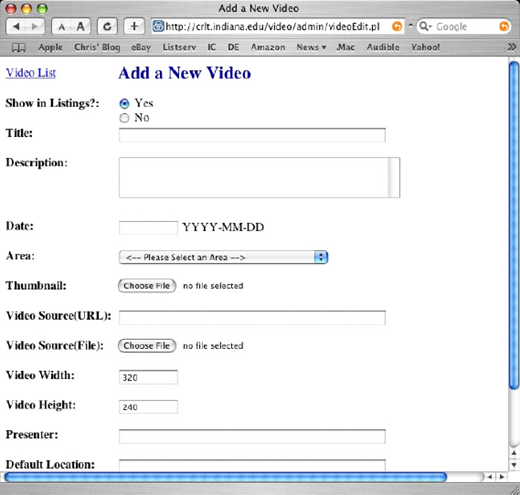
Administrative Interface (partial view)
Administrative Interface (partial view)
We were fortunate that most of the viewers of the video would be working at their School of Education office workstations, with a known technical configuration. A few of our users needed to have Realplayer installed or updated to the latest version, but that was the only technical support required. We did receive some complaints of dropouts in sound or video due to network congestion or server load, but these were short-term and temporary problems. Sometimes it took a few moments for a presentation to get started, due to the way Realplayer buffers a certain portion of the file before starting to play.
Faculty Response
We were very pleased with our viewership for the series. Our school has just over 100 full-time faculty members, and our live broadcasts reached 20 to 80 viewers, depending on episode. The archived VIP versions of the presentations have had from 80 to almost 300 views. This can be compared with on-campus workshops, for which we are lucky to have 10 faculty members show up. And, while the primary audience for the presentations is our faculty, the Website is open to the world. The VIP system has had visits from Australia, Canada, Austria, the United Kingdom, Taiwan, Philippines, Korea, France, Japan, China, the Netherlands, Singapore, India, Spain, Turkey, Greece, Cyprus, Italy, Malaysia, New Zealand, Hong Kong, and Malaysia. These international numbers are not large (generally under 20 visits), but the series has not been advertised anywhere outside of our school (except for faculty members contacting their colleagues about the presentations). Overall, the VIP video system has streamed over 3,300 video sessions.
We have received many compliments on the quality of the series from faculty and associate instructors, as well as from the administration. Faculty members have commented about how convenient it is, being able to view these training sessions at any time from their office or home computers. They also appreciated being able to randomly access any part of the presentations, and being able to repeat or skip sections. The fact that they can multitask—listening to the audio of the presentation while skimming through e-mail, eating lunch, and so forth—was also appreciated.
On feedback forms, we received comments such as “I would love to see all kinds of seminars and topics archived as this seminar was!” Another appreciated the fact that “it could be taken in the comfort of my office & at my convenience.” The only complaints we received about the series were due to technical issues, as mentioned above, not about the content of the video presentations.
It is worth noting that since the VIP system worked so well for us in presenting this series of faculty development workshops, we have now broadened its use. We now use VIP to present archived versions of our technology training sessions, such as recent workshops on iLife and Dreamweaver, digital video production, and desktop publishing. The system is also being used to deliver colloquia for our online master’s program in instructional technology. We are also presenting the Faculty Research Colloquium series through VIP. And recently a department was hiring a professor and had candidates give presentations that were broadcast through the system. We expect use of the system to continue to grow.
Further Developments
We plan to further develop the VIP system in several ways. The top priority is to ensure full Macintosh compatibility. While a minority of our faculty use Macs (only 22 of 112), we still want to be able to reach every faculty member with our training activities. We are hoping to find a programmer who is experienced in the OS X environment to help us with this issue.
Another area for further development is the administrative interface, which has basic functionality but lacks features such as the ability to view the slides that you are adding to the presentation in the same window as the video. It would also be useful to be able to input Powerpoint files directly, without having to convert them to image files.
VIP is also somewhat lacking in visual appeal and, more importantly, documentation. There has been preliminary talk about developing a commercial version of the tool but this is just speculation at the moment. Right now, we are focusing on meeting the needs of our local faculty members.
Conclusion
Based on our successful experiences with our program, I strongly recommend that other postsecondary instructional support offices consider streaming video and synchronized slides as a new option for delivery of professional development opportunities to their faculty. This delivery medium engages faculty where they are, at a convenient time, using technology that they are already familiar with. A program such as this also provides an ideal way for isolated and overextended faculty to share their technological and pedagogical innovations with each other.
“I strongly recommend that other postsecondary instructional support offices consider streaming video and synchronized slides as a new option for delivery of professional development opportunities to their faculty”
—Christopher Essex
