

Students taking hybrid or online classes are often unprepared for the kinds of skills that are needed to be successful in this environment. This report provides an overview of one approach, SPARK (Student Preparation and Resource Kit)—an interactive CD-ROM, that faculty can use to assist students in narrowing the gap between needed online learning skills and their current technical knowledge.



The popularity of online learning continues to transform the educational landscape. As more faculty redesign courses to meet the demands of education in the 21st century, some students can be left behind. Students who have not used information technology in previous school experiences and those who are returning to school after a long hiatus from higher education are of particular concern. Even those students who consider themselves to be technically proficient may have developed bad habits over the years that create barriers for them in the online context. Faculty should recognize this potential “digital divide” and ensure that their students have the tools they need to be successful in online learning experiences.
Online courses suffer from high attrition rates. A possible explanation is that students are not adequately prepared. According to Rowntree (1995), one of the key skills areas that students identify as requiring a “steep learning curve” for online learning includes computing skills (p. 212). The Student Preparation and Resource Kit (SPARK) was created to address gaps in knowledge between needed online learning skills and students’ knowledge deficits. SPARK has been piloted with two groups of nursing students: 19 undergraduates and 18 graduate students. Following is a description of SPARK, related definitions, a brief review of usability literature and a report of student evaluations of the CDROM.
Description of SPARK
SPARK was created through a partnership of the College of Nursing and MediaKube, LLC, a digital solutions provider and funded by the Arizona Regents University. The CD-ROM was planned to be easy to navigate, entertaining, and conversational. The decision to use this instructional style had two positive implications. First, students who considered themselves computer novices would be more likely to retain information presented in a nonthreatening manner. Second, students who felt they already were familiar with the material would be enticed to explore the content for the entertainment value.
A significant challenge was that the program had to effectively present items of a technical nature in a way that was not daunting for the user. Wherever possible, real-world analogies were used to relate terminology to something with which the student was likely to be familiar. For example, a flatbed scanner is compared to a traditional copy machine with the noted exception that the scanner output is sent to a computer via a digital signal instead of printed onto a piece of paper. Humor was injected throughout to make the content less intimidating and to facilitate the description of complex subjects. Remediation for wrong answers was provided in a helpful and friendly manner. The scripting allows students to repeat a question just to find out how the software reacts to the wrong answers. Learning why an answer is wrong can often be more educational than simply knowing the correct response.
SPARK is an appealing visual experience with plenty of motion and imagery. This delivery style helps direct the immediate attention of the students, while at the same time giving them a mental image to recall at a later date when they need to apply the information they have learned. Where appropriate, animated simulations demonstrate the appropriate steps in a particular task prior to requiring the user to perform the task.
For ease of use, SPARK is configured to launch automatically when the CD is inserted into a PC. The navigation in SPARK is designed to be as unobtrusive as possible, while still providing a substantial degree of control for the student. The replay and skip buttons allow the student to quickly maneuver within a topic, while a click of the map button offers him or her a hierarchical view of the entire content tree. The student can navigate to any other program topic with just three or four clicks.
SPARK Configuration and Navigation
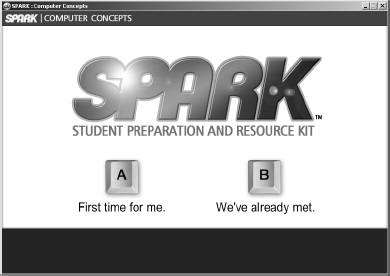
The program begins with an animated series of credits and title screens. The narrator starts by asking, “Is this the first time you’ve sat down to go through this CD or have we already met?” A click of button A, “First time for me,” takes the user through a full introductory sequence, while clicking button B, “We’ve already met,” directs them directly to the SPARK Topic Map. Similar branching occurs throughout much of the introductory section of the program for each main topic. The Topic Map displays the main categories of information followed by a layer of main topics. Below the main level is a set of subtopics for each major category. Table 1 shows the overall layout of SPARK.
SPARK Category and Topic Layout
| Categories | Main Topics |
|---|---|
| Hardware | Introduction, CPU, Memory, Storage, Input, Output, Connectivity |
| Software | Introduction, OS Software, Applications, Viruses |
| Internet | Networks, LAN vs. WAN, World Wide Web |
| Skills | Keyboard Shortcuts, File Formats, Using Adobe Reader, Using a Web Browser, Sending Email, Searching, Downloading, File Management |
| Navigation Help | A detailed explanation of each navigation button and feature is displayed on the Topic Map screen. |
Definitions and Usability Literature
The following definitions are provided to clarify the meaning of various terms used in this study:
Multimedia is the convergence of computers with motion, sound, graphics, and text (Azarmsa, 1996, p. 2).
Hypertext is the presentation of information as a linked network of nodes which readers are free to navigate in a nonlinear fashion (Keep, McLaughlin, & Parmar, 1993-2000).
Hypermedia is a special case of hypertext that employs multimedia and describes linked information presentations that contain many forms of media (Azarmsa, 1996) that include sound, video, and so on (Keep et al., 1993-2000).
Hyperlinks are the connections among units of information (nodes) in hypermedia. This arrangement can be described as a three-dimensional web of information (Dede & Palumbo, 1991, p. 2).
Computer literacy level refers to the ease with which a learner is able to operate the system controlling the hypermedia program. For example, a person with a low level of computer literacy may need assistance operating the mouse or keyboard commands necessary to navigate within the program.
Hypermedia Usability
The term “hypermedia usability” refers to the ability to use a piece of hypermedia software for the intended audience. It pertains to the ease with which a learner can perform a specific search task for a particular piece of information. “Usability is the combination of fitness for purpose, ease of use, and ease of learning that makes a product effective” (Kushner, 2003).
Usability has been applied to the World Wide Web for a number of years; however, it is not specific to the Web. “Since the early 1980s ... researchers have been investigating the usability and usefulness of hypermedia across a wide spectrum of domains” (Buckingham-Shum, 1996, p. 1).
Two main factors influence usability: content and design. Critchfield (1998) asserted that a well-designed Website appears more credible regardless of the information provided. The usability of instructional multimedia (hypermedia) is vital for the success and satisfaction of its users because confusion resulting from poorly designed programs can be detrimental to learning performance.
The process of assessing and evaluating online content is subjective and internal (Krug, 2000). Several approaches for expert-based evaluation of usability have been proposed over the past few years. According to Dimitrova, Sharp, and Wilson (2001) there is little evidence in the literature regarding the effectiveness of these approaches. Although expert evaluators are somewhat successful predicting usability problems, they still have difficulties identifying certain types of learner problems such as comprehension. Expert evaluations do not eliminate the need for tests with actual learners. To that end, an evaluation by the end-user was deemed appropriate.
Pilot Study and Evaluation
SPARK was piloted at Arizona State University’s College of Nursing in the fall of 2004. The CD-ROM containing SPARK was distributed to 19 members of an accelerated RN to BSN program and 18 members of a graduate level neonatal nursing program. All participants were allowed to keep the CD for their future use. Undergraduate participants received extra credit in their course; graduate students volunteered to complete the evaluation survey. The students were shown how to launch the CD in class and then asked to take it home to review it on their own time. They returned evaluation data via a seven-item survey (described below) the following week.
Evaluation data were collected using a seven-item survey addressing level of confidence after viewing SPARK, its pace, ease of use, ability to keep participants’ attention, newness of material, and its usefulness. Participants ranked their responses to each of these questions on a five-point Likert scale ranging from “Strongly Disagree” to “Strongly Agree.” A comment area was provided for each question. Finally, participants were asked what else should be included in SPARK as well as how long it took them to review the CD.
Results of Evaluation
An analysis of the data was used to determine what improvements and modifications should be made to the program. All of the students from the undergraduate class and 51% from the graduate class responded to the survey. Means were calculated for responses to the Likert-type scale items; qualitative data were analyzed for themes.
Comments were analyzed for further insights into participants’ experience with SPARK. However, comments tended to mirror each groups’ rating of the evaluation items. Of the ten comments provided by graduate students, three students felt that the pace of the program was too slow to meet their needs and two students indicated that only some of the content was new to them. The undergraduate students provided many more comments (n = 86) and were more positive in their evaluation. The two most frequent comments had to do with ease of use (n = 6) and enhancement of current knowledge (n = 6). Five comments indicated that not all of the content was new to the student. However, it appeared that SPARK was able to either reinforce information that students were unsure about or that it corrected misinformation.
SPARK Survey Items and Comparison of Means between Undergraduate and Graduate Students
| Item | Undergraduate Mean | Graduate Mean | Overall Mean |
|---|---|---|---|
| SPARK was easy to use. | 4.53 | 4.89 | 4.70 |
| The topics covered in SPARK were new to me. | 3.11 | 2.50 | 2.81 |
| The topics covered in SPARK were useful to me. | 4.11 | 3.77 | 3.95 |
| How (narration, self-paced units) topics were covered in SPARK kept my attention. | 3.84 | 3.94 | 3.89 |
| The pace in which topics were covered in SPARK was just right. | 3.63 | 3.94 | 3.78 |
| I feel more confident about my computer skills after using SPARK. | 3.58 | 3.61 | 3.59 |
| How much time did it take for you to review the materials of interest to you? (time in minutes). | 45.79 | 29.64 | 38.94 |
The amount of time spent in SPARK by undergraduate students as compared to graduate students was significantly higher. Several circumstances may account for the difference. The undergraduate students were taking a class from one of the investigators (Hrabe); they also received extra credit for taking the time to complete an online survey. The graduate students completed a paper-and-pencil survey voluntarily (i.e., no extra credit), and the investigators were unknown to this group. The positive evaluations could also reflect participants’ gratitude for receiving a free copy of a CD and faculty concern for the students’ success in school.
Discussion and Summary
Overall, data suggest a positive experience with SPARK. Ratings indicate that students felt the CD was easy to use, kept their attention, and enhanced their confidence in learning the skills necessary to navigate online courses. While the lowest rankings indicated that much of the content was not new to the participants, having the information readily available helped to refresh and reinforce what they already knew and increased their confidence.
Using SPARK or similar approaches highlights the importance of helping students acquire the technical expertise they need to be successful in hybrid or totally online courses. These endeavors should assist faculty in narrowing the gap between the skills students bring versus those they need. Future work will focus on improving assessment of skill and matching results to targeted remediation. (Figures 1 through 4 show selected screens from SPARK, copyright and patent pending 2004.)
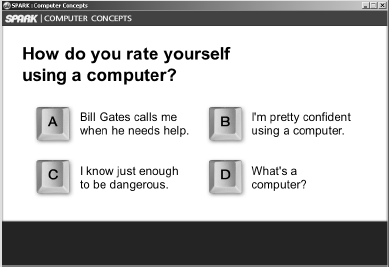
Introductory screen asks user to rate his or her computer skills. Narrated voice-over feedback is individualized according to response.
Introductory screen asks user to rate his or her computer skills. Narrated voice-over feedback is individualized according to response.
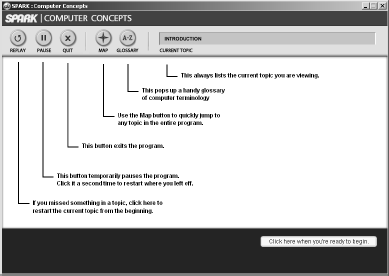
Program Navigation Instructions includes voice-over narration.
Program Navigation Instructions includes voice-over narration.
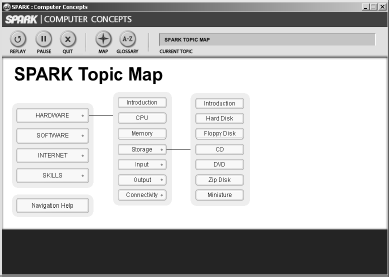
SPARK Topic Map allows random navigation to any topic or subtopic.
SPARK Topic Map allows random navigation to any topic or subtopic.
Acknowledgment
This research was funded by a grant from the Arizona Regents University.
