Introduction
College faculty face many demands on their time: teaching, research, committee meetings, office hours, as well as family and other obligations. It is not that they do not wish to continue to improve their teaching and technology skills through attending workshops, panel discussions, and training sessions, it is just that it is so difficult to find the time in the day to get to them. In the past, this has often meant scheduling things on Friday, when fewer instructors have to teach, but even Friday has become cluttered with competing meetings and workshops and other types of face-to-face, synchronous sessions. Thus, instructional support personnel need to look for other ways and means to deliver technological and pedagogical information and resources to their faculty. Podcasting is an exciting new tool for delivering professional development to college faculty.
Definition of Podcasting
A podcast is a digital “radio show”—one of a series of audio programs that can be downloaded from the Web. The Wikipedia cites the first use of the term podcasting as happening in February 2004 (Wikipedia, 2005). Podcasts have become a huge new information and entertainment option for Internet users. It is estimated that 4.8 million people downloaded a podcast in 2005, and by 2010 the podcast audience is estimated to be between 45 and 75 million (Bridge Ratings, 2005). The podcast has been incorporated into the culture to the degree that the word “podcast” was chosen as the New Oxford American Dictionary’s 2005 Word of the Year (New Oxford American Dictionary, 2005).
Many instructional support personnel may initially ignore the possibilities of pod-casts because they know that few of their faculty members have access to Apple iPods or similar devices. They are confused by the term podcast, expecting that the programs can only be accessed through digital music players, but this is not the case. In fact, a recent survey shows that less than 20% of podcast listeners use a digital music player to access their programs (Bridge Ratings, 2005). Instead, the vast majority are using their computers. Any reasonably modern computer can play a podcast. This immediate accessibility by a huge potential audience has been a major force in the popularization of pod-casts. A listener does not have to go out and buy anything new, either hardware or software, in order to receive these online “radio shows.”
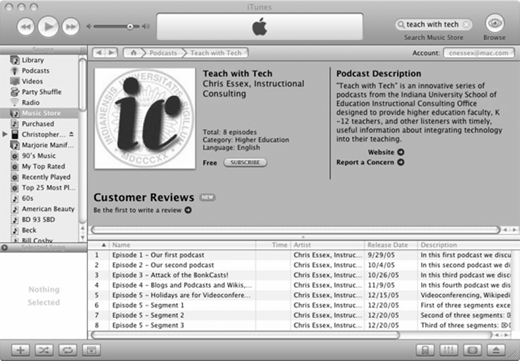
Downloadable digital audio is nothing new, of course. People have been downloading audio files for years. But podcast-ing is not just a matter of downloading audio files. Podcasts also involve the use of a subscription system. When a listener subscribes to a podcast, through any of a number of free programs called aggregators, such as Juice (formerly iPodder [http://juicereceiver.sourceforge.net/]), RSS Radio (http://www.dorada.co.uk/), or iTunes (see Figure 1—http://www.apple.com/itunes/), new episodes of the podcast are downloaded automatically, as they become available. Aggregators regularly check a file on the podcaster’s Web site, called an RSS (Really Simple Syndication) file, to see if new episodes have been uploaded.
It is this combination of features—a common file format that can be read by many programs and devices, and the ability to subscribe to a program—that has led to the popularity of podcasting. But one other factor is also crucial: like a Web page, which can be created using basic, easily available tools and using a coding system that is easily learned, podcasts can also be developed by novices with software and hardware that is easily accessed and has a minimal learning curve.
Podcast Production
The first step in making a podcast is the creation of the audio file. You will need to plug a microphone into your computer, either through the microphone jack in the back, or through a USB connection. Obviously, speakers and/or a headset are a must, so that you can hear yourself. For the actual recording, you will also need to have a program such as Audacity (available for Mac and Windows, http://audacity.sourceforge.net/), Goldwave (http://www.goldwave.com/) for Windows, BIAS Peak (http://www.bias-inc.com/) for the Mac, or any of a number of other audio recording programs. Another option, if you are a Mac user and have Apple’s iLife ‘06 suite, is to use Garageband to record and edit your file, and to convert it to mp3 format. As we use the iLife ‘06 programs every day in my office, this is my preferred production path.
You may want to add music and sound effects to your podcast, to liven up the proceedings. It is important to respect copyright law when you do this. You may want to consider using a “podsafe” music source such as the Podsafe Music Network (http://music.podshow.com) or Podsafe Audio (http://www.podsafeaudio.com/). If you use Garageband, you will find that it comes with a useful selection of copyright-free sounds and jingles.
The next step is to create the RSS file. These files can be created without hand-coding by using any number of programs, RSS Publisher, for Windows (http://www.rsspublisher.com), or Podifier, for Windows and Mac OS X (http://www.podifier.com).
Now you have your mp3 audio file and your RSS file. Both need to be uploaded to a Web server. Since the audio files are to be downloaded, streaming software does not need to be installed on the server. Once the files are online, you are officially a pod-caster!
Podcast Audience
Your initial concern as a podcaster should be your audience. Is it just the faculty in your school, or is it the whole university? What about other campuses? What about faculty at other universities, or around the world? Also, are there content-area professionals that might also find the podcast interesting—for example, if you are in a school of nursing, would nurses in the field find your podcast useful? You may find that you have more than one audience; if so, you will need to make sure you provide content that is meaningful to each of them in each episode, or to define specific episodes as being for one audience or the other.
Your second concern is, will your audience be able to access the shows you create? With a college faculty audience, the percentage of actual iPod owners may be small, though all of them will have access to a computer. At our university, the computers all come with sound cards and speakers, but you may want to check with your technology services people. They will also need some program on their computer that can play mp3 files: Windows Media Player and Quicktime will do the job and are nearly ubiquitous. An aggregator program that will allow them to subscribe to your show—either iTunes or one of the other software packages described previ-ously—will be helpful. If installing such a program is impossible, though, you could just put the files on your Web site and send out e-mail announcements when new episodes are available.
Podcast Content
Once you have established who your audience is, and that they can download and play your mp3 files, you’ll want to consider the information that you want to deliver via these podcasts. What do your faculty need to know? What would help them in their teaching, research, service, or even family responsibilities? In the case of “Teach with Tech,” my podcast series, I decided to focus on integrating technology into teaching, both at the college and K-12 levels. This topic fits well with my audience because they are college instructors teaching current and future K-12 teachers. They may not use the K-12 information directly, but they can pass it on to their students. This topic is also good for a podcast series because there is always news in this area: new hardware and software become available, and new research is constantly being published. I could have also chosen to focus on teaching tips and strategies, and may do so in a future series. The main thing is to provide content that faculty will feel is worth their time to listen to.
There should also be a reason that you are not just sending this information out in an e-mail or posting it on your Website. What is it about the audio dimension that makes it an appropriate delivery method for the material? One answer to this, in general, is that with audio content, you can multitask. You can listen to a podcast while answering e-mail, while jogging, while driving home, while doing the dishes, etc. With print, you have to focus the entirety of your attention on the content in front of you. This severely limits the amount of print content one can process before weariness sets in. In the case of our program, my choice of podcasting was based upon my desire to reach an audience of faculty who are already deluged with text-based announcements. I wanted to offer faculty content that they might not access if it came in an e-mail, or just added to our already voluminous Website.
Podcast Format
Before reading this section, I encourage you to listen to two or three different pod-casts. A good place to start might be the education directory at Podcast Alley (http://www.podcastalley.com/podcast_genres.php?pod_genre_id=7). One thing that you will quickly grasp is the informality of most of the presentations. The tone is more drive-time DJ than NPR host. One of my favorite K-12-oriented podcasts is called “The Tech Teachers” and is hosted by Ray and Hollye, who are both teachers (http://thetechteachers.blogspot.com). Listening to their show is just like sitting in their living room and hearing them chat about their experience. Occasionally, they leave the couch for a “Dinner and a Podcast”—a recent one was recorded at the local Outback Steakhouse. The goal for most pod-casts is to provide a friendly, casual atmosphere (with humor always a plus!). This has been a goal with my podcast series; faculty do not want to feel like they are being lectured to. It is important, however, not to go too far in the other direction, either, and get silly, as faculty time is valuable.
Six Tips for Better Podcasts
Listen. Few of us have access to recording studios for our podcasts, but the environment that you are recording in should be as quiet as possible. Turn off that fan, close the windows, tell your cubicle neighbor to turn off the radio, etc. Close the door and put a “Don’t Knock” sign on it.
Rehearse first, but record the rehearsal as well. Oftentimes, I find that my delivery during the rehearsal take is more lively and spontaneous than the “final” version. You may want to edit together the best parts of both attempts.
Provide the URLs for related resources on your Web site or, even better, on a companion blog site, rather than tediously spelling out every underscore, dash, and dot verbally.
Keep it short. While there are podcasts that last for an hour or more, that is asking a lot of your listeners. Especially given a faculty audience that may be listening to the show on a walk across campus, or between students during office hours, and so forth, it is best to keep the show to 15 minutes in length. If you have more content to cover than that time will allow, give the listeners the option to download the show in multiple segments.
Don’t go it alone. Find a colleague with an engaging personality, sense of humor and clear speaking voice to join you during your recording sessions. Dialogue is more interesting to listen to than monologue, and it also takes some of the pressure off. It is also good to provide multiple perspectives on issues when possible. Invite guests who are experts or at least experienced in the topic at hand.
Get feedback from your listeners. In order to ensure that you are meeting your audience’s information needs, you should provide them with multiple methods of providing feedback on the show. Mention your e-mail address and blog URL regularly. Create a listener feedback survey, using one of the many free tools out there, such as Sur-veyShare (http://www.surveyshare.com) or Zoomerang (http://www.zoomerang.com).
The Future of Podcasting
Many see the addition of video as being the next step with podcasting. For one thing, broadband Internet access is becoming more and more common, so the large file sizes associated with video aren’t as big a problem as in the past. Also, the recent introduction of new video-capable iPods and other devices with video support has brought a lot of media attention to the idea of videocasts. I’m not so sure, though, that video will overtake audio podcasts. For one thing, video requires that the viewer attend fully to the show, and thus one of the major advantages of podcasting—the ability to multitask—is lost. If faculty can’t take in your content while walking the dog, or hurrying across campus to teach, then much of the primary benefit of the medium is lost.
The biggest challenge, as I see it, for podcasters in instructional support services, is to keep faculty listening once they are past the novelty value of podcasting. This will be the case for podcasting in general. Just as many mediocre Websites have disappeared since the beginning of the Web, many of today’s podcasts will also soon be gone. But the ones that truly meet the needs of their audiences will survive and continue to be popular.
Conclusion
Podcasting provides instructional support personnel with a new tool for their toolkits. As a way to reach faculty with useful information and resources in an easy-to-access format, it can be a very practical delivery medium for college-level faculty technical and professional development programs, and should be considered by instructional support staff as one of many ways that they can fulfill their goals related to faculty support.
6 Tips for Better Podcasts
Listen
Rehearse first
Do not put URLs on recordings
Keep it short
Don’t go it alone
Get feedback
About the author