Introduction
The International Academy of Design and Technology (IADT) is a for-profit, 4-year art and design career college. It has traditional “brick and mortar” campuses in 10 cities in the United States. IADT is owned and operated by its parent company, the Career Education Corporation (CEC). In 2005, CEC began to discuss the initiative to expand IADT into the field of distance education with the addition of a new branch campus—the International Academy of Design and Technology-Online (IADT-Online). Leaders at both CEC and IADT envisioned a virtual college that could serve as a selfcontained branch campus, as well as offer distance education opportunities to the current traditional IADT students in a hybrid format. IADT-Online offers prospective students a way to earn a career-focused, creatively driven degree.
IADT Online offers the opportunity to earn a degree tailored to your dreams, imaginative ideas and creatively motivated professional goals. When innovative technology hooks up with the power of a broadband Internet connection, amazing things become possible for motivated students who have the talent to think visually and communicate graphically. (IADT, 2009b)
The cornerstone of the IADT-Online virtual college is the proprietary learning management system (LMS), the Virtual Campus (VC). The VC was developed by a team of information technology specialists, instructional designers, and software developers at CEC. After conducting research of currently available LMSs, the team determined that an entirely new LMS, rather than an existing proprietary system, was the best solution for IADT-Online for two reasons: the ability to have control over the look and feel of the interface so that it could match the existing IADT brand identity; and to integrate with the college database system, CampusVue, already in use by all of the IADT branch campuses.
The Virtual Campus was launched along with newly developed online general education and graphic design courses in July of 2007. This has since been expanded and students can now pursue degree programs in the following areas: graphic design, web design, web development, fashion merchandising, advertising and design, game production, and digital media production (IADT, 2009a). In the last two years the VC has grown and evolved with these new programs into a very successful LMS; upgrades and new features are continually being added to improve the quality of interaction for both students and instructors.
Today, the IADT-Online VC provides quality educational experiences to over 1,400 online college students and approximately 900 hybrid students at the traditional campuses (Carlson, 2009). It is a vibrant learning community. As frequently debated in the field of distance education regarding virtual learning environments, it is a place that is far from “virtual,” where actual interactive, engaging, and innovative learning in happening in real time (Simonson, Smaldino, Albright, and Zvacek, 2009).
Key Features of the Virtual Campus
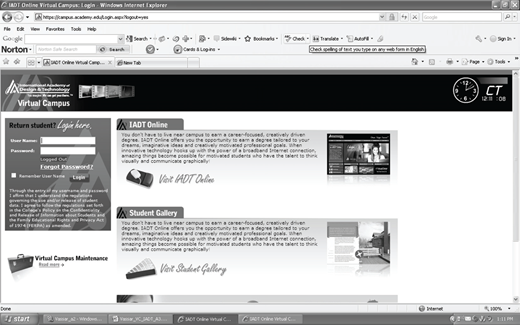
The Virtual Campus is a fully functioning online college campus. It has many of the key features that students expect to have access to on a traditional campus. There are some features that are only available through the technology of the online environment and are currently unavailable to traditional students. These features include: 24/7 technical support, online student services, and instant messaging with all contacts, classmates, and instructors. An example of the VC interface can be seen in Figure 1.
The VC can be accessed by any computer platform through a standard Internet connection. Certain aspects of the VC can also be accessed through mobile technology. The VC uses MobiClass, a mobile software program that supports a long list of mobile devices. MobiClass allows students to stay current with their courses by allowing them to download course podcasts, download course videos, view class assignments, access school e-mail, check their grades, and access faculty contact information (IADT, 2009c).
Many best distance education practices are an integral part of the VC. Both synchronous and asynchronous learning are supported and encouraged through its design and technological features. The VC is divided into five distinct areas, each one designed to assist the students in their learning: the classroom, online library, learning center, virtual commons, and technical support.
The Classroom
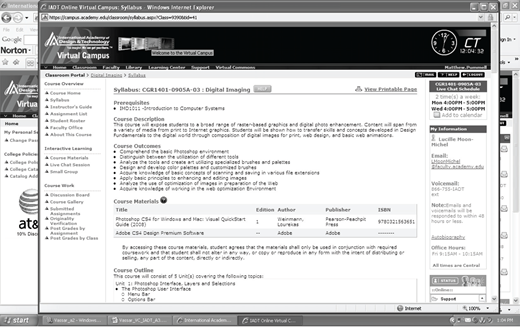
The virtual classroom is the place where all essential learning activities occur both in real-time and on-demand. Online students can access important information that they need in order to successfully complete each course. Figure 2 shows an example of an online course in the VC. The students can access the course overview which includes the syllabus and the list of assignments for the course. The course work section of the virtual classroom includes the discussion board feature. The discussion board assignments are mandatory for all online students for every course to ensure quality interaction with the course content. The course work feature includes a course gallery where the art and design students can post their class projects for critique by both instructors and peers. This is also the section where students submit assignments and receive communication from their instructors regarding their grades.
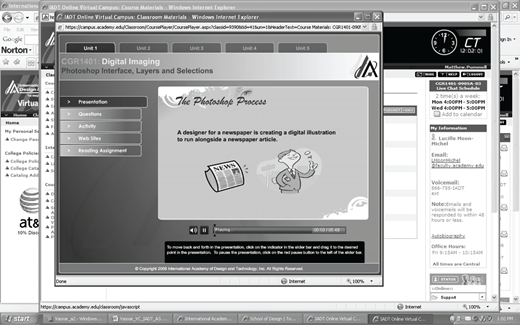
The most dynamic feature of the virtual classroom is the interactive learning section. This section has three main areas: course materials, small group discussions, and live chat. The course materials are Flash-based, animated, and interactive materials and provide additional course content that supports the reading assignments, individual and group projects, and discussion boards. An example of interactive material is seen in Figure 3. The small group discussion feature is a vehicle for instructors to organize students into groups for the purposes of collaborative learning assignments and projects.
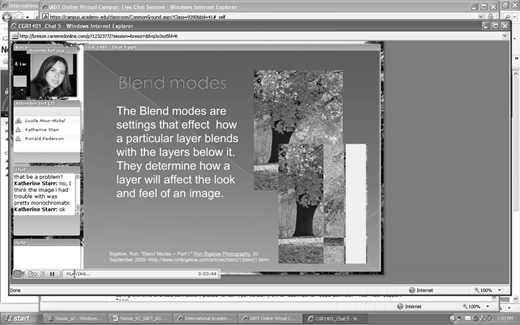
The live chat feature is the cornerstone of the virtual classroom. All courses are required to provide two live chat sessions per week on pertinent course topics such as software demonstrations, lectures, and project critiques. Live chats are primarily delivered synchronously, but are recorded for students to use asynchronously. Figure 4 shows a recorded live chat session that can be viewed by students at their convenience. The live chat feature is also used for all additional synchronous academic events including tutoring, academic advising, meetings, and seminars.
Adobe Acrobat Connect Pro is the software that is used to support the live chat feature. It is an effective, robust tool that can be used for eLearning due to its design and capabilities. Adobe promotes Adobe Acrobat Connect Pro for specific online classroom use:
Technology should make eLearning a rich, interactive experience—not a slow, cumbersome ordeal. That’s why Acrobat Connect Pro offers a captivating interface and interactive tools to help participants learn and retain the material that you teach in virtual classes and self-paced courses—and enjoy doing it. You can quickly design compelling courses with templates and a library of content, teach more effectively with instructor management tools, and track learner progress to make sure your eLearning is actually achieving its goals. (Adobe, 2008, p. 2)
The flexibility and interactivity are the elements that make the IADT-Online VC classroom a successful learning environment. Students are able to learn at convenient times and to collaborate with their instructors and classmates to complete career-focused, problem-based learning tasks.
Online Library
The VC online library, or eBrary, is a full-service online media center as seen in Figure 5. The IADT-Online VC library is linked to the CEC-owned company-wide online library the CECbrary. The CECbrary is used by all colleges and universities in the CEC system of school and therefore can provide extensive media resources to all its schools. Online students have instant access to these electronic library resources.
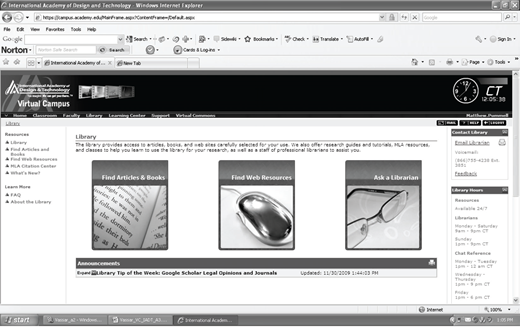
The eBrary provides student access to eBooks through NetLibrary, PsycBOOKS, and Safari Tech Books. The eBrary also subscribes to an extensive list of online library databases featuring journals and periodicals including the new resource, EBSCOhost Mobile, for learners who access course content via mobile technology. Additionally, the eBrary has web learning resources that are listed by subject. This is a list of about 2000 webpages selected by librarians, students and instructors as being high quality information sources on the topics discussed in the IADT-Online general education and design courses (IADT, 2009b).
There is always a qualified, professional online librarian available to assist students with research questions at flexible times. This assistance is provided either through specific live chat times, the instant messaging feature, e-mail, or phone. There is also the MLA Citation Center to assist with the formatting and citation of sources in research-based papers and assignments.
Learning Center
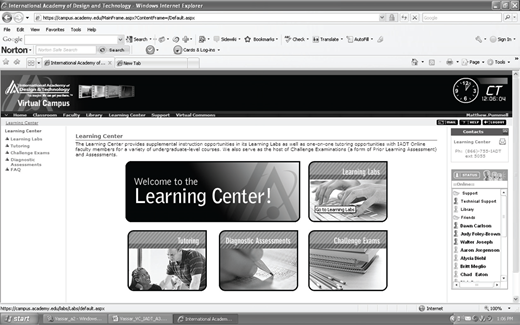
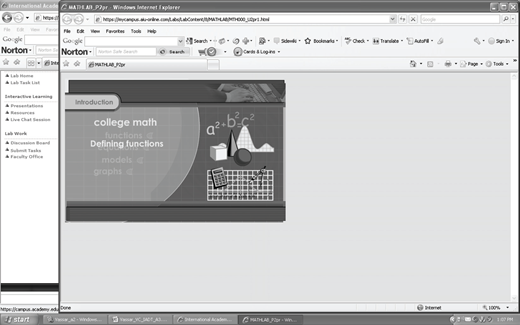
The Learning Center (LC) feature of the VC provides an additional level of indepth educational support to online students. The LC is shown in Figure 6 and encompasses learning labs, tutoring, diagnostic assessments, and challenge exams. Learning labs are a unique student-centered feature of the VC. Learning labs are geared toward students’ areas of interest. Learning labs are available in two forms—generic interactive Flash-based tutorials (as seen in Figure 7) or specially recorded Adobe Acrobat Connect Pro live chats conducted by instructor on pertinent and/or specialized design topics.
Students attend live tutoring sessions in the LC in a variety of subject areas including college-level mathematics and English composition. Tutoring sessions are also offered in core concentration subject areas. Tutoring sessions are scheduled by individual instructors and conducted through the live chat feature.
The diagnostic assessments and challenge exams in the LC are designed to assist students in the preparation for lifecredit test-out examinations. Students who possess certain prerequisite skills, educational experience, or life experience can qualify to take an examination and earn college equivalency credit for those skills and experience. The LC gives them a way to prepare themselves for the test-out process.
Virtual Commons
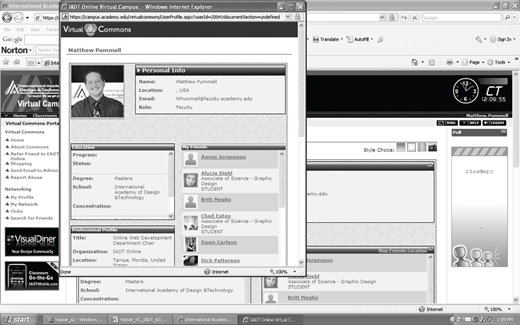
The Virtual Commons is an online community that allows IADT-Online students to participate in social networking opportunities with other students and instructors. The Virtual Commons also has the instant messaging feature that is integrated into every “place” a student visits in the VC. This feature can be seen in Figure 8. Like all social networking websites, the Virtual Commons allows its users to create profiles (Figure 9) and become “friends” with other members of the university community. These friends become part of a student’s social network.
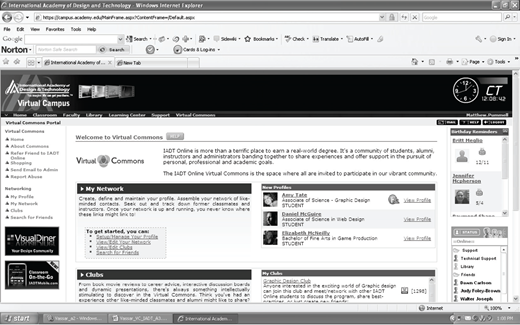
Like traditional students, online students want to get involved in campus life. This can be challenging in a virtual learning environment. The Virtual Commons in the IADT-Online VC provides students with student club opportunities. Virtual student clubs have faculty moderators, members, and hold virtual club meetings using the same live chat feature that is used in course delivery. These clubs are academic in nature and give the students a chance to participate in book and movie reviews, get career advice, join interactive discussion boards, and attend dynamic presentations (IADT, 2009b). A sample of these clubs is listed here: Graphic Design Club, Military Students Club, Study-Buddy Club, The Fashion Forward Club, and The Freelancer's Society.
During each term, the student clubs in the Virtual Commons host an event. An event is a live chat session in which guest speakers discuss topics related to the subject area of the club. The guest speakers have a wide knowledge base of the club’s subject matter and provide valuable information to students on this topic. Topics for events originate from club members and the faculty moderator. Events typically last one hour and provide time for a question and answer period.
Technical Support
A feature that is always present but very much working in the background is the 24/7 technical support feature. This is where students go to get technical assistance, important software downloads, and the ability to check a computer for the required Internet browser plug-ins. The technical support area also includes contact information for important functional departments of the online university such as financial aid, student accounts, student services, and the registrar.
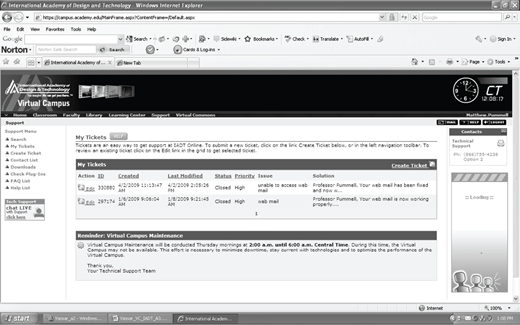
Technical support runs on a ticket system as shown in Figure 10. If a student has a technical issue, he or she submits a ticket and a professional information technology specialists work on its resolution, contacting the student when the ticket is closed. Students can also contact technical support from the instant messaging screen, by e-mail, or by phone. Because technology is a part of every experience in the VC, technical support keeps things running smoothly so that students can focus on the important task at hand—learning.
Advantages and Limitations of the Virtual Campus
According to Simonson et al. (2009), there are many advantages, as well as limitations, of online learning as compared to conventional teaching. Some of these advantages are: the fact that students can participate from a variety of locations; access asynchronous course components 24 hours a day at their convenience; work at an independent pace; learning materials are available across the Internet and work on multiple platforms; the Internet can provide a student-centered learning environment; and online courses provide a variety of active learning experiences that allow for different learning styles.
There are also limitations of online course delivery models, including: potential students do not have the access to the technology; well-designed online courses require many labor-intensive resources; courses that were teacher-centered are not sufficiently adjusted and adapted to the learner-centered model; instructor-stu-dent communication and feedback may be significantly delayed and can affect the quality of learning; bandwidth limitations impact the use of advanced technologies; and the technical support infrastructure may be minimal.
When compared to these lists of advantages and limitations, the IADT-Online Virtual Campus measure up very well. It is a vibrant learning environment with very few limitations. The advantages of the VC are its flexible delivery model, student-centered learning, interactive experiences, and creative community. The two biggest limitations of the VC are the significant amounts of bandwidth space required to deliver the industry-current technologies and the time and resources it takes to produce the quality interactive learning experiences (Pummel, 2009).
Flexible Delivery Model
The VC emphasizes the flexible delivery model by providing many types of learning in multiple formats. Students can participate in both synchronous and asynchronous learning. They can access course materials from anywhere, at anytime via the Internet, as well as through advanced mobile technology applications and devices. Students learn independently and have control over when, where, and how they learn course content.
Student-Centered Learning
The primary focus of the VC is on the student. This is evidenced by the many indepth support services available to students, from the extensive online library resources and customized web resources to the personal tutorials, interactive learning labs, and student-centered extracurricular clubs. The VC at IADT-Online is all about the student and the students’ learning experiences are designed to provide them with quality career-focused education.
Interactive Experiences
Every “place” in the VC is interactive—from the classrooms to the technical support center. Instant messaging is a feature throughout the campus. Each classroom has a library of course-related interactive materials. The Learning Center and the Virtual Commons also provide students with interactive experiences. The live chat, the foundation of the VC, is completely interactive allowing the students and instructors to communicate in real-time.
Industry-Current Technology
CEC and the IADT family of schools have invested many resources on the technology behind the Virtual Campus. The VC is industry-current and provides many applications of advanced technologies including multimedia, graphic, and mobile delivery options. The students participate in the classrooms using the latest Internet meeting software, Adobe Acrobat Connect Pro. Additionally, the students at IADT-Online pursue art and design degrees that require them to use the newest graphic, web, and production software—Adobe Creative Suite 4 Master Collection. Every student and instructor is provided with this software so that they can effectively learn and use these tools in the virtual classroom.
Creative Community
The Virtual Commons is a unique feature of the VC allowing students to collaborate with mentors and peers through a common social networking community. This experience greatly enhances every online student’s learning experience through the networking opportunities associated with the student-centered clubs and events. This creative community effectively mirrors and simulates the networking that occurs so often in the professional design community. This gives students a real-world experience that transfers to their potential careers in design and technology.
Bandwidth Limitations
The greatest limitation for the VC is the advanced technology that it utilizes and relies on for course delivery. Bandwidth limitations are a serious concern for the CEC and IADT instructional designers and developers. They are tasked with the creation of interactive multimedia and video content that must be effective when delivered via the Internet. Similarly, the same bandwidth issues that affect content development also have an impact on the live chat feature and content delivery. Although video is enabled in the live chat application, many instructors choose not to use this option because it “bogs down” and “lags” during the class causing the flow of course content delivery to be interrupted. In response to this issue, many instructors choose to deliver the chats only using the audio features.
Course Development
An additional limitation to the VC is the amount of time, funding, resources, and personnel involved in the creation of original content and its continual updating. IADT-Online is part of the larger corporation, CEC, and must rely on budgetary and resource limitations from this level of administration. This significantly slows the natural cycle of curriculum development and causes great frustration for those at the local administration level. The VC is proprietary and the program chairs and instructors have very little control over quickly changing course content to meet the ever changing students’ needs (Pummel, 2009).
Summary
The IADT-Online Virtual Campus is an exemplary distance education application. It is obvious that attention to best practices of distance education were considered by the CEC and IADT instructional designers and software developers during the creation of the VC. This virtual career college has a long list of advantages when compared to the relativity few limitations. The highlights of the VC are its interactive, student-centered, flexible features; the utilization of advanced instructional and web-based communication technologies; and the truly unique creative social networking community of the Virtual Commons. In the words of an IADT-Online graphic design instructor, Glen Perotte (2009), the Virtual Campus is “an exciting, interactive experience for the students.”
About the author