Introduction
Instructional technology is defined as “the study and ethical practice of facilitating learning and improving performance by creating, using, and managing appropriate technological processes and resources” (Richey, 2008). Prior definitions focused on instructional technology as a resource such as a program or a machine. The evolution of the definition from a tangible item to the latest definition is a result of the research and theory that have become a foundation for instructional technology as it is viewed today. Theory looks at how learning occurs, motivation, communication, change and diffusion. Research focuses on learner characteristics, instructional strategies, needs assessments, evaluations, and cost effectiveness. Given the impact of research and theory on instructional technology, what is observed in the classroom is based on practice (Saettler, 2004).
The Scope of Instructional Technology
One of the most important functions of technology is within instruction. Instructional technology supports the curriculum and learning of the teacher as well as the students within the classroom. Instructional technology, also referred to as educational technology, can be of considerable value to a K-12 district as long as the structure within which instructional technology operates is supportive. As with any system, integrating instructional technology is part of a larger system within which several individual components impact the creation of an environment that will nurture the integration of instructional technology. Instructional technology is influential in (a) informing technology, (b) improving the quality of teaching and teaching staff, and (c) enabling students to expand their learning. The use of technology is influenced by the network infrastructure, the quantity and quality of hardware, and the network bandwidth. Earlier definitions of instructional technology referred only to these components and not to the actual impact of each resource on student learning. Without a viable network and equipment, the use of technology would lead to frustration and eventually lack of use. The technology needs to be transparent so that the focus remains on the task at hand rather than the tool being implemented to accomplish the task.
How technology is supportive of district operations and functions is also important. Administratively, student and staff information systems support informational needs for many district databases such as special education programs, lunch programs, library systems, data analysis to inform instruction, and electronic data submissions to the state Department of Elementary and Secondary Education and the federal Department of Education. The use of technology within these administrative functions fosters instructional technology through informing instruction.
The availability of professional development is another consideration today as the importance of educating our educators in the use of these new resources is realized. This continuing professional development is valuable not only in formal coursework in higher education prior to graduation but also once the teacher is in the classroom. With new technologies appearing every day to support instruction, educators need to keep informed and learn the significance of instructional technology and its impact student achievement.
Rogers’ (2003) theory of diffusion of innovations is an important theory to consider for effective professional development for learning about instructional technology. This theory addresses understanding not only at what rate new ideas and technology diffuse through society over time but also how and why. Rogers adds that teachers will be more apt to use a new tool if they are in need of an improved means of helping students grasp concepts. Ease of use and access to coaching will also positively impact teacher use of new resources. The five stages of innovation adoption are knowledge, persuasion, decision, implementation and confirmation (Rogers, 2003). Making teachers aware of the technological resources available to them is the first step toward the use of these resources within instruction. Support from the technology integration specialist is a method to persuade teachers to move toward the decision to use the resources within instruction. Implementation will follow when teachers are confident the resource will support teaching and the results of the implementation leads to a confirmation that technology integration will support instruction.
Instructional Technology in Salem, Massachusetts
Given the value of instructional technology in a K-12 district, let us examine how it is used in a small urban city in the northeast part of the United States. Salem, Massachusetts is located north of Boston and has a population of 41,343 (U.S. Census Bureau, 2006). Salem is home to Salem State College as well as five K-5 elementary schools, two K-8 schools, one 6-8 middle school and one 9-12 high school. Founded in 1626, it became a major seaport and famous for the 1692 Salem Witch Trials. Tourism is a major industry in the city of Salem today (Welcome to Salem, Massachusetts, The City Guide, n.d.).
During the past few years, the Salem Public Schools district in Salem, Massachusetts has provided administrators, educators, and students with the network infrastructure and hardware conducive to the effective use of technology in instruction and productivity. The trend in many districts has been to invest millions of dollars to infuse schools with the hardware, software, and infrastructure necessary to bring technology into the learning process (Price & Stokes, 2003). The missing component has been the provision of effective, sustained professional development to successfully utilize technology especially within instruction (Overbaugh & Lu, 2009). According to federal No Child Left Behind (NCLB) legislation, adequate yearly progress (AYP) is defined as the minimum level of improvement that states, school districts, and schools must achieve annually. As a district that has not made AYP, it is evident that teachers will benefit from quality professional development to enhance instruction with technology (Matzen & Edmunds, 2007).
Advancements in technology require teachers to learn the benefits of using technology to enhance instruction prior to using technology within classroom instruction (Anderson, 2000). As society relies more and more heavily on technology in every facet of existence, it is important that teachers learn to use technology to improve instruction and prepare students for life in the twenty-first century. Teacher quality is an important consideration as educators are required to continuously analyze data and modify instruction to accommodate the diverse needs of all learners, especially since the district student population is mainly Hispanic and about one third of our students are on individualized education plans (NCLB report card, 2008).
As our students progress through their years in Salem schools, it is necessary to provide them with the technological background necessary to graduate skilled, productive members of the twenty-first century. The students of today do not have the same needs, skills, and learning styles as the students of the 1980s and 1990s. Known as “digital natives,” our students do not know life without technology; without a computer, cell phone, digital resources. Those of us born before the inception of technology are known as “digital immigrants” and are forced to learn how to use technology just as if we were learning a new language. Salem graduates must be life-long learners capable of dealing with the rapid change of a digital age.
Technology has been available to students and educators in the Salem Public Schools K-12 district since 1984 with the development of a computer literacy program for students and staff. Equipped with a few Apple computers, the program began to introduce administrative uses of technology and eventually expanded into computer-aided instruction. During the mid-1990s Salem began to construct a small system of local area networks in each of the schools to allow access to the Internet.
The first Salem Public Schools Technology Plan covered 1997-2002. Prior to this document, no districtwide plan existed. The current technology plan addresses Salem technology initiatives from 2008 through 2012. During the fall of 2010, the technology plan will be revisited to assess progress and adjust the plan for future growth. The technology plan is key in keeping the district focused and moving forward with integrating technology into district functions including but not limited to instructional technology.
The district has now replaced the older T1 connections with fiber at each of the schools and all schools are now connected through Verizon’s Switched Ethernet Services. The Salem K-12 district now supports about 2000 computers available for staff and students and our network has expanded to encompass almost all school instructional areas as well as all administrative offices. The network is now a true wide-area network allowing for district level server-based resources such as a library system that connects the libraries in all the schools, a student information system, staff information system and numerous resources for instruction. We have met the state recommended ratio of 5:1 ratio for all students but the age of the computers is now beginning to limit access to more advanced technology. Computers need to be upgraded and replaced on a regular schedule to ensure that students and staff can access effective productivity and achievement resources within instruction. Much as computers are upgraded as much as financially possible, the growing budget limitations have caused much of the hardware to become limited in enabling integration of instructional technology.
In order to allow for the expansion of technology into each school, the district’s administration began a renovation project in 1980 to build the backbone for the necessary infrastructure. Table 1 shows the date each school was renovated and the percentage of students attending each school out of the total number of students within Salem Public Schools. The last column shows the comparable percentage of computers from the total of computers in the district. The Nathaniel Bowditch School and the Carlton Elementary School were new building constructions. The percentages show the distribution of computers as equitable.
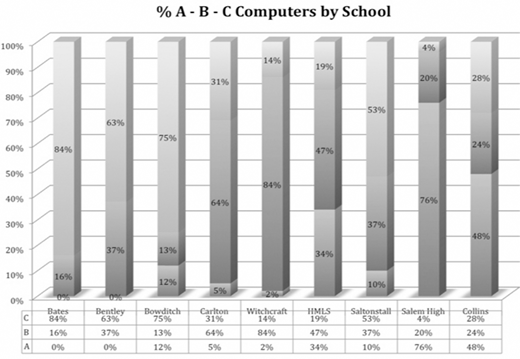
The number of computers, however, is not a true indicator of the quality of the computers at each school as shown in Figure 1. The Massachusetts Department of Elementary and Secondary Education recognizes three categories of computers. Type A computers (bottom in this chart) are less than 3-years-old and are capable of supporting the newest technologies available. Type B computers (middle in this chart) are between 4 and 8 years but cannot support newer resources. Type C computers (top in this chart) are over 9 years old and in most cases cannot access many Internet resources. Clearly, it can be seen here the impact that hardware and infrastructure have on instructional technology.
If instructional technology is so valuable to the Salem K-12 district, how can is be sustained in light of restricting budgetary limitations? The district currently employs three technology integration specialists to work with over 500 teachers in nine schools. One technology integration specialist works full-time at the high school with about 140 teachers while a second technology integration specialist works full-time at the middle school with about 60 teachers. The remaining 300 teachers in the seven elementary schools share the third full-time technology the technology integration specialist. The Salem district is fortunate to have this last technology integration specialist since the elementary technology integration specialist position was eliminated in the 2008-2009 year. From August 2000 through June 2008, the seven elementary schools shared 3.5 technology integration specialist positions. Budget issues caused the elimination of these positions but recognizing the importance of the work these specialists perform, the district was able to find funding to return one position during this school year. The problem became how to share this person among so many schools and teachers and the idea for the “Learn IT, Use IT, Share IT” program was born.
Date of Renovation, Percentage of District Enrollment, and Percentage of Computers
| School | Renovation | Percent Enrollment | Percent Computers |
|---|---|---|---|
| Horace Mann | 1980 | 7 | 5 |
| Bentley | 1992 | 11 | 7 |
| Collins Middle | 1994 | 14 | 18 |
| Saltonstall | 1995 | 9 | 7 |
| Bates | 2000 | 7 | 9 |
| Bowditch | 2001 | 11 | 14 |
| Witchcraft Heights | 2003 | 10 | 12 |
| Carlton | 2004 | 4 | 3 |
| Salem High | 2008 | 27 | 25 |
The Learn IT, Use IT, Share IT program was developed to support the technology integration specialist in working with staff to make full use of the technology resources available. This program provides Salem teachers with several resources that can be used within classroom instruction. Instructional technology specialists support teacher use of these resources. The development of the Learn IT, Use IT, Share IT program is provides teachers with the opportunity to explore resources that might be useful for instruction at their grade level or subject area. Using a website and the program, the technology integration specialist can provide teachers with information about these resources and provide tailored professional development to facilitate teacher use of theses resources. Further communication then translates into one-to-one or group training and more use of the resources (Barkley & Bianco, 2002).
An initial professional development day was held in September 2009 during which teachers were made aware of the availability of several resources. Teachers were given online access to technology standards for teachers and students, curriculum standards by subject and by grade, the employee handbook, the Massachusetts Department of Elementary and Secondary Education Data Warehouse for data analysis, the website for staff resources and the FirstClass e-mail system for collaboration and communication. The teachers were also introduced to Atomic Learning, an online resource that provides online training for teachers to learn to use the online environment and software programs available in the district. Additional online instructional resources include Internet Safety curriculum, Study Island, BrainPop, BrainPop Jr., and BrainPop Español.
Both BrainPOP and the iSafe Internet Safety program are new resources. Study Island has been available for 3 years but has not been used consistently. The addition the technology integration specialist supports teachers in learning how to effectively use each of these three products and allows for the evaluation of teacher use of these tools.
BrainPOP provides short, online, educational movies aligned to curricular state standards in subject areas such as, English, Math, Social Studies, Science, Arts and Music. Interactive quizzes, games, and activities are also available to engage students and support instruction. BrainPOP can be used with grades 4-12 while BrainPOP Jr. is used with grades K-3. The district’s Hispanic population can make use of BrainPOP Español where BrainPOP content is presented in Spanish. BrainPOP was selected because it is a resource that provides support for grades K-12 in all curriculum areas (“BrainPOP About Us,” n.d.).
Study Island is a web-based tool in which content is derived from state standards and standardized tests. The program provides for parental involvement, ongoing skill practice, and assessment mechanisms. Online access to the program and the variety of instructional formats motivates students to use the program while learning curriculum-related information. Teachers have access to usage reports for each individual student as well as aggregate information for all students within the class. Teachers can assign specific areas of Study Island to support classroom instruction (Study Island Online Massachusetts Standards Mastery and MCAS Preparation, n.d.). The technology integration specialist has worked with teachers to align Study Island with the district’s Everyday Math program and to access Study Island reports which inform teachers about individual student and class understanding of math concepts as they are learned.
The Internet Safety curriculum is provided by i-SAFE, Inc. The K–12 curriculum focuses on cyberbullying, personal online safety, and online social networking. Through the use of this curriculum teachers educate students to utilize the Internet safely and responsibly. Teachers present the Internet Safety curriculum to students as Internet resources are used within curricular instruction (“About i-SAFE,” (n.d.). Internet safety is a new area teachers are responsible for teaching. The district has purchased this curriculum to facilitate its inclusion into instruction. In light of increased use of technology and the possibility of increased cyberbullying, the district is placing an emphasis on informing students, staff and parents in this critical area.
Reasons for Integrating Instructional Technology
The goal of education is not simply to impart knowledge to students, whether K-12 or adult learners, but also to teach students of any age how to learn. Learning is no longer contained in a classroom but is a life-long process for teachers as well as students (Blocher, Echols, & Sujo de Montes, 2003).
Teacher integration of technology for teaching and learning in their classrooms is now considered essential and no longer just a possible addition to instruction (Hall, Fisher, Musanti, & Halquist, 2006). Hall et al. suggested a number of factors that hinder the use of technology within instruction, such as lack of common time during which peers can discuss teaching challenges, lack of a common structure for educators, little motivation to improve current practices, and limited infrastructure, programs, and equipment to facilitate technology integration (Hall et al., 2006).
Training in the effective use of technology must have content, continuity and immediate application (Pardini, 2002). Both Anderson (2000) and Eib (2002) found teacher instruction must be focused to support integration and instruction design. Additionally, Pardini (2002) stated that training opportunities must also accommodate the different learning styles of teachers. Pardini also mentioned the importance of knowledgeable support staff at each school to facilitate the process of technology integration (Pardini, 2002).
Barriers, such as teacher attitude and anxiety, can hinder the effectiveness of professional technology development and its transfer into instruction (Brinkerhoff, 2006). Teachers fear or are skeptical of insufficient time to prepare for a lesson using technology, hardware, software or network problems. Lack of opportunity to co-teach because of incompatible schedules is another barrier (Brinkerhoff, 2006). Matzen and Edmunds (2007) found that as teachers became more confident in their use of technology, integration into instruction was more successful. Teachers who had access to a working network, hardware, and software in addition to peer coaching as needed found student achievement improved, especially for lowperforming students, with the added use of technology (Matzen & Edmunds, 2007). When professional development includes a component specific to classroom instruction, where teachers are also learners, teachers can observe and model effective teaching using technology, and during these sessions, the teacher works with a mentor or coach as a team providing instruction in the classroom (Matzen & Edmunds, 2007).
Conclusion
Technology will help our students become skilled, knowledgeable, independent, and self-directed learners and will support our teachers to facilitate learning in an environment where students are active participants in what and how they learn (Matzen & Edmunds, 2007). The challenge before us is to move forward as technology continues to evolve in order to provide students, staff, and administrators with access to technological resources that support teaching and learning.
The technology integration specialists work with classroom teachers to maximize the effectiveness of instructional technology. Educators need time with technology integration specialists for professional development and exposure to new resources in order to embrace instructional technology. The Learn IT, Use IT, Share IT program and the use of technology integration specialists as instructors, mentors, and collaborators for district educators contribute to Salem’s success in implementing instructional technology within the classroom.
Salem is part of the evolution of instructional technology. James D. Finn (1964) predicted, “The educational future will belong to those who can grasp the significance of instructional technology” (p. 27). Using its limited resources in people, infrastructure, resources and time, instructional technology is becoming part of the culture of our schools. Our administrators, our teachers, our students, and our community expect instructional technology to be transparent within our schools. With technology continuously changing, our goal to integrate instructional technology throughout our schools can never been accomplished but we are educating our staff and students toward that end. Salem is preparing its students by using instructional technology and leading them to life-long learning.
About the author