Introduction
The 21st century nurse is a forward-thinking individual who is expected to deliver holistic nursing care. Multigenerational learners are seeking degrees and the new Net generation learner will reflect the majority of the workforce (Merrill, 2015; Worley, 2011). Thus, the integration of a multilevel interactive classroom is instrumental in facilitating the student's knowledge acquisition phase. Prelicensure nursing students are expected to know and understand the multifaceted topic of end-of-life (EOL) care. Gillan, van der Riet, and Jeong (2014) reported that nursing students are not adequately prepared to provide care for a patient at the end of life. The online module using Raptivity and iSpring is part of an EOL study to evaluate the nursing students’ attitudes toward providing care at the end of life. The module was designed for accelerated bachelor of science nursing students to integrate the key concepts related to caring for a patient and family at the end of life. This article will describe the development and implementation of an interactive end of life online module for second-semester students at a school of nursing in a 4-year university in Southern Florida. In addition, the article will include the lessons learned from integrating the innovative technological applications and the benefits to educators.
Integrating technology into nursing can create a more engaging learning environment for nursing students (Huang & Chiu, 2015). Thus, future nurses are expected to be familiar with technology to provide care. In this technological age, educators must use technology as a tool to support future nurses (Worley, 2011). Hahn and Bartel (2014) lend support for the use of gaming in technology, which they conclude that it stimulates and promotes clinical decision-making.
Technology is a valuable aid to augment clinical experiences and simulation nursing modalities. The Raptivity and iSpring learning modalities are groundbreaking tools to create engaging learning platforms. Raptivity elearning program is a unique tool to create interactive learning experiences via a gamebased forum (“Leading Interactive,”2011). Similarly, the iSpring tool allows the educator the creative ability to infuse various educational tools into one application and create a captivating learning environment. iSpring allows the educator to integrate power point technology in a novel way to present information, quizzes, and video in a fluid process (“Start Making,”2013). Both Raptivity and iSpring complement each other because both e-learning applications allow the educator to create unique learning environments that captivate the learners.
Designing an Online Module
To achieve effective e-learning, the needs of skilled instructional designer subject matter expert, along with technologies development tools are crucial (Miller, 2010). The school of nursing’s instructional designer, a collaborator on this project, specializes in instructional technology and distance education. With this background, she was able to provide consultation on best practices for implementing the EOL modules as one unit in the second-semester adult health course. The instructor was the subject matter expert who identified essential topics to include in the EOL course. During the course design phase, the instructor collaborated with the instructional designer to delineate the appropriate content for the Raptivity and iSpring tools. The EOL unit consisted of modules that students completed outside of the classroom at their own pace. The content included of a variety of Web 2.0 technologies and sources such as YouTube videos, narrated PowerPoint presentations, and an interactive game-based introduction. The literature supports the notion that students are satisfied with online contents that were developed using narrated PowerPoint (Kumar, 2016). Using Raptivity was a valuable instructional delivery tool to create an interactive and engaging online module.
Raptivity Development
The instructor and the instructional designer made the decision to divide the content of the EOL units into four modules based on the learning objectives for the unit, and include an interactive EOL introduction section. Raptivity was used to design and develop the introduction section. Raptivity is a template-based tool that allows developers to select and sequence templates, each with a different presentation objective (Miller, 2010); Raptivity has a robust library of prebuilt interaction templates that quickly helps developers to customize content and embed them into e-Learning courses using a learning management system (LMS) (Landay, 2010).
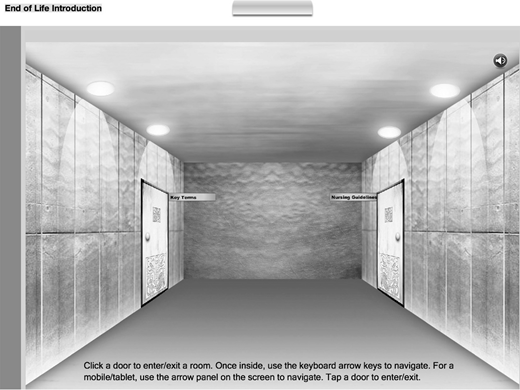
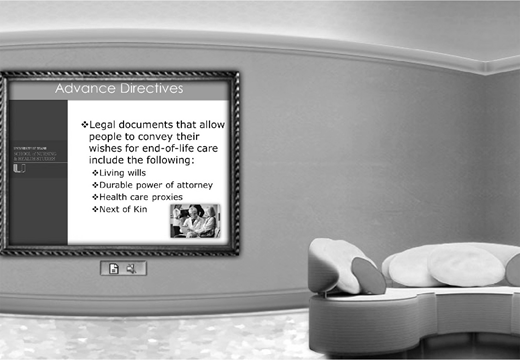
A museum template was used where students can interact with the content and tour the museum rooms while listening to the instructor, or reading the narrated audio. The template was 3D and the format enabled the students to have a “walk through” museum experience. The museum template was customized into two rooms with four walls. For instance, Figure 1 depicts the different museum rooms in the online module. The headings displayed in the rooms were beneficial for guiding the learner through the different EOL content areas. Each wall had a narrated image along with written script to meet all students’ learning style. The asynchronous e-learning environment, developed using the virtual Raptivity museum, allowed students to see the content independently and navigate in and out of the museum at their own pace. The combination of Raptivity and iSpring eLearning tools helped create an engaging instructional delivery method for the online EOL content. The iSpring software was used as a foundation for the online module, whereas Raptivity facilitated the creation of an interactive museum for the students to learn the end-of-life content.
Integrating Theispring Tool
In order to use iSpring, the instructor completed the lecture voice-over narration using the PowerPoint software. iSpring is an authoring tool that enables users to develop interactive course content that can be published in Flash and/or html5 web-based deliverable content. A microphone with a headset was provided to the instructor to complete the recording. A cloud storage service called “BOX” was used to upload the completed recorded lectures, and access was given to the instructional designer. The use of low technologies to implement an online lecture such as PowerPoint software allowed the students to have control over the presentation. Students are able to navigate through the slides and jump from one slide to another (Marlin, 2016). Additionally, the instructor integrated a section called “test your knowledge” that included questions at the end of each PowerPoint (module) to reinforce learning, and one YouTube video was incorporated to enhance the understanding of the content.
Once the recorded lectures were completed, the iSpring authoring tool was used to compile the PowerPoint files into web-based modules. This content was uploaded to Blackboard, the school’s learning management system. Furthermore, video and the Raptivity software were added to iSpring providing students a variety of mediums within the module. iSpring allows users to add quizzes, videos, and audio to the PowerPoint as well. Users who have been using iSpring are impressed with the quality of the program, and it is considerably less expensive than comparable products (Landay, 2010). After the development process, the instructor and instructional designer changed from the Blackboard edit mode to the student mode to view the final module. Transitioning into the student mode was beneficial toward viewing the module from the student’s perspective and this pivotal step enabled the instructor and the designer the opportunity to verify that the module flowed in a good sequence without technical delays. Upon review, the module flowed seamlessly and the implementation phase began.
Implementation Phase
The Blackboard LMS was the course delivery platform chosen to introduce the modules to the students. All modules were part of a unit in the end-of-life course. The students completed the Frommelt Attitudes Toward Care of the Dying pre and post survey developed by Frommelt (1991). Additional qualitative questions were included in the survey which was also downloaded into the Blackboard LMS system. Both the iSpring and Raptivity contents were embedded into the Blackboard LMS system and. The adaptive release function was used so students could access one module at a time. Students were instructed to create a pseudonym name to use when completing the pre/ post survey. The students completed the presurvey before entering the museum. Once students entered the EOL introduction museum, they could see the instructions to navigate through the museum (see Figure 2).
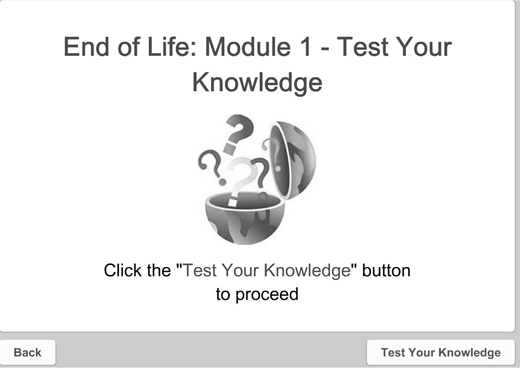
In each module, students had the opportunity to download the PowerPoint document; however, they were not be able to proceed to the next module unless the previous module was completed. Each activity included listening to all audio for the slides as well as completing the “test your knowledge” questions with 100% accuracy. Figure 3 depicts an example of the “test your knowledge” question section created in iSpring. Upon completion of the modules and the scheduled simulation, students were asked to complete the postsurvey. The students provided interesting responses about the survey.
Student Responses
Seventy-five students completed the pre/post survey with which included the qualitative questions. There were positive responses to the EOL module. As one participant stated, “It’s important to have knowledge regarding the process of end of life, to provide adequate care for the patient and education to support the family.” Another participant mentioned, “I don’t see the end of life as something so negative now that I am more educated on it and know how to deal with it with my patients.” A third participant noted after completing the module, “It has made me less fearful in caring for dying patients because I have more background of what I may be expected to do and what I could do in providing care.” Both the iSpring and Raptivity interactive programs provided a unique experience to learn about EOL. The interactive software supported the inclusion of auditory and visual cues to promote student engagement.
Lessons Learned
In this section, we will discuss the various lessons learned in this project, which included interdisciplinary collaboration, advantages of the instructors’ expertise, matching the content and to the appropriate eLearning tool, benefits of module testing, and the time commitment. First, a collaborative relationship with an instructional designer and instructor is pivotal toward creating a seamless online learning module. Collaborating with an instructional designer who is knowledgeable about various interactive instructional modalities is beneficial toward facilitating the vision of the online learning module. The instructional designer in this study provided expertise in supporting and constructing the content to create a seamless flow of the EOL content.
Second, the instructor’s familiarity with the topic is beneficial toward delineating the key concepts to integrate into different learning environments. Before embarking on the development of an online module, the instructor should distinguish which educational content is needed for the online environment and assess the needs of the target audience. Thus, many topics need to be eliminated to support the key concepts.
Third, viewing the interactive tools in advance is instrumental to matching the content with the delivery modality. For instance, EOL would not match well with a “Spin the Wheel” template due to the nature of the content. The tone and theme of the educational content should correlate with the e-learning modality. Next, testing the online module is important to assess for any technological delays and the effectiveness of the content delivery. For instance, in the development stage of this module, it was important to allow the module to be viewed from the following operating systems: iOS, Android, and Windows. Assessing the feasibility in different operating systems is beneficial to promote feasibility of the online learning module and support the fluidity of the students entering and exiting the module. Finally, developing and implementing an interactive online module requires a significant time investment from development to dissemination. Although the interactive learning approach requires a time investment, the benefits of the learning modalities are exponential in supporting student learning.
Conclusion
The article described the description of the development and implementation of interactive technological tools that are beneficial to educators seeking to use unique methods for instructional delivery. Furthermore, the article described lessons learned that are beneficial in creating an effective asynchronous online learning module. Nurse educators are expected to be at the forefront of innovative teaching and learning modalities. Interactive learning modalities create an innovative environment for facilitating nursing education. Embracing technology into the nursing curriculum creates exponential possibilities and opportunities to facilitate and create groundbreaking learning environments. Infusing Raptivity and iSpring into online learning environments are beneficial in promoting student engagement and stimulating learning in a meaningful and engaging manner. Integrating iSpring and Raptivity technology facilitated the nursing students’ ability to learn EOL content in an interactive environment and create a “walk through” educational experience. Students reported being more knowledgeable and aware of the nurse’s role in caring for patient’s and families at the end of life. Future research can be conducted using the Raptivity and iSpring programs with students in the upper semesters (third and fourth) at the university.
Acknowledgment: The authors would like to acknowledge Dr. Mary McKay for her support in this study.