We explore the value of using screencast videos to give feedback and how videos can improve the quality of feedback and student learning. With COVID-19, many teachers have had to become familiar with the use of screencast to lecture, but they could use the same method to provide timely and efficient feedback to students. Relying on text alone can present instructors with difficulties and limitations. We suggest that the instructors include screencasting in their toolkit for giving feedback. We also offer suggestions to best practices in using screencasting for rich, timely, and effective feedback that students can act on to improve both their current and future work.
Introduction
The COVID-19 global pandemic of accelerated the rapid implementation and adoption of online teaching methods. Teachers are becoming increasingly familiar with remote lecturing using screencasting tools, many of which can also be repurposed to give students rich and timely feedback. As the adoption of screencasting for lecturing grows, teachers are not rushing to use the screencasting method to give feedback, even though the technology to do so is becoming easily available.
Giving feedback to students is an important instructional activity but it is not receiving nearly as much attention as other aspects of teaching and learning, such as lectures or assessments. In this paper, we explore the benefits of using screencasting to give feedback by presenting existing research literature about the need for better feedback, problems with traditional text-based feedback, benefits of giving feedback with screencast videos, and recommendations for best practices.
The Case for Effective Feedback
Even before the pandemic, many small private colleges and universities had been struggling to survive as student enrollment declines and tuition rises, while also facing the pressure to meet growing student expectations and expand services to stay attractive to prospective students (Krantz, 2018; Simon, 2017). To cope, institutions often reduce costs by cutting staff and faculty members, using more adjunct faculty, or overloading existing faculty members, thus increasing cases of occupational stress and hurting the quality of learning for students (Berg & Seeber, 2016).
As institutions go through these changes, there is an increasing conflict between teacher resources and student needs for personalized and effective feedback. Giving feedback face-to-face is limited even in residential universities due to an increase in enrollment and the reduction or even elimination of physical spaces (Borup et al., 2015). In addition, adjunct professors do not always have office spaces, which limits how much and how often they can give feedback as they traditionally do (Planar & Moya, 2016). To complicate matters even more, social distance needs during the COVID-19 pandemic makes screencasting even more desirable, and sometimes mandatory, to reduce face-to-face meetings in small office spaces. Because of these reasons, there is a case for improving the way teachers give feedback.
As institutions consider options to make positive changes, they often turn to technology as low-hanging fruit. As a result, more and more hybrid or online courses and programs use learning management systems (LMS) and other technological platforms to expand student pools beyond geographical barriers, representing opportunities for cost reduction and revenue increases. As online programs grow in universities, awareness of quality control is also on the rise. A survey of six sets of quality standards of online courses indicated that all these standards share a common theme: For online courses to succeed, they have to include meaningful student-teacher interactions (Baldwin et al., 2018).
The lack of such interaction, on the other hand, can hurt the credibility and effectiveness of online programs. As a matter of fact, it is now easy to deliver content online, but rich, timely, and personalized interaction between instructors and individual students has become a bottleneck. Duke and Clark (2018) found that student-teacher interaction for online students is lower than that for traditional students, which could have negative implications for student motivation and retention. Ineffective interaction could cause distance education students to spend more time with their program before they can graduate. While teachers have found effective ways to lecture and assess students, ineffective feedback to individual students could be the last bottleneck as institutions migrate to distance education options.
The much-publicized case of Western Governors University illustrates the concern of the lack of interaction: In 2017, the Office of Inspector General of the United States Department of Education released an audit report asking Western Governors University to return over $713 million in federal financial aid because there had been a lack of meaningful interaction between teachers and students (Office of Inspector General, 2017). According to the report,
for each of the 102 courses required to complete the school’s 3 largest programs, we reviewed course design materials for evidence that each course was designed to offer regular and substantive interaction between students and instructors, the key requirement to be considered a course offered through distance education. We concluded that at least 69 of the 102 courses were not designed to offer regular and substantive interaction with an instructor and, therefore, did not meet the regulatory definition of distance education. Instead, these 69 courses met the Title IV definition of a correspondence course (34 C.F.R. § 600.2). (Office of Inspector General, 2017, pp. 2–3)
Traditional correspondence courses are characterized by teaching and learning through asynchronous written communication between teachers and students, usually using copy machines and the postal system. Such courses do not nearly mirror the rich interactions in face-to-face classes (Simonson et al., 2003).
Feedback is an important component in the learning process, not just for online courses, but also for college education in general, including face-to-face classes. Chickering and Gamson (1987) listed providing students with prompt feedback as one of the seven principles for effective undergraduate education. Gagné (1977) included giving feedback as one of the nine instructional events to make up a lesson. Scriven (1967) advocated the use of formative assessment in teaching, which involves the giving of feedback. Effective feedback can reinforce retention of information students receive, correct misunderstanding, and motivate students to improve existing and future work. Comparatively, summative feedback passes a judgment on a person or program, often when it is too late to make any changes. According to the National Survey of Student Engagement, students have lower satisfaction with teacher feedback and its promptness compared to other best practices in teaching (National Survey of Student Engagement, 2018).
Good feedback should be manageable, meaningful, timely, and constant (Hartshorn, 2008). Sadler (2010) proposed that, to be useful, feedback should be construed in the light of mutual responsibility: Teachers ought to be specific and communicative, while students should possess certain key knowledge, such as task compliance, quality standards, and various tacit knowledge to make good use of teacher feedback. Gibbs and Simpson outlined six qualities for quality feedback, including “sufficient in frequency and detail,” “focused on students’ performance … rather than on students themselves,” “timely,” “appropriate to the aim of the assessment and its criteria,” “appropriate in relation to students’ conception of learning,” and “attended to and acted upon” (Gibbs & Simpson, 2004, as cited in McCarthy, 2015, p. 154).
Problems With Traditional Text-Based Feedback
Traditionally instructors give feedback in the form of text annotations, whether they are handwritten notes on a paper’s margins, or suggested changes and comments in the revision mode of Microsoft Word or Google Doc. There are a number of problems with such text-only feedback. Comments teachers write on paper can be illegible, especially for second-language users (Dunn, 2015; Morris & Chikwa, 2016; Sprague, 2016). Students also complain that feedback from teachers is insufficient, unclear, or untimely (Cann, 2014; Cranny, 2016). Another common problem is the lack of clarity in communication (Dunn, 2015; Morris & Chikwa, 2016; Sadler, 2010). The clarity issue is even more evident when teachers give complex explanations or demonstrations involving graphics, diagrams, or computer interfaces, or when teachers have to go back and forth through a longer assignment instead of marking a specific problem area. Traditional text-based feedback often increases students’ cognitive load as teachers use text as a default medium in the rest of their courses (Grigoryan, 2017; Kay & Edwards, 2012). Using text alone for commenting may also lead to “fix”-oriented feedback (Bissell, 2017, p. 6) as students only fix the issues that have been highlighted, while teachers talking through an assignment with students would more likely encourage students to think more deeply about the causes of issues in their assignment and take the responsibility of fixing the problems themselves.
There are affective issues involved in giving feedback using only text. Due to the lack of visual cues and verbal elaboration, some comments, such as “awkward” may sound overly critical to students (Dunn, 2015). For lack of better visual and auditory cues, messages in text can sound harsher or more negative than what the teachers may have intended.
Some teachers are also frustrated that students demonstrate apathy and lack of action after seeing their feedback (Bissell, 2017; Cann, 2014). As feedback may come simultaneously with a grade, some students may review their grades and ignore comments, causing teachers’ efforts to be wasted, and with that, an opportunity for students to improve their work. Such tension hurts faculty-student relationships (Bissell, 2017; Cann, 2014).
Giving text-only feedback can also be timeconsuming, increasing a teacher’s workload or even health (Cann, 2014; van Haren, 2017). This problem is growing in severity as LMSs are increasingly used to collect and grade student work. Giving feedback often means teachers sit in front of a computer for a long time to type comments in student assignments, which can lead to teacher burnout. According to Cherniss, when a person loses balance between the demands of a job and the resources she has, it causes role overload, which subsequently leads to burnout, frustration, or depression (1980, as cited in Fong, 1990, p. 102). Fong (1990) found that faculty members spend on average 59 hours per week on their job, leading to quantitative overload (p. 104). Teachers’ frustrations grow when they realize that some students may not read their feedback once they get the grades they want, while teachers can be more interested in students’ growth in learning.
Alternatives to Text-Based Feedback
Alternatives to text-only feedback include the use of rubrics that break down an overall evaluation of an assignment into detailed criteria, which in turn can be broken down into a qualitative grading scale using such terms as “novice,” “nearing proficient,” “proficient,” and “advanced,” or a sliding scale of 0–5 points for a single criterion (Brookhart, 2013). The use of rubrics greatly simplifies the process of giving feedback by chunking an otherwise messy collection of comments into meaningful categories. Teachers can write criteria in a rubric to proactively reduce the amount of writing for feedback at the time of grading. However, rubrics in a digital learning environment are usually not linked to specific areas in an assignment that could use comments, and students may not know which comments correspond to which sections in an assignment. This is especially true for longer pieces of writing such as theses or dissertations.
Other alternatives to text-based feedback are audio comment or screencast to supplement or replace text feedback. A number of applications offer the functionality to give audio feedback. For instance, Turnitin is a popular plagiarism detection tool that teachers can use to give generic feedback using audio. Notability is another popular grading tool that helps teachers annotate a document and then generate an audio comment that students can listen to. LMSs like Canvas include a feature for teachers to make media comments using audio. Students do not actually prefer audio-only feedback to text feedback, as audio feedback is more difficult for students than either text or video to identify specific problems (Morris & Chikwa, 2016), whereas with screencasting videos, students can utilize visual cues in preview modes to skip to certain parts of the video.
Benefits of Screencasting for Feedback
Screencast videos show great promise, especially when teachers use them in conjunction with other feedback mechanisms, such as text comments and rubrics. The term screencast can be traced to 2004, when Udell searched for a specific term for the medium that shows how the user interacts with a software and narrates naturally as if in a conversation (Udell, 2004). At this time, Camtasia already had a product called Camtasia Studio that helped users produce screen recording (Udell, 2004). After readers had suggested a variety of names, Udell decided to call the method “screencast” and the term is now widely in use.
Since 2004, a great variety of screencasting technologies have become available, including Screencast-O-Matic, Jing, and Camtasia for desktop and laptop computers; and Showme and Explain Everything on mobile devices. There are also multiple applications for synchronous screencasting, such as Skype, Google Meet, Canvas Conference, and Zoom, which all have screensharing features. Compared to earlier days when users had to rely on hardware such as DVI frame grabber cards and dedicated converters, users can now record screencast videos on the same device using its existing audio and video capabilities. The software has also become easier to use. For instance, a Mac user using OS Mojave or later can simply press Command+ Shift+5 simultaneously to record a screencast video session. On an iPad, users can record a screen video by turning on the screen recording function in the control panel. Technically, it has never been easier to produce a screencast episode. No special recording equipment or spaces are necessary unless special circumstances, such as noise from a computer’s fan, call for the utilization of external recording devices or facilities. Some of the benefits of screencasting in giving feedback have been well documented in research studies.
Affective Benefits
Screencast-based feedback has affective benefits for the learners, including better tone of voice, better teacherstudent rapport, and increased student motivation (Bissell, 2017; Borup et al., 2015; Cavaleri et al., 2019; Henderson & Phillips, 2015; Sprague, 2016; Turner & West, 2013).
Tone of voice
Screencast videos include tone of voice that could soften criticism (Bissell, 2017). Bissell (2017) completed a qualitative study using Screencast-O-Matic to give feedback to first year critical and contextual studies students in the contemporary performance practice program at the Royal Conservatoire of Scotland to develop student writing, image analysis, presentation and research skills using questionnaires, focus groups and direct feedback from students, and evaluation by staff. She found that students prefer such feedback, as it is personal; it includes faculty tone and allows faculty to give both positive and negative feedback in a way that is not hurtful. In the author’s own interaction with professors who do use screencasting to give feedback, we find that they often say such feedback sounds less critical and more encouraging, which makes it more conducive for students receiving the feedback.
Lamey (2015) found that traditional written feedback is limited in usefulness for his class, so he experimented with video feedback. He wanted to find out if video-based feedback produced better results. He sent out a qualitative survey to two philosophy classes to find out students’ attitudes toward video feedback. Students’ comments were overwhelmingly positive about such feedback. They cited the ease to understand, better tone and gesture, greater depth, and larger quantity as strengths of video feedback. The one criticism students provided is that it initially was awkward to receive such feedback because they were not familiar with the format. As teachers use such videos more, and more teachers become adopters, the awkwardness will eventually wear off.
Cavaleri et al. (2019) studied 1,040 comments and concluded that audio-visual feedback provides a multimodal format of interaction that is conversational and personalized, and such feedback helps students with low proficiency in English internalize teacher feedback. As a result, students are more likely to use the feedback to improve their work.
Teacher-Student Rapport
Giving rich, prompt, and personalized feedback can also increase a teacher’s social presence and personalized attention to students (Darby & Lang, 2019). A number of studies found that students prefer video feedback, and such preference improves teacher-student rapport (Bissell, 2017; Borup et al., 2015; Heath & Heath, 2017; Henderson & Phillips, 2015; Marshall et al., 2020; Sprague, 2016; Turner & West, 2013). Screencast videos feel personal and individualized (Bissell, 2017). Using screencasting videos to give feedback communicates faculty support of the students as individuals. A study by Borup et al. (2015) showed that students found videos to be more elaborating,supportive, understandable, and conversational. They could improve student confidence (Bissell, 2017), reduce anxiety (Sprague, 2016), improve teacher-student rapport (Sprague, 2016), and renew teacher enthusiasm (Henderson & Phillips, 2015). In the study by Marshall et al. (2020), students view the video feedback positively, considering it to be constructive and helping to improve teacherstudent relationships.
It is important to improve rapport between teachers and students. Ambrose et al. (2010) listed student development and course climate as contributing to learning, and they maintained that a positive climate would improve student learning. In particular, Ambrose et al. cited faculty-student relations as a contributing factor to course climate: “Climate is determined by a constellation of interacting factors that include faculty-student interaction, the tone instructors set, instances of stereotyping or tokenism … and the range of perspectives represented in the course content and materials” (p. 157). Screencasting sets teacher-student interaction in an informal atmosphere, which contributes to the positive environment for a class.
Student Motivation
Student preference and teacher-student rapport, in turn, increase motivation for students to improve their work. Heath and Heath (2017) described an experiment in which psychologist David Scott Yeager divided 44 seventh-grade student essays into two piles. For one group (control group), the teacher gave feedback saying, “I’m giving you these comments so that you’ll have feedback on your paper,” while for the experimental group the teacher left a note saying, “I’m giving you these comments because I have very high expectations and I know you can reach them” (p. 122). It turned out that 40% in the control group chose to revise their paper, while 80% of the experimental group chose to revise it. Heath and Heath (2017) had this to say about the phenomenon:
What makes the second note so powerful is that it rewires the way students process criticism. When they get their papers back, full of corrections and suggestions, their natural reaction might be defensiveness or even mistrust. The teacher has never liked me. But the wise criticism note carries a different message. It says, I know you’re capable of great things if you’ll just put in the work. The marked-up essay is not a personal judgment. It’s a push to stretch. (p. 123)
To sum up, for students to take suggestions for improvement, they have to care about such suggestions first, which depends to a large extent upon the way such suggestions are given and who is giving them. By using screencasting to give feedback, teachers can create a personal, informal, and individualized dialogue with students, and in so doing, improve the teacher-student relationship, which eventually motivates students to make improvements to their work.
Cognitive Benefits
Screencast-based feedback has numerous cognitive benefits for the learners: They provide enhanced understanding, more details, greater complexity, and nuance in feedback (Arif et al., 2017; Bissell, 2017; Hattie, 2015; Henderson & Phillips, 2015; Kay & Edwards; Planar & Moya, 2016).
Cognitive Load
Students often complete assignments in writing, and most course readings exist in the form of written text, which can cause an overload of information processing. Screencast videos offer opportunities to diversify the method of information delivery. Researchers are starting to perceive screencasting as capable of reducing cognitive load (Grigoryan, 2017). Kay and Edwards (2012) also found that video podcasting can reduce cognitive load for students at the middle school level, after surveying 72 middle school boys and 64 girls from grades six through eight in Canada. The researchers found that students appreciated the clarity in the step-by-step demonstration of solving math problems. They enjoyed the control of pace. Their performances also improved following the use of such videos.
The reduction of cognitive load can be attributed to several principles for multimedia use proposed by Mayer (2009):
Temporal Contiguity Principle: People learn better when corresponding words and pictures are presented simultaneously rather than successively.
Modality Principle: People learn better from graphics and narrations than from animation and on-screen text.
Multimedia Principle: People learn better from words and pictures than from words alone.
Personalization Principle: People learn better from multimedia lessons when words are in conversational style rather than formal style (pp. 267–268).
Screencasting embodies the first three of these principles by distributing feedback simultaneously among visual, verbal, and auditory information, and it is also addressing individual students one at a time (personalization principle). Comparatively speaking, if a teacher only uses text in communications with students, it can overload the students’ mental capacities for processing verbal information, causing the cognitive overload while underutilizing visual and auditory senses for students. Screencasting provides a balanced use of a learner’s senses and information processing capacity.
Immediacy
Hyland (2013) conducted a qualitative study using interviews at a research university in Hong Kong. The researcher chose 24 students from four departments for the study to identify student perceptions of teacher feedback. Hyland (2013) found that high-quality feedback is characterized as being timely, individualized, focused, and aligned between student expectation and teacher practice, while low-quality feedback is perfunctory, delayed, and irrelevant to individual needs. Screencasting has the potential to deliver feedback in a timely fashion, as teachers do not have to wait to release feedback until they see the students, by which time they may have forgotten the comments the teachers have made. Screencast videos can be delivered to students via an LMS almost immediately after they have been produced and uploaded. In Canvas and other LMSs, teachers can release comments on work before posting grades to students, which would encourage students to read or watch comments to improve their current and future assignments.
Specificity
Specificity is another advantage of video feedback. A study by Henderson and Phillips (2015) reported on student reactions to video responses from professors and claimed that students gave an overwhelmingly positive response to video feedback. The authors concluded that such positive feedback resulted from the timely, clear, educational, sensitive, ongoing, goal-oriented, and task-specific attributes of video feedback. To further benefit from the specificity advantage, researchers for this paper provided a structure for video feedback that functioned as a scaffold for teachers who might fear using video feedback. The structure included such elements as “salutation,” “relational work recognizing and valuing” students, general “evaluative summary,” “textual issues” such as grammar and punctuation, “commenting on the substance with an emphasis on feed forward,” and “valediction and invitation,” again addressing students, offering “congratulations and commiseration” (Henderson & Phillips, 2015, p. 56).
When student work needs improvement, they do not always need an entire overhaul. Rather, there are weak links to be strengthened or specific errors to be corrected. The affordances of screencasting to show and tell have the potential to give highly specific feedback in subjects such as visual arts, music, theatre and other performance arts, nursing, occupational therapy, and athletic training, to name a few. Teachers can use cursors (on a computer), finger, stylus or digital pen touches (on a touch screen mobile device) to highlight weak areas for improvement and strong areas for praise. Killingback et al. (2019) pointed out that the visual cues provide nonverbal communication that helps with students’ comprehension.
When teachers use videos to give feedback, they also model the way videos can be used to improve individual performances. Some video solutions allow teachers and peers to comment on specific parts of a video, leaving visual cues to skip to sections where viewers should pay special attention. This is especially helpful when diagrams and procedures are involved: When teachers are working on a mathematical problem step-by-step, students get a full and direct exposure to the way teachers think in the problem-solving process (Kay & Edwards, 2012).
Individualized learning
Specific feedback given in screencast videos can address individual needs better than generalized group feedback often given in class, thereby boosting individualized learning. The study by Henderson and Phillips (2015) highlighted that video feedback can be more student-specific. Jones et al. (2012) conducted a mixed-method study in a British university surveying 75 undergraduate students, their tutors, and 119 MBA students, 75% of whom came from India. The researchers alternated the use of paper-based feedback and video-based feedback over a two-year period. The study revealed that students perceived video feedback favorably, citing such reasons as extra opportunities to teach, personalized learning, closeness to students, quantity of feedback, time-saving, and accommodations for dyslexic learners and students who do not speak English as a first language. As shown in these studies, screencast video, as a type of video, puts the control in students’ hands so that they could skip parts they have already mastered and spend more time reviewing areas where they particularly struggle, and this control is a key ingredient in individualized learning.
Multiple modality
Screencast videos present advantages for language learning that benefits learners; the multimodal format exposes language learners to visual, verbal, and auditory format all at once. Ali Batel (2014) conducted a quantitative experimental study comparing groups of language learning students who view 10 minutes of a movie based on a book, while the control group read the corresponding part of the book. It turned out that the movie group outperformed the text group in test scores, showing that watching a movie can increase student understanding because of the use of visual aids, multiple delivery modes, and increased student motivation. The study was focused on video lectures for ESL students, for whom videos are particularly useful, but the same conclusions should apply to video feedback, as it also has the same multiple modalities that benefit language learners by immersing them more fully and holistically in the language environment.
Transparency
Hattie (2015) promoted the idea of visible learning, which means that learning is best accomplished when faculty clearly demonstrate what they expect and students demonstrate how they understand what they learn. Hattie synthesized over 1,200 metaanalyses to identify the factors that affect student learning. He found that almost all interventions showed positive results, which prompted him to rank the size of the effects to find which methods work best. To maximize the impact, teachers should inform students what success looks like, and that teachers should align such success with assessment and teaching. Teachers as a group should also become skilled evaluators to seek feedback, interpret such feedback, and use such feedback to improve their work. Though his concept of visible learning does not refer to screencasting specifically, screencasting is visually easy to demonstrate, and it should make it easier to facilitate visible learning. Screencasting is a holistic way to communicate to students about teacher expectations. In some cases, students may also use screencasting to communicate with faculty about what problems they face. Such communication may also help faculty clearly identify what problems or challenges students face.
Enhanced understanding
The use of video, in general, has the potential to enhance understanding of a complex phenomenon. Arif et al. (2017) conducted a quasi-experimental study of 159 students who were given video vignettes of patient-pharmacist encounters to watch as part of a cross-cultural communication training in a college of pharmacy in Chicago. After the training, students were given surveys to reflect on the use of video vignettes as compared to text reading as an instructional method. Arif et al. found that a majority of respondents preferred video vignettes, which they believed helped them understand cross-cultural concepts. The facilitators of the training workshops in which the video vignettes were shared also believed that the videos made the workshops more interactive by revealing cultural biases and barriers in a more concrete way. The study’s results reaffirmed the utility of videos as a teaching method, which is promising for future studies of video use in teaching and learning.
Special accommodations
Screencast videos can also help certain groups of students, such as second language learners (Sprague, 2016) and students with a physical or learning disabilities such as dyslexia (Bissell, 2017; Jones et al., 2012), though the same method can create issues for others. For instance, videos without closed captioning may cause difficulties for students with hearing difficulties. Having closed captioning offers an alternative way to access what is being said in a video, including screencast videos.
Time saving
One benefit often cited by teachers about screencasting-based feedback is that it saves time in grading, sometimes by up to a half (Woodard, 2016). Henderson and Phillips (2015) claimed that in speaking, a person produces approximately 625 words in five minutes; it would take far longer to type that many words. “One minute of audio is equal to six minutes of writing feedback” (Lunt & Curran, 2009, as cited in Cann, 2014, p. 2). Similarly, Cunningham (2019) mentioned that by using screencasting feedback, she could save 33% of her time on average compared to using text. Such time-savings may come after the initial learning curve for faculty to become comfortable with the method. Once they are used to it and save time in grading, their stress and vocational burnout could be reduced.
Best Practices for Using Screencasting to Give Feedback
Readers should note that some advantages, such as time-saving and multiple modality, could be perceived as advantages by some in some situations, while they could also be perceived as concerns or hurdles for others in other situations. We therefore would offer some recommendations or best practices, based on both research and work experience, for utilizing screencasting for feedback while addressing some of the concerns.
Focus on dialogue, not information
We believe that for screencasting to be better used, the focus from the instructor should shift from merely passing on information to having a conversation. If the instructor wants to pass on information, such as APA style issues, it is probably easier to insert a link in text. A screencast video is better received if the instructor adopts a conversational tone directly talking to the students. Mahoney et al. (2019) synthesized 37 studies and found that video feedback has high acceptability among both students and markers, but it is better for the transmission of information rather than the facilitation of dialogue (Mahoney et al., 2019).
Focus on process, not content
Grigoryan (2017) used a mixed-method, quasi-experimental design to study first-year composition students at a for-profit university. The study showed no significant difference in student efficacy except in purpose and audience, which are usually more complex than grammar, punctuation, and other writing issues that are easier to point out with written feedback. Using screencasting gives such feedback greater depth, and it communicates with greater effectiveness the faculty’s rationale for giving the feedback. The paper also points out certain limitations of traditional text-only feedback, including time limits, lack of quantity and quality, negative perception of faculty criticism, and miscommunication. Grigoryan used the process-theory of composition claiming that writing improves when students increase practice and incorporate feedback in the revision.
Build student autonomy
We recommend that instructors do not give students fixes that they will soon forget. Instead, build student autonomy by having them make changes on their own with teacher guidance. When used as a method for feedback, videos have functions such as pausing, rewinding, and forwarding that give students some individual control, which not only facilitates individualized learning but also increases student autonomy. Students can rewind and watch video feedback multiple times to deepen understanding (Bissell, 2017), or pause the video to apply the feedback and revise their work (Cranny, 2016). As teachers explain and show the thematic or structural issue of an assignment in a screencast, students become more autonomous and self-regulated in learning by incorporating the suggestions on their own, rather than being spoon-fed fixes for specific problems (Hartshorn, 2008). The study by Alvira (2016) shows that the use of screencasts increased student autonomy, teacher scaffolding, and overall writing performance. The author encouraged other second language teachers to use similar written and oral feedback to improve writing (Alvira, 2016).
Promote feed forward
We recommend that instructors focus on promoting feed forward, namely, not to just offer feedback on existing work so that students can go back and fix it. Instead, encourage students to incorporate your feedback given in screencast videos to improve future work as well. Literacy consultant Rita van Haren recommended that feedback should be informal, using technological applications to make the feedback process easier, and feedback should be forward-thinking and formative (van Haren, 2017). Other studies also embrace the use of screencasting for feed forward (Brereton & Dunne, 2016; Cranny, 2016; Henderson & Phillips, 2015; Jones et al., 2012; Planar & Moya, 2016).
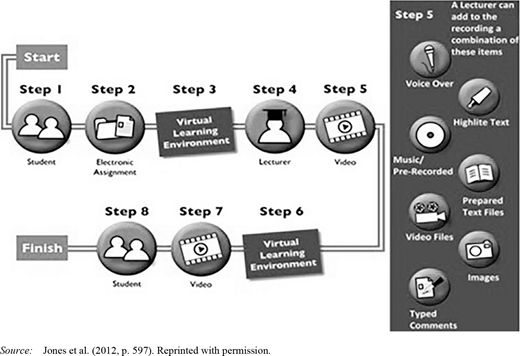
In spite of its usefulness, feed forward does not automatically result from the use of screencast videos. The feedback should also be timely (Brereton & Dunne, 2016; Planar & Moya, 2016). Having explicit directions or structure in videos should help students make informed decisions in their future work. Jones et al. (2012) included a process flowchart for giving feedback using this new method: Students submit their assignment through a virtual learning environment, teachers read the assignment, produce a video feedback, and upload this feedback to the virtual learning environment for students to access. Step 5 seems to have many possibilities, allowing teachers to mix videos with many other elements, but novice users in screencasting can start with a simpler method, such as simply recording themselves talking, until they become comfortable to include more components.
Shift to other tools when screencasting is limited
We acknowledge that sometimes screencasting can also limit instructors in giving effective feedback. There are situations when using text alone is sufficient. Henderson and Phillips (2015) stated that video feedback may work poorly for writing mechanics such as grammar and typos, and they indicated that future researchers should focus on situations where video feedback has more potential of being effective. Similarly, Grigoryan (2017), whose study focused on writing courses, also emphasized that video feedback could be more useful for advanced issues in writing, such as structure and content, while text feedback may be equally useful for local fixes. Text feedback is especially powerful with some technologically enhanced tools, such as Microsoft Word’s revision mode, the comments feature of Google Docs, and the annotation tools of Canvas and Turnitin, a plagiarism detection tool that is now used more broadly for giving feedback. Such tools make it easy to correct local mistakes like grammatical errors, academic style problems, and other lower-level issues that do not require elaborate explanation. Turnitin even has features for teachers to create, store, and reuse comments for similar problems in different student assignments, while it is much more difficult to use screen cast videos to do that. Some professors use text annotations to make comments and use screencasting videos for summaries, which could also be a good option to take in giving student feedback.
Focus on a toolkit, not the best tool
As discussed above, we do not believe that using screencasting for feedback will be a panacea for the ills of instructor feedback, and as such, this new method should not replace other methods of feedback, including text-based feedback. Rather we hope that instructors will focus on expanding their toolkit and be flexible in their choice of a tool, or a combination of tools, when giving students feedback. Our position is informed by multiple research studies which compared text-based feedback and feedback using screencasting.
Several studies have compared differences in student perception of feedback given in text versus screencast videos and found no statistically significant differences (Boraup et al., 2015; Dunn, 2015; Ghilay & Ghilay, 2015). Sometimes text was seen as being more effective as it is easier to access, more efficient, and concise in wording, and teachers find text easier to edit (Boraup et al., 2015). The study by Dunn (2015) found that students saw both methods of feedback as sufficient, but they preferred video feedback given through Tegrity, a video production and hosting platform, because such feedback was more detailed and more personal.
McCarthy’s study (2015) compared three types of feedback using text, audio, and video for three summative assessments in the same course, and these feedback methods were evaluated with an online survey for students to reflect on their perceptions of the differences and the advantages and disadvantages of each method without concluding that one is better than the other two. Instead, each method had its own advantages in terms of cost, time, and affordance, and each method also had its own limitations. For instance, video feedback had the following limitations: large file size, heavier workload to produce, slow to distribute, and requires technological tools to access. McCarthy (2015) concluded that in higher education, there should not be a standardized feedback model for all situations.
All these studies showed no difference in results or perceptions between the text-only and video-enhanced feedback. However, authors from several studies have claimed that there are qualitative differences between text and screencast feedback (Borup et al, 2015; Dunn, 2015; Ghilay & Ghilay, 2015). We have explored the limitations of a single method, such as text-only, but we advocate that faculty develop their toolkit of feedback methods that could include the use of text, rubrics, audio, and screencast. When instructors have large toolkits at their disposal, they can choose the appropriate tools as the situation requires. For instance, using highlighting tools and links in written feedback, while using screencasting to talk about larger issues.
Focus on production, not polishing. Even though time-saving is often cited in support of using screencasting to give feedback (Cunningham, 2019; Henderson & Phillips, 2015; Sprague, 2016; Woodard, 2016), ironically time is also cited when teachers show hesitation in using screencasting for feedback. Borup et al. (2015) found producing screencast feedback to be time-consuming, contrary to the claims of some other researchers.
In this paper, we adopt a broad definition of screencast videos that may include talkinghead videos. Sensitivity toward self-image may contribute to extra time spent on producing videos, which in turn may affect the adoption of screencasting because screencasts are also videos. Arif et al. (2017) highlighted that, though video clips are helpful in teaching, it would take huge resources and time to produce videos and the production may involve the hiring and management of actors, actresses, and a media team, which may be challenging to schools with tight budgets. Jones et al. (2012) pointed out that producing individual videos could cause faculty to spend extra time. Dunn (2015) concurred with this assertion and recommended future teachers use some generic videos if it accomplished the same purpose.
This disparity in understanding the time factor has a lot to do with self-perception and self-efficacy, as well as training and development. Naturally, there is an initial learning curve to be comfortable with such a way of giving feedback, but a learning curve can be shortened with training, development, and initial guidance. Self-perception can also be changed. Some professors may be shy in front of a video recorder, or they want to be perfect in their recording, starting over again and again until they become satisfied with the video. However, students do not necessarily expect professors to be speaking without hesitation or pauses in their recording. It is more important to have students learn about the teacher’s thinking process, including their hesitations in the thought process. Anders (2018) encouraged the acquisition of skills by learning from experts talking aloud about representative tasks. The method—thinking aloud—is used in a number of studies related to learning driving, art appreciation, and web searches, as a way to show to novice learners how experts think (Bauer & Schwan, 2018; Gerjets et al., 2011; Kircher & Ahlstrom, 2018). Screencast videos are usually produced without a script, and it is a great tool to represent the thinking process of a professor who is the subject-matter expert in a field.
Minimize distraction
When it comes to advantages and disadvantages of using screencasting for feedback, one person’s advantage can be another’s disadvantage. Grigoryan (2017) saw the multiple modality of screencasting as capable of reducing cognitive load, but multiple modalities may overwhelm others. A teacher can give feedback in a variety of ways for the same comment, including grading of criteria following a rubric, annotations in text, as well as general video comments. When multiple methods coexist, students may feel overwhelmed or distracted. Another source of distraction comes from video storage and distribution; If a teacher posts video comments in YouTube or Vimeo, students may wander away watching something else on YouTube while or after watching the faculty video. For situations like this, we think it is best to embed the video, if at all possible, in a learning management system, so that students can just play the video without leaving the learning management system.
Closed captioning, too, has some risk of distracting students. Federal or state laws often require captions for accessibility, but captions do not necessarily increase learning. Ozdemir et al. (2016) conducted a mixed-method experimental study to learn if the use of captions interferes with learning and student motivation because of redundancy effects caused by the same message delivered through multiple channels. The researchers randomly assigned 109 sophomores at a university in Turkey to a group that used captions and a group that did not use captions. The researchers gave achievements tests as well as a survey to both groups after the viewing of the videos. The researchers found that there was no significant difference between the two groups in achievement and motivation. Qualitative analyses from the study showed mixed results: While some students commented that captions could be distracting, some liked the clarity that captions provided, and others found that, while the lack of captions can cause confusion, the issue can be remediated by watching the video again.
This is a significant study as closed captioning is studied in the United States mostly out of the need to comply with federal or state accessibility laws. Captioning was rarely studied in the light of the media redundancy principle. Ozdemir et al. (2016) found that the use of captions did not necessarily have any pedagogical advantage or disadvantage. Rather, a user may prefer captioning when there is a personal need, or skip it when one does not perceive of such a need. For this issue, we recommend that closed captions not be added in a video in a way that users have to view them. Rather, leave them as an option for users to turn on when there is need to.
Use the taxonomy of feedback
It is important to combine a variety of messages in a screencast feedback, including cognitive, affective and overarching messages. In the dissertation study for one of the authors (Fang, 2019), he interviewed professors and reviewed their actual comments to find out what kind of components a teacher usually includes in their feedback. He found that, whether or not participants used screencast for feedback, their feedback often consisted of a rich array of instructional messages. Instructors used at least three broad categories of feedback messages: (1) cognitive messages that appealed to cognitive responses from students; (2) affective messages that appealed to emotional responses from students; and (3) macro feedback that were not tied to one assignment but addressed student’s overall performances throughout the course or even their degree program. Each of these categories includes a number of subcategories, as summarized in Table 1.
Having these components as part of a video produces feedback rich and useful to students. Usually such feedback encourages students to act upon it to improve their work. We would encourage other instructors to go through the list and seek to include some of the items in their own feedback.
Conclusion
This paper could help teachers see the benefits of screencasting so that they can be more motivated to teach online. Spector (2005) found that there is higher time demand for teaching online as most communication and collaboration are done with text, which is time-consuming to produce compared to simply talking to students. Such reservations hinder the university’s effort in promoting more courses to be taught online.
Time demand for online teaching is especially high in giving student feedback. In attempting to reduce the concern for the extra time demand for online teaching, Van de Vord and Pogue (2012) completed a study asking face-to-face and online teachers to keep a time log of their average time spent per student per week. The study found that, in general, face-to-face teaching took more time, but in specific areas, especially involving giving feedback, assigning grades, and solving technical issues, it took online teachers much more time. For instance, compared to 22.49 minutes per student per week on average, it took online teachers 47.84 minutes to evaluate student work. Recording grades took face-to-face teachers 2.03 minutes on average but 4.46 minutes for online teachers. Solving technical issues took face-to-face teachers and online teachers 0.11 and 0.86 minutes, respectively (Van de Vord & Pogue, 2012).
Screencasting represents a great opportunity to reduce the time to give feedback due to the increased volume of words one can produce by speaking while also improving the quality of feedback and, subsequently, student learning. If screencasting is more widely adopted as a method to give feedback, it should remove one significant barrier to the adoption of online teaching, thereby alleviating faculty concerns of higher time demands and the lack of interaction between teachers and students, and consequently increasing motivation for more faculty to teach online. Admittedly, there are also concerns about the potential learning curve, faculty perceptions, and potential waste of time that should be identified and addressed for wider and deeper adoption of the method.
The COVID-19 pandemic is radically changing the landscape of education by exposing people to online teaching in a way that few have seen before. Some researchers even argue that the pandemic is accelerating the uberfication of the university, connecting students to individual teachers through channels of technology (Grange, 2020). Screencasting for feedback went beyond pure text in establishing teacher-student interaction. We call for future studies in this method of giving feedback that would incorporate perspectives on faculty concerns in adoption.
The literature review in this paper reveals that traditional text-based feedback has problems, while there are affective, cognitive, and other benefits to using screencasting to give feedback, as well as concerns for using screencasting to give feedback. Existing literature also supplies many models to explain faculty adoption of technologies, but less is known about factors influencing faculty in using or rejecting screencasting to give feedback. It is important to study such concerns as it will assist universities in providing better interventions to support teachers as they consider using screencasting to give feedback, which ultimately will benefit students and institutions as well.