Research has illustrated the role visual design plays in effective communication and instruction. However, more research has yet to investigate how online course designers (i.e., anyone who designs online courses) add visual appeal to online courses. This study explored the visual design process in online course develop ment. It examines how educators utilize the Thinking, Looking, Doing, and Critiquing (TLD+C) method in online course design, identifying common barriers in applying visual design principles. The research high lights a gap in formal visual design training among instructors and emphasizes the need for institutional support in enhancing visual design in online education. Through semi-structured interviews with experienced educators, the study revealed how design thinking, despite its complexity, is crucial in creating effective and engaging online courses.
INTRODUCTION
Instructional design models focus on the design of instructional materials rather than visual form (Bader & Lowenthal, 2018; Figle et al., 2010), even though research over the years has highlighted the important role visual design plays in designing effective instruction (Davis, 2015; Dirksen, 2015; Lohr, 2008). Form and functionality are inevitably intertwined in visual design (Bader & Lowenthal, 2018; Malamed, 2009). Parrish (2005) even insists that aesthetics is integral to an ideal high-level instructional design model. Research suggests that the emotional effect of aesthetics promotes learning benefits (Simonson & Maushak, 2001). Other research has shown how good visual design even affects the perceived credibility of online courses; online courses with visual appeal are often perceived as high-quality (Dillon, 2004; Glore & David, 2012; Margolin & Margolin, 2002; Reyna, 2013). However,research on how online course designers (i.e., anyone who designs online courses) add visual appeal to online courses is nascent (Bader, 2019; Brown et al., 2013 Given this, we set out to investigate this gap in the literature by investigating online instructors' design thinking processes when designing and developing online courses. In the following paper, we present the results of our inquiry and implications for research and practice.
BACKGROUND
Solving design problems (i.e., design thinking) is an ongoing area of inquiry in design disciplines. Design thinking, though, is a poorly defined, complex, and messy construct (Norman, 2002; Schon, 1983; Stolterman, 2008). Brown (2008) argues that this is because design thinking is more-or-less an individual's strategies, ideas, methods, and visualizations. Brown goes on to state that design thinking “require^] a human-centered, creative, iterative, and practical approach to finding the best ideas and ultimate solutions” (p. 9). Brown, though, ultimately conceptualized design thinking as involving three phases: ideation, inspiration, and implementation. Pentak and Lauer (2016) define design thinking as involving three activities: thinking, looking, and doing. Researchers like Petnak and Lauer point out, though, that design thinking is rarely a linear process; due to the iterative nature of the design process, projects cycle back through each of these phases or activities more than once as ideas are further refined and take various tangents (Author, 2018; Brown, 2008; Pentak & Lauer, 2016). These phases or activities are briefly described in the rest of this section to provide a theoretical framework for this study.
Thinking/Ideation
Every step in designing and creating involves decisions ideally determined by reasoning. Sometimes, random chance can present compelling and attractive solutions, but design ultimately is not mindless (Kimball, 2013;Pentak & Lauer, 2016). Thus, the design process begins with thinking or ideation. Part of the thinking process may include reflection on questions like: What is the desired outcome of the design? What visual styles will engage the viewers? What are the limitations of the system? When is the product needed?
Looking/Inspiration
Observing the world around us is said to be the predominant activity of a creative individual (Pentak & Lauer, 2016). Through observation, many possibilities that would have been unthinkable can be modified and applied to specific design plans. Conversely, observing the visual vernacular (i.e., designs reflecting local needs and traditions) can be beneficial. The looking process may include questions like, What colors work well together? How is typography modified to create a more appealing visual layout? How have others used media to communicate?
Doing/Implementation
The activity of doing enables the creator to explore a series of concepts through various points of view. Pentak and Lauer (2016) define this as experimenting with materials through trial and error, intuition, or the deliberate application of a visual system, often involving a return to the activities of looking and thinking while prototyping and refining. Schon (1983) has famously characterized this process as “reflection-in-action,” in which the practitioner becomes “a researcher in the practice context.” The practitioner, Schon continues, is not necessarily “dependent on the categories or established theory and technique but constructs a new theory of the unique case” (p. 68).
Critique
Finally, design usually involves a fourth phase involving critique, reflection, testing, and so forth (Author, 2018). The critique process refers to an analysis of the strengths and weaknesses of a final product. As a counterpoint to reflection-in-action, critique representsa slightly different combination of thinking and doing processes that can be characterized as a reflection-on-action (Schon, 1983). Critique processes can range from self-critique through the outside evaluation of an expert to a less formal process of open discussion with peers (Author, 2018).
These four phases of design result in what Author (2018) call the Thinking, Looking, Doing, and Critique (TLD+C) model of designing. For this study, we use the TLD+C framework to analyze the data collected, which will be described in greater detail in the next section.
METHOD
This study investigated online instructors' design thinking processes when designing and developing online courses. The TLD+C model involves an iterative creative process of treating context and content within a finished design. Specifically, the TLD+C process makes meaning and utility less ambiguous through a transparent relationship between the design objects and their purpose. Therefore, we used this framework to guide our investigation of how instructors use visual design when developing their online courses by categorizing instructor course design activities into one of the TLD+C activities. Through this process, we sought to answer the following questions:
How do educators employ the TLD+C method of thinking, looking, doing,and critiquing in the creative process of building online courses?
What barriers do educators describe when applying visual design to their online courses?
Research Design, Participants, and Data Collection
We used an exploratory research design defined by Creswell (2013) to answer the two research questions in the previous section. Three participants took part in semi-structured interviews (see Table 1). Each participant taught at a California Community College using the Canvas learning management system (LMS). Participants were recruited and then screened to determine their suitability for the study. We then purposively sampled three participants with diverse subject areas (i.e., computer science, digital media, and health science), years of experience in teaching online, technical knowledge, and prior participation in faculty development workshops. Each participant (i.e., case) had taught online for over 10 years, participated in faculty development workshops related to online learning, and exhibited a strong technical background in creating media and HTML coding. Participants with a strong instructional and technical background were purposefully selected because we posited that they would be better able to assess the use of visual design than novice instructors.
The interviews were conducted in Zoom and lasted about 45 minutes. Zoom enabled participants to illustrate specific visual elements referenced in their online courses. The interviews consisted of 16 questions that asked participants to describe and elaborate how, if at all, they used activities of the TLD+C model in terms of the visual design of their course. During the interviews, participants were asked questions such as:
What is your process of arranging content on the page? What tools do you use, and what do they accomplish?
What design elements do you usually change within the learning management system?
How do you visually highlight essential elements so students do not miss them?
What barriers does the learning management system place on your ability to design a course?
Data Analysis
Transcripts were imported into NVivo for analysis. For research question one, there was a pre-coding step using a structural coding process whereby the data was aggregated to analyze the relationships between the TLD+C categories. The more extended responses from each participant were chunked and assigned a code according to the general premise of the response. These were separated into individual folders to be analyzed independently.
The first coding cycle used descriptive coding, where a single code was applied to relatively sizeable chunks of text in the corpus to capture an overall sense of meaning. The descriptive codes (Miles & Huberman, 1994; Saldana, 2011) were generated to index the data corpus. This generated 102 unique nodes, 29 of which had at least two data portions assigned to an individual node. This left 73 singular nodes.
The second coding cycle involved applying pattern coding of the descriptive codes to consolidate the data nodes into smaller analytic units. This was done to systematically elaborate on the activities performed within the established theoretical framework of TLD+C and describe the dominant themes of barriers instructors face in applying visual design to online courses. Pattern coding also laid the foundation for a comparative analysis of each instructor and forming connections within each of the TLD+C activities.
Data Trustworthiness
This study used confirmability, transferability, credibility, and dependability to ensure data trustworthiness (Lincoln & Guba, 1985). First, member checks were conducted. Each interviewee received a copy of their transcript to validate the accuracy of the recorded data. Second, rich and thick descriptions let the reader connect the participants' backgrounds with their responses. Third, the instructors provided access to their courses to ensure visual confirmation of statements. If there was any discrepancy between what an instructor said and what was visually discovered, the inconsistency was noted or not used in the reporting.
RESULTS AND DISCUSSION
Common themes emerged across the interviews. The TLD+C framework was an effective way to analyze how online instructors attend to visual design. All the instructors showed they valued visual design as a necessary element of their course design process. They also were open to learning more about visual design, specifically, how it can support individual aspects of their instructional goals. They were most critical, however, of their lack of visual design expertise and the fact that such expertise was not available elsewhere, either from their peers or from more formal institutional supports. The following section describes and discusses the results based on each research question.
Thinking
Participants' statements coded as thinking essentially relate to decision-making throughout the design process. For example, one respondent used the perceived idiosyncrasies of the audience [Thinking about audience characteristics] as a factor in making decisions about the type of instructional content to use [Looking at useful media] and how to arrange the instructional content [Doing: text/image placement]. Take, for instance, the following quote.
[P1] They [faculty] have to be able to communicate to the audience. Moreover, we often build courses based on what we think we need or want. We are not doing it necessarily from the student lens … . So if we recognize our audience, which is now Gen Zs and mil- lennials, we cannot recognize them without knowing that they are a highly visual, highly interactive generation. Their attention span is now eight seconds. We need to get that and start designing things and approaching things from that aspect to ensure their ability to learn in this day and age. The day of writing copious piles of text ends unless you are going into education or becoming a researcher.
Although researchers have questioned some of these assumptions about generational attributes of learning (Bennett et al., 2008; Helsper & Enyon, 2010), this participant thought about their student characteristics when designing instructional content.
Another respondent echoed the need for text-heavy instructional content to be broken up to generate visual stimulation for the audience, as evidenced in the following quote.
[P2] Sometimes, images break up the monotony of purely textual content for students. So, initially, I selected images, graphics, visuals, and other similar things primarily to augment the text but also to break it up [to avoid] the content of the course being presented exclusively as text.
“Breaking up the monotony,” as one participant described by including images and media, illustrates a concern for the learner experience and their media consumption preferences. This concern also extends to video presentation formats and the possible hardware configurations that their student audiences may be using, as captured in the following quote:
[P1] Can I do this in a video format? Our students are video-driven. Their lives are built around YouTube, and so if I can do it in a video, whether it's videotaping me or videotaping screen capture[s], that's fine. If you are going to put a video in, it has to work for your audience and has to make sense.
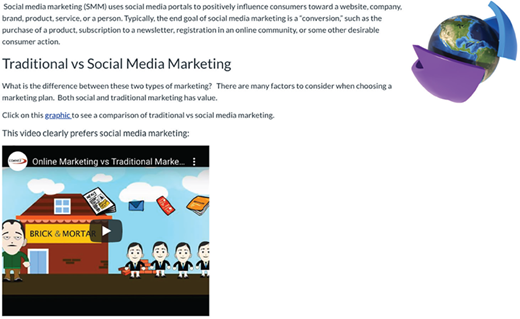
However, this desire to break up the monotony can lead to the overuse of decorative or non-educational images, which research discourages (Clark & Mayer, 2016; Lohr, 2008). (Figure 1). is one example of an unrelated and distracting decorative image. Figure 2)., on the other hand, is an example of how an instructor can add competing visual design elements as it includes an unrelated decorative image with a related YouTube-embedded visual element. Further, this participant talked about how they think about their learners and how they might access the content described below.
[P2] … I am also making sure that I am aware of dynamic design so that I know that some students may be viewing this instead of on a 27-inch monitor like I am right now, they might be looking at it on a three-and-a- half-inch smartphone screen.
Participants also talked about how the thinking process applied to their creative process and the demands on their time that technical affordances and constraints of the LMS might entail.
[P1] The other element to that is the logical layout of the course. Of course, we work with Canvas, which has a built-in logic to it… . Some of the things I look for… is how much, how much time do I have to invest to learn it.
Finally, all instructors mentioned accessibility in their concerns about the design process. In these cases, accessibility can be understood as a particular category through which audience needs are thought about, identified, and considered, as illustrated below and in Figure 3.
[P2] Back in my seminal years of teaching online courses, accessibility wasn't a concern at all. Now, accessibility is a really big part of my job.
[P1] But accessibility right now is the great limiter for Canvas. It is infused into everything, and it limits our ability to do some of the things that we would like to do with color and font styles.
Looking
Design activities coded as looking included references to visual ideation, such as using professionally designed websites for aesthetic inspiration and design solutions developed by peers to arrange instructional content effectively. Participants also discussed looking for innovative ways to create and deliver content. This included video tutorials that instructed how to use the LMS and software applications. They also searched for third-party media that could be imported for use in their classrooms.
Two participants used web-based and print media as sources of aesthetic inspiration for their page layouts. One emphasized that because design trends change, they always look at new layouts to provide a pleasing visual design for their audience, tying the looking activity back into the audience in the thinking activity.
[P1] So also every year there is what comes forward as the types of websites that are the top of the design line. And those are very important to look at because it tells you what your audience wants to see in your design, and it changes.
Another respondent looked at exemplary design solutions from peers who were also designing courses to see how others solved similar problems of online course building.
[P3] I even signed up for that to be one of those poker people. You remember what the poker is? Where you could review them [other online instructors], and I did that not for the money but just to see how people were doing things.
The Internet was also mentioned as a content source for classrooms and applications that the instructor and the students can use. The Internet was also used to find effective content for the audience.
[P2] For further visual images, I rely heavily on images from Google.com to identify images that align with the message of the content I'm trying to communicate with students.
Doing
In this study, the doing activity is the content development and arrangement with the LMS environment. The instructor's actions address the concerns identified in the thinking process and reflect the examples and solutions observed in the looking process. The following four sub-themes of doing emerged from the data: (a) composing the instructional information while following a visual systematization, (b) controlling the LMS, (c) utilizing knowledge of HTML to fine-tune the content within the LMS, and (d) utilizing an array of software applications for external content creation. These specific doing activities point to two separate but intertwined contexts. The first is the application of visual signaling for communication purposes, otherwise known as visual composition. The second is the corresponding technical activity necessary to achieve this communicative purpose (e.g., using Photoshop to make images or HTML to change the typeface appearance). The following quotes demonstrate creating media to communicate with learners.
[P1] I may need to include a graphic that says this is important. Sometimes, it's a stop sign, and sometimes, it's a “thumbs up” hand.
[P2] The light bulb for this is an idea that visually says, did you know?
In both cases, the instructors used two images to symbolize important information to the audience. They then returned to the looking process to search the Internet for useable images and either edit the images using software applications or integrate them into the page using the LMS.
Beyond the use of icons to represent different types of signaling, all participants mentioned integrating self-produced videos or third-party content as an essential aspect of their design, especially in terms of how such videos relate to the textual content. Simultaneously, all participants were critical of their video creation skills, as captured with the following quotes:
[P3] And then at the end, after I have shown some examples and given some text and some graphics, I typically throw in a video, give them a practice problem, and then walk them through the video on the practice problem.
[P1] As Internet speeds and connectivity have improved over the years, the ability to start incorporating video into an online course has become increasingly part of my visual design. I am still behind the curve, excuse me, in the sense of creating my video content, but I have resourced through YouTube and streaming media via the library, etc., and added a lot of video content to my courses.
[P2] The area in which I've really lost my skill set and diminished a lot is video production. That is the next big frontier for distance education. Presenting the content visually so that you have the moving images with the narrative of the moving images affects the dual processing capabilities of our brains and allows for deeper learning. That will be the next area where I need to make significant improvements.
The interest in video production extends beyond simply understanding the tools involved. The instructors are demonstrating an interest in how their audience would use the medium through content integration and hardware displays. However, the last statement from [P2] expands beyond the technology and into how video can affect the cognitive processes involved in learning. The participants were also critical of their own video production skills, showing an interplay between the thinking and doing processes. The participants were aware of their technical limitations, resulting in a self-perceived suboptimal finalized design.
Critique
The critique process of evaluating prototypes is integral to each iteration of using the visual design process. Based on the data in this study, there were three main modes of reflection on the courses: external feedback, LMS analytics, and self-feedback through prototyping.
External feedback involves critical commentary from specific stakeholders such as industry partners, instructional designers, and students. The feedback given by most of these sources applied almost exclusively to instructional content rather than to visual design. One participant specifically mentioned his disappointment in the lack of student feedback on the aesthetics of the course, as illustrated in the following quote; however, this is not surprising as those not versed in visual design will likely not suggest constructive changes in the visual aspects of a course layout.
[P2] I have a suggestion area within the discussions I post every semester called the suggestion box. I also have a survey… . Interestingly, I get virtually no comments from students regarding the aesthetics of my course, and it's a little disturbing because I have spent a lot of time trying to create a course that's not only content-rich but also aesthetically rich in the sense that it's visually interesting to look at.
In the design studio, critique hinges on feedback from a content expert and peer review. While the participants in this study pointed to instructors' use of feedback, there was little evidence of peer or expert feedback on visual design. One participant cited this concern.
[P3] I think they [the institution] could actually have better personnel on hand who can help you with those [visual design] things. They are there to help you with any Canvas problems, but I don't think they really get the idea of [visual] design. I don't know anybody there [in support] who I would say is an expert on it.
Two participants used student performance and LMS analytics to reflect critically on their course design. For instance, one instructor specified that a high number of student inquiries related to content indicate that the instructional content could be “[P3] clearer.”
[P1] One of the things that I love about Canvas is its analytics. I use Canvas analytics to figure out where students are falling off.
Lastly, two instructors mentioned prototyping to find content or applications that did not work. These were due to content providers changing content, resulting in broken links and outdated applications usually caused by browser updates and testing on multiple platforms like computer and mobile devices.
Summary of the Visual Design Process
This study focused on understanding how online instructors use design thinking (i.e., thinking, looking, doing, and critiquing) to attend to the visual design of the online courses they create. We used the TLD+C framework to organize the general design activities described by the participants and then elaborated on these through emergent codes. Table 2 illustrates the adequacy of the TLD+C framework as an overarching frame for understanding instructors' concerns and activities. It also shows that each could be detailed through two sub-code layers that emerged in the elabora- tive coding process. Finally, the distribution of the frequencies of the first layer of elaborative sub-codes accentuates the comparability of results across cases. This not only suggests the credibility of the results but also underscores the uniformity of design, both of general processes and their potential contribution provided by their elaboration into particularized sub-processes.
Perceived Barriers
We also investigated possible barriers online instructors face when applying visual design to their online courses. The main barriers referenced in the interviews were a lack of knowledge of visual design, accessibility standards, LMS restrictions, and lack of visual design support. Each of these is discussed briefly below.
Lack of Visual Design Knowledge
The participants all identified a need for more background or formal training in visual design. A common theme throughout the cases was that the instructors make visual design decisions based on personal appeal, signaling a lack of confidence in their visual design choices.
[P3] I just try to find something visually appealing that explains what I want. Sometimes, I will use the design in a way a person has done things, and I'm not really a designer, so it is, you know, it's not professional by any stretch. It's just what appeals to me and how I can get the idea across.
[P3] You know, I'm not a designer, so I just put color, and it looks good to me. Now, whether that is appropriate or not, I do not know.
Another comment pointed to the need for greater awareness of visual design among instructional personnel, particularly their faculty colleagues.
[P2] Because they're still coming out of universities that do not teach visual design,they're still doing PowerPoints and research papers. So, we still inherit instructors with that background, particularly in the social sciences, which becomes a bit problematic.
This suggests training workshops, hiring graphic artists to review designs or develop templates, and employing instructional designers from programs with graphic design as part of their curricula.
Accessibility
Creating accessible content was a concern repeated by all the respondents. They pointed to the incorrect use of font styles, tables, headings, colors, images, and videos as potentially detrimental to accessibility. Whereas in most corporate settings, professional graphic designers need only target most of their potential audience, in publicly funded online education, designers are legally obligated and hopefully ethically motivated to meet the needs of the entire audience:
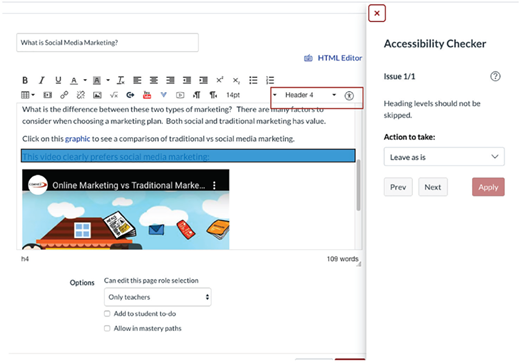
[P1] One of the significant challenges I have in delivering professional development to faculty is a lack of familiarity with accessibility … . You do not get to skip headings because a screen reader for a visually impaired person will use those like chapter headings.So many of our faculty members need some help with technology in general. So, they chose a heading because that is their desired font size. So, they grab a heading two for this chunk of text [because they like the visual properties], not realizing they created a queue for a person with visual impairments.
Another respondent pointed out that the Canvas LMS problematically limits the selection of design elements like fonts and colors to ensure accessibility for those with visual impairments:
[P2] Accessibility is the great limiter for Canvas right now. It is infused into everything, and it is limiting our ability to do some of the things that we would like to do with color and font styles. No matter how much they want to put a color in or how much they wantto have something look a certain way, if it's going to undermine or change accessibility, they cannot do it.
Figure 4 shows how using headers to change the font or skipping a header level will trigger an accessibility warning in Canvas. The respondents emphasized that aesthetic and visual design freedoms could still be exercised without limiting accessibility, allowing for a visually and functionally effective experience for all students. Still, observations of each course in Canvas suggest that participants needed to use functions that would change the fonts' size, weight, or colors.
System Limitations
Beyond accessibility, every instructor cited limitations imposed by the Canvas LMSregarding visual design. The most significant limitation cited was the lack of global style customization. For example, an unlocked version of the Canvas LMS allows users to set standard colors for text, hyperlinks, sidebar backgrounds, and icon colors.
[P3] I wish the school would give us a little bit more flexibility to do [Cascading Style Sheets] CSS and JavaScript and things like that. They lock it down pretty tight, and I think it limits what we can do here.
[P2] So I don't go in and do anything specific, like changing the Cascading Style Sheets.I don't have any access to do anything like that … . I didn't have as much flexibility as I did using CSS, but it gave me enough flexibility to utilize the tools and the rich content editor, especially heading size.”
[P1] Canvas places barriers. Canvas is only as good as the customizations are. So, if we want to communicate, we have to customize the software within Canvas to do that, which is certainly possible. So, it is limited by [the] budget and skill set of those that would do the programming.
One of the suggestions given in the interviews to address this limitation, other than to give style sheet access, was the development of more templates that instructors could use. Based on one interview response, this is an apparent possibility within Canvas, giving the institution control over visual styles while still allowing some customization and personalization of visual design.
Lack of Support
All participants emphasized the need for expert analysis and review of their visual designs. While one participant (above) noted that instructional designers provided by the institution must be versed in visual design, another was skeptical of the efficacy of peer review of visual design.
[P3] I do not think any faculty members are better at it than I am. You know, it'd be nice if they brought an expert in from somewhere with some real credentials... They don't mention much of aesthetics, but they seem to be big on ADA [i.e., accessibility] compliant things.
Another participant pointed out the need for training and support for faculty at large on how to use custom HTML and CSS to control the visual design of pages in Canvas.
[P1] They have to have basic HTML tagging skills. I just don't see any way for them to create unless they figure out a way to add some help in this Canvas shell. I don't see ways for them to be highly creative without having to go into that coding.
However, it was pointed out that instructional designers assist in some avenues of course design and media development.
[P2] I did not create this banner. One of the instructional designers created it using Canvas. So, they create banners for people and help them create and edit other images in their courses.
Suggestions for improvement in this area included a wide range of possibilities. However, they could be summarized as follows: (a) the need for a graphic designer on the instructional design support team; (b) workshops focusing on visual design in the LMS environment; and (c) workshops on learning visual development applications.
CONCLUSION
Design thinking can transform how instructors and institutions develop and deliver online courses. The participants in this study demonstrated how some instructors attempt to blend what is desirable from a heuristic point of view with what is technologically viable while following institutional guidelines. Furthermore, the participants demonstrated how some instructors who do not have a background in visual design still attempt to make visually creative decisions and use design elements within the design process. This aligns with Kimball (2013), who argued that design principles could significantly impact design for educational media whereby neophytes can rationalize an unfamiliar activity. However, the participants in this study could not justify their visual design decisions due to a lack of confidence in visual design knowledge.
There is a common belief that great design is created by brilliant artists using imagination- al powers beyond mere mortals' capabilities. However, what the design development of the instructors in this study shows is that the ability to design is neither a sudden breakthrough nor the direct adherence to formal design training; it was the result of trial and error using a creative, human-centered discovery process which was exemplified through iterative cycles of activities that can be conceptualized through the TLD+C method. Thus, the design process can be described as a network of processes rather than predefined, orderly steps. Because design thinking is ill-defined, it appears chaotic even to experienced instructors. However, over the life of many projects, as the participants in this study show, the ill-defined process becomes more rational through each experience.
Results from this study show the iterative and closely interrelated process of TLD+C within course design. The individual activities of thinking, looking, and doing are justified or reflected on one another. Each participant also describes a course design as never final, requiring multiple iterations over time. There are always new or unknown technologies, applications, content, and trends that encourage course designs to evolve, meaning that the design process for instructors will be continuous. This concept is summarized well in a discussion on new media technologies by Bolter and Grusin (1999), where they infer that software applications and new technology emerge from within cultural contexts. As instructors, instructional designers, and administrators become aware of their needs, they can assist in refashioning the technologies they use.
While the findings highlighted that the participants used the basic design processes described in the TLD+C model, the results suggest using a less monolithic or highly structured design process that is commonly shared amongst the participants. Correspondingly, the participants struggled to describe some of their activities. For instance, none of the participants could vividly describe how they gathered visual ideas for layout design or list specific things they looked for in this process. Participants also used an array of software applications to develop content, demonstrating that they may have been unaware of how to operate the tools that are most appropriate for a task, further showing that the design process itself, no matter the medium, is ill-defined but still necessary to integrate into practice. From a technical standpoint, LMSs like Canvas likely limit the design affordances so the user can avoid creating visual chaos. For example, media content like text, images, and video align left by default. The fonts are standardized to maximize readability, and they can only be changed if the individual can create images with the custom fonts or knows HTML to code the fonts into the LMS.
While the participants' visual design strategies could all fit under the TLD+C framework, instructors faced common themes and barriers when infusing visual design and instructional content simultaneously. This study underscores the need for institutions to support and enhance the visual design within online course offerings. Unfortunately, as this study also suggests, faculty cannot independently provide such support and enhancement. It is, therefore, possible to conclude that Lohr (2008) may well be correct in advising institutions to adopt three particular measures to support instructors in developing online course designs: (a) constantly offering workshops to train and remind individual faculty members how to apply visual design, (b) making available professional instructional designers who are versed in visual design; and, (c) offering the services of a professional graphic artist who can devel-op well-structured templates for instructors to adopt.