


Automated real-time captions and subtitles are useful for implementing Universal Designfor Learning (UDL) Checkpoint 1.2 that suggests offering a text-based alternative to auditory information for all learners to access the content equally. The purpose of this study was to determine the effectiveness of the Microsoft PowerPoint Live feature of automated real-time captions/subtitles in English and Spanish. The word accuracy (WAcc) of the captions and the intelligibility scores (IS) of the subtitles were obtained to determine the effectiveness. Five native English- and 5 native Spanish-speaking participants read a prepared script in their native language. The average WAcc of captions in English was 96.3%, and the average WAcc of captions in Spanish, which included special terms, was 87.9%. On average, the IS of subtitles in Spanish (1.74) was better than the IS of subtitles in English (2.06). The WAcc of captions in Spanish excluding special terms (96.2%) yielded an IS of subtitles in English of 1.75. The researchers cautiously concluded that automated real-time captions/subti- tles generated by PowerPoint Live in English or Spanish could be useful to implement UDL Checkpoint 1.2, mainly when the viewer can hear the presenter and is fluent in the presenter's spoken language.
Introduction
Presentation tools with features of real-time automated captions and subtitles have enabled educators to offer a text-based alternative to auditory information during live online sessions, as suggested in the Universal Design for Learning (UDL) Checkpoint 1.2 (CAST, 2018b). However, how useful and effective are these tools? To address this question partially, Orellana et al. (in press) conducted a qualitative moderated usability testing with 10 English- and Spanish-speaking participants to identify challenges when presenting using PowerPoint Live’s feature of real-time automated captions/subtitles. Orellana et al. also interviewed the participants to determine how they described the feature’s potential uses, challenges, and benefits. Participants in Orellana et al.’s study described PowerPoint Live as a useful and easy-to-use tool to present with captions/subtitles for teaching or training. In addition, participants did not encounter challenges that they could not overcome during the usability testing. Themes that emerged as potential challenges included the need for training before using the tool, the presenter’s potential distraction when checking for accuracy of their captioned speech, and the proper use of the technology by an online or an on-site audience (Orellana et al., in press). Orellana et al. concluded that PowerPoint Live’s feature of captions/subtitles could be used to implement UDL Checkpoint 1.2, but that there was a need to determine its effectiveness. Specifically, Orellana et al. recommended measuring the accuracy of the captions and the quality of the subtitles.
This article discusses the findings of a study to determine the effectiveness of the feature of automated real-time captions/subtitles in PowerPoint Live as measured by the accuracy and quality of the captions/subtitles in English and Spanish. The findings of this study were not meant to provide performance measures as input to product developers or inform decision-makers when acquiring software licenses. It was expected that findings from this study would supplement findings from Orellana et al.’s (in press) study to help educators select presentation tools when implementing the UDL Checkpoint 1.2 for online live sessions. Following is an introduction to UDL Checkpoint 1.2, captions and subtitles, and automated captions/subtitles in PowerPoint Live.
Checkpoint 1.2 in Universal Design for Learning
UDL is an evidence-based framework that promotes inclusive pedagogy to eliminate barriers and meet the varying needs of learners(CAST, 2018a; Meyer et al., 2014). Although research findings have been mixed because of the variability in how researchers reported relationships between specific UDL guidelines and their interventions (Ok et al., 2017), in general, findings suggest that UDL can be an effective framework to design flexible learning environments to benefit all types of learners (Al-Azawei et al., 2016; Capp, 2017; Seok et al., 2018; Shreffler et al., 2019). The UDL framework is also referenced in U.S.-based education policies, such as those found in §1003(24) of the Higher Education Opportunity Act (2008), where it is defined as a “scientifically valid framework for guiding educational practice” (p. 182).
The UDL guidelines “offer a set of concrete suggestions that can be applied to any discipline or domain to ensure that all learners can access and participate in meaningful, challenging learning opportunities” (CAST, 2018a, para. 1). Meyer et al. (2014) offer a comprehensive history, theory, and practice of UDL. CAST (2018a) offers detailed explanations and visuals of the UDL principles, guidelines, and checkpoints on their website. Overall, nine guidelines address the three principles of UDL to provide multiple means of engagement, representation, and action and expression. Each guideline includes a list of checkpoints supplemented with specific suggestions that designers can follow to implement the guideline.
UDL can also support educators in the complex endeavor of translating “research on technology and individual differences to their classroom practices” (Antonenko et al., 2020, p, 108). Designers or instructors can implement specific UDL guidelines and checkpoints in their strategies suitable to their context and content areas. Nonetheless, properly combining suggestions with effective technologies, strategies, and materials from the myriad of options available can be a daunting task.
In this study, real-time captions/subtitles were examined as a means to implement the UDL Guideline 1 that indicates that a way to reduce barriers is to provide the same content through multiple means of representations; specifically, the UDL Checkpoint 1.2 that suggests that offering alternatives to auditory information can allow all learners to access the content equally. One suggestion listed under Checkpoint 1.2 is to “use text equivalents in the form of captions or automated speech-to- text (voice recognition) for spoken language” (CAST, 2018b, para. 2); hence, the use of automated real-time captions/subtitles can be an alternative to auditory information when the instructor is presenting live. Figure 1 depicts UDL Checkpoint 1.2 to offer alternatives to auditory information, within UDL Principle to provide multiple means of representation, and the UDL Guideline 1 to provide options for perception (CAST, 2018a).
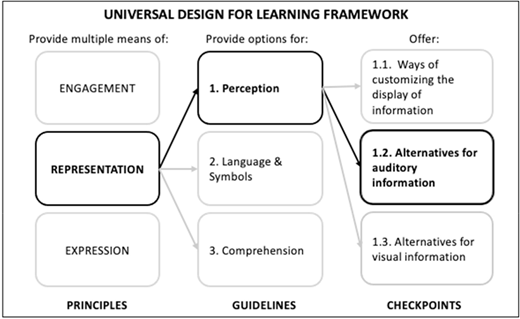
Universal Design for Learning Checkpoint 1.2: Offer Alternatives for Auditory Information
Universal Design for Learning Checkpoint 1.2: Offer Alternatives for Auditory Information
Captions and Subtitles
Captions are the transcription of the presenter’s speech in the same language and include background sounds and speaker identification, whereas subtitles are the translation of the speech into a different language (3Play- Media, n.d.; Myers, 2019; Take Note, n.d.). In general, studies have shown that captions in recorded videos are beneficial to many (e.g., Dallas et al., 2016; Gernsbacher, 2015; Linder, 2016; Morris et al., 2016). The use of captions aligns with UDL principles. It is also a matter of compliance with regulations and guidelines regarding accessibility, such as the Americans with Disabilities Act (U.S Department of Justice Civil Rights Division, n.d.), the Rehabilitation Act Section 508 (U.S. General Service Administration, n.d.), and the Web Content Accessibility Guidelines 2.0 (World Wide Web Consortium, n.d.).
Real-time captions/subtitles can be generated by a human transcriber or generated automatically using speech recognition technology (SRT). Speech recognition, “also known as automatic speech recognition (ASR), computer speech recognition, or speech-to-text, is a capability which [sic] enables a program to process human speech into a written format [and] focuses on the translation of speech from a verbal format to a text” (IBM Cloud Education, What is speech recognition section, para. 1).
The field of automatic speech recognition “has been a field of research for more than 60 years. The industry has developed a broad range of commercial products where speech recognition as the user interface has become ever useful and pervasive” (Li et al., 2015, Chapter 1 Introduction section, para 1). According to Linn (2015), speech recognition tools have had limitations. The biggest hurdle has been to solve the problem of the speech recognition tool to comprehend what a person is saying (Linn, 2015). Additionally, speech recognition tools do not do very well in
noisy, crowded, or echo-laden places. They aren’t as good with poor hardware, such as low-quality microphones or people talking from far away. They also can struggle when people speak quickly or quietly or have an accent. It’s also sometimes hard for computers to understand children and elderly speakers. (Linn, 2015, Right! Right? Write! section, para. 3)
Because of SRT’s limitations, the accuracy of SRT-generated automated captions is, in general, lower than the required 99% for accessibility purposes. According to Enamorado (2019a), “typically, automatic speech recognition produces about 60-70% accurate transcripts, which means that 1 out of 3 words is wrong” (Automatic Speech Recognition section, para. 3). Enamorado (2019b) compared the accuracy rates of two vendors and found that their measured accuracy rates fell between 84.7% and 94.4%. In 2017, Microsoft’s speech and dialog research group announced they had reached a 5.1% error rate, or 94.9% word accuracy, for the English language with their speech recognition system, described as “a new industry milestone, substantially surpassing the accuracy we achieved last year” (X. Huang, 2017, para. 2).
On the other hand, the potential uses and benefits of SRT in the classroom are various. SRT can be a cost-effective solution to generate real-time captions for classroom presentations when hiring dedicated staff would otherwise be necessary (Revuelta et al., 2010). SRTs can provide a transcription of what the instructor presents in real time (Revuelta et al., 2010). Non-English-speaking students have found SRT beneficial in their English- language lectures to aid learning, help them better understand a lesson, take notes, and confirm what was being said in the lecture (Y.M. Huang et al., 2015; Y.M. Huang et al., 2016). Students in Shadieve et al.’s (2017) study found speech-to-text recognition technologies helpful in aiding their comprehension and attention, enhancing learning, awareness, and meditation. Y.M. Huang et al. (2016) summarized studies that “looked at how STR application supports the learning of nonnative English speaking” (p. 18) and concluded that the literature showed that, for the most part, students found SRT helpful during real-time lectures.
Real-Time Automated Captions/ Subtitles in PowerPoint Live
Studies have shown the usefulness and benefits of using SRT in the classroom (e.g., Y.M. Huang et al., 2015; Y.M. Huang et al., 2016;,Revuelta et al., 2010; Shadieve et al., 2017). However, as of the time of this study, the literature search showed a scarcity of empirical studies related to the use, benefits, or effectiveness of SRT-based presentation applications that educators would likely use to provide live captions, such as Microsoft PowerPoint (PPT, Microsoft, n.d.-b) or Google Slides (Google, n.d.). The literature search yielded Cooke et al.’s (2020) study that compared the performance of both applications to “demonstrate the effectiveness of straightforward strategies using widely available auto-captioning tools to greatly improve the accessibility of jargon-rich content” (para. 1). Cooke et al. found that the effectiveness of PPT and Google Slides was similar under most of the scenarios tested. Additionally, both tools could yield acceptable quality of captions in the English language (Cooke et al., 2020), like the one available in Google Slides at the time of the study.
The live captions/subtitles feature in PPT is one of the cloud-enhanced Microsoft 365 features powered by Microsoft Speech Services. The speech utterances are sent to Microsoft (Microsoft, n.d.-b, Important Information About Live Captions & Subtitles section, para. 1) to provide the service. In 2018, the PowerPoint team announced the feature as one powered by artificial intelligence that would allow PPT to support “12 spoken languages and display on-screen [real-time] captions or subtitles in one of 60+ languages” (PowerPoint Team, 2018, para. 2). In addition, PPT uses cloudbased speech recognition for real-time captioning of the presenter’s spoken words (Microsoft, n.d.-b). As of late January 2019, the feature has been available for Office 365 subscribers worldwide for PPT on Windows 10, PPT for Mac, and PPT Online.
In January 2020, Microsoft announced the PowerPoint Live feature in Office 365 (Microsoft Education, 2020) that became available on PPT for the web by June 2020 (Johnson, 2020). Real-time presentations with PowerPoint Live can be on-site or online via a conferencing system; viewers who have internet can connect to the presentation using any device and browser, read real-time captions/ subtitles in their preferred language, and compile the captions/subtitles transcriptions (Microsoft, n.d.-a).
PURPOSE OF THE STUDY
The purpose of this study was to determine the effectiveness of PowerPoint Live’s feature of real-time automated captions/subtitles in English and Spanish as measured by (a) the word accuracy of the captions; and (b) the quality of the subtitles, determined by the intelligibility of the translated sentences. In this study, captions were PowerPoint Live’s transcription of the presenter’s speech in the same language without background sounds or speaker identification, and subtitles were the PowerPoint Live translation of the speech into a different language. To address the purpose, the following questions were examined:
1. What is the word accuracy of PowerPoint Live real-time automated captions in English and Spanish?
2. How intelligible are PowerPoint Live real-time automated subtitles in English and Spanish as a translation of the captions in Spanish and English, respectively?
Methodology
The methodology included preparing materials, asking the participants to read a prepared script in their native language using PowerPoint Live, compiling the transcripts of the captions/subtitles generated by PowerPoint Live, and analyzing the transcripts to obtain the accuracy of captions and the quality of the subtitles. The participants of this study were the five native English speakers (two males and three females) and five native Spanish speakers (all females) that were purposefully sampled by Orellana et al. (in press) in their study. The English-speaking participants spoke American English, and the Spanishspeaking participants spoke Spanish from different Latin American and Caribbean countries or regions. Following is a description of the methodology.
Preparing Materials
The materials included a consent form, a 6 minute video tutorial on using PowerPoint Live, and two scripts—in English and Spanish—taken from O’Keefe et al. (2020) related to “key principles for online learning course design.” The script in Spanish was the equivalent translation of the script in English. The researchers did not translate into Spanish proper names and terms in English that they considered special terms Both scripts contained 26 sentences. The script in English contained 553 words and the script in Spanish 625 words.
Compiling and Analyzing Transcripts of Captions and Subtitles
The participants presented with PowerPoint Live by reading the script in their native language. Upon the participant reading the script, the researchers used their mobile devices or computer browsers to compile and save the transcripts of the captions/subtitles in English and Spanish. Following is a description of how the researchers determined the accuracy of captions and the quality of subtitles generated by PowerPoint Live.
Accuracy of Captions
The PPT feature of real-time captions/subti- tles is powered by Microsoft Speech Services (Microsoft, n.d.-b, Important Information About Live Captions & Subtitles section, para. 1). For this study, these services are referred to as PPT-SRT. The performance or effectiveness of an SRT is evaluated based on its word accuracy rate (WAcc) and its speed (IBM Cloud Education, 2020). In this study, the researchers used the WAcc to determine the effectiveness of PPT-SRT of spoken words in English and Spanish. The WAcc value was obtained by first computing the word error rate (WER) and subtracting it from one (i.e., WAcc = 1 - WER). The WER was computed by first adding S, D, and I and dividing the sum by the total number of words that the participant spoke (see “Word error rate,” 2020). Where S was the number of substitutions that occurred anytime a word was replaced, D was the number of deletions that occurred anytime a word was omitted from the spoken transcript, and I was the number of insertions that occurred anytime a word that was not said was added.
Each document with the transcribed captions and subtitles was curated by deleting extra lines, spaces, and paragraph marks; and separating the words from beginning to end of the original sentence in the script. The text in the original script and each of the transcripts was converted into a single-column table with 26 rows.
The N value corresponded to the words spoken by the participant, and the Microsoft Word feature of Word Count was used to obtain the word count of the captioned text. In addition, the Zoom recording of the session was reviewed to note any additional words that the participant had spoken but were not transcribed or had not spoken but were inserted in the transcript by PowerPoint Live. Thus, the participant’s N value differed depending on the actual words spoken, whether transcribed or not.
The number of words in proper names and special terms that the participant read from the script was included in calculating WAcc of the captions in English. For the WAcc calculation of captions in Spanish, two N values were obtained: N1_Sp with all words of proper names and special terms from the script, and N2_Sp without the words in these terms (i.e., N2_Sp = N1_Sp - 63). The 63 words (proper names and words in English) in the Spanish- language script are shown in Table 1 Table 1.
To compute the values of S, D, and I, the following steps were carried out:
1. The compiled text of the captions was compared to the text in the prepared script using the Microsoft Word feature of Compare Documents, with the transcript as the revised document and the script as the original document.
2. Changes or comparisons indicated in capital letters, punctuations, and differences between numbers expressed in words versus numerals were ignored.
3. An insertion was accounted for only if the participant did not say the word that appeared in the transcript.
4. A deletion was accounted for only if the participant said a word omitted in the transcript, even if the word was not in the original script.
5. The words deleted from, substituted in, or inserted into the script were noted.
Total of Words per Special Term and Proper Name Contained in the Spanish-Language Script (N = 63)
| Special Term or Proper Name | Number of Words |
|---|---|
| Delivering high-quality instruction online in response to COVID-19: Faculty playbook | 12 |
| COVID-19 | 2 |
| O’Keefe, Rafferty, Gunder, and Vignare | 5 |
| Online Learning Consortium | 3 |
| The Association of Public and Land-grant Universities | 8 |
| Every Learner Everywhere Network (2 occurrences) | 8 |
| Fundación Bill y Melinda Gates | 5 |
| Creative Commons Attribution No Derivatives 4.0 International License | 8 |
| Universal Design for Learning | 4 |
| Rúbrica de Equidad de Peralta | 5 |
| Stark and Kelly | 3 |
Quality of Subtitles
The researchers used a black-box evaluation strategy (Trujillo, 1999) to determine the quality of the subtitles in English/Spanish as the target languages (TL), with captions in Spanish/English as the source languages (SL), respectively. In a black-box evaluation, the “system is seen as a black box whose operation is treated purely in terms of its input-output behavior” (p. 256). According to Trujillo, this evaluation strategy is suited for users and translators who may or maynot be the intended end-users.
Intelligibility and accuracy are quality measures in machine translation (Trujillo, 1999). Once intelligibility is assessed, the accuracy can be measured (Arnold et al., 1994, Trujillo,1999). Intelligibility is the “extent to which the translated text can be understood by a native speaker of the target language” (Nagao et al., 1985, p. 103). It measures the “fluency and grammaticality of the TL text, without concern for whether it faithfully conveys the meaning of the SL” (Trujillo, 1999, p. 258). Intelligibility is “affected by grammatical errors, mistranslations and untranslated words” (Arnold et al., 1994, p. 161). On the other hand, accuracy is the “indication of how the translated text preserves the content of the source text” (Trujillo, 1999, p. 259). According to Arnold et al. (1994), a “highly intelligible output sentence need not be a correct translation of the source sentence” (p. 162).
Because intelligibility directly reflects the quality judgment of the evaluator, there is inherent subjectivity when using humans to evaluate the output of machine translation (Arnold et al., 1994; Tobin, 2015; Trujillo, 1999). To minimize subjectivity, the researchers followed the recommendations of Trujillo and Arnold et al. to have several evaluators score intelligibility. Specifically, Arnold et al. recommended having a minimum of four persons to evaluate intelligibility; thus, the researchers recruited five evaluators who were fully fluent in English and Spanish. Evaluators were purposefully selected as educated professionals (i.e., with degrees in doctor of education, master’s in business administration, and doctor of medicine) who would understand the meaning of the text without needing assistance from the researchers. Two evaluators were faculty in higher education; one worked in the corporate finance industry, one worked in the defense-related industry, and one worked as a physician.
The evaluators used the 5-point Intelligibility Scale (see Table 2) developed by Nagao et al. (1985), which was slightly modified by Trujillo (1999), to determine the extent to which an average educated reader fluent in the TL could understand the output without making any reference to the SL. The intelligibility scores (IS) ranged from 1 (highest intelligibility) to 5 (lowest intelligibility).
The evaluators rated all 26 subtitle sentences that included the translation of the special terms in the script in English and Spanish (i.e., special terms were not excluded in the subtitles). Each evaluator scored each subtitle sentence (i.e., with English and Spanish as TL) for each participant without access to the SL. The researchers gave instructions to the evaluators and advised them to score sentences for the same language first, take a break, and then move to score sentences for the other language.
Discussion Of The Findings
Following is a discussion of the results that answer the research questions: (a) What is the word accuracy of real-time automated captions in English and Spanish generated by PowerPoint Live? and (b) how intelligible are realtime automated subtitles in English and Spanish generated by PowerPoint Live as a translation of the captions in Spanish and English, respectively?
Accuracy of Captions
To obtain the WAcc, the researchers analyzed the caption transcripts of 2,784 words spoken by English speakers and 3,148 words spoken by Spanish speakers. Participants were asked to read with PowerPoint Live the same script in their native language. The script consisted of 26 sentences: 553 words in English and 625 words in Spanish, including proper names and special terms. Participants added or skipped words as they spoke; hence, the number of words in the caption transcript varied per participant.
Description of the Intelligibility Scores of the Intelligibility Scale
| IS | Description |
|---|---|
| 1 | The meaning of the sentence is clear, and there are no questions. Grammar, word usage, and/or style are all appropriate, and no rewriting is needed. |
| 2 | The meaning of the sentence is clear, but there are some problems in grammar, word usage, and/or style, making the overall quality less than 1. |
| 3 | The basic thrust of the sentence is clear, but you are not sure of some detailed parts because of grammar and word usage problems. You would need to look at the original source language sentence to clarify the meaning. |
| 4 | The sentence contains many grammatical and word usage problems, and you can only guess at the meaning after careful study, if at all. |
| 5 | The sentence cannot be understood at all. |
Note: IS = Intelligibility score. IS values range from 1 (highest intelligibility) to 5 (lowest intelligibility). Descriptions are quoted from Trujillo (1999, pp. 258–259). Use of the scale is permitted under the Copyright, Designs, and Patents Act of 1998 as fair dealing for the purposes of research.
Number of Words Spoken in English, the Word Error Rate, and the Word Accuracy per Participant (NEn = 2,782)
| Participant | nEn | WEREn | WAccEn (%) |
|---|---|---|---|
| P03 | 561 | 0.021 | 97.9 |
| P05 | 549 | 0.036 | 96.4 |
| P06 | 565 | 0.023 | 97.7 |
| P07 | 555 | 0.083 | 91.7 |
| P11 | 552 | 0.024 | 97.6 |
Note:NEn = Total number of words spoken = MS WordCount + omitted words – extra words; WEREn = (Insertions + Deletions + Substitutions) / NEn; WAccEn = 1 – WEREn; WAccEn percentages were rounded up.
Number of Words Spoken in Spanish Including Special Terms and Proper Names, the Word Error Rate, and the Word Accuracy per Participant (N1_Sp = 3,148)
| Participant | n1_Sp | WER1_Sp | WAcc1_Sp (%) |
|---|---|---|---|
| P04 | 614 | 0.166 | 83.4 |
| P08 | 641 | 0.121 | 87.9 |
| P09 | 655 | 0.119 | 88.1 |
| P10 | 635 | 0.085 | 91.5 |
| P12 | 603 | 0.111 | 88.9 |
Note:N1_Sp = Total number of words spoken = MS WordCount + omitted words – extra words; WER1_Sp = (Insertions + Deletions + Substitutions) / N1_Sp; WAcc1_Sp = 1 – WER1_Sp; WAcc1_Sp percentages were rounded up.
The number of words spoken per Englishspeaking participant (n_En), the WER_En, and the WAcc_En expressed in percentage are shown in Table 3. On average, participants spoke 556.8 words in English, resulting in an average WER_En of 0.037 and an average WAcc_En of 96.3%.
The number of words spoken per Spanish- speaker, including special terms and proper names in English (n1_Sp), the WER1_Sp, and the WAcc1_Sp expressed in percentage is shown inTable 4. On average, including proper names and special terms in English, Spanish-speaking participants spoke 629.6 words, resulting in an average WER1_Sp of 0.116 and an average WAcc1_Sp of 87.9%.
The total number of words spoken, per Spanish-speaking participant (n2_Sp), excluding special terms and proper names in English (N2_Sp = 2,853), the WER2_Sp, and the WAcc2_Sp expressed in percentage are shown in Table 5. On average, participants spoke 566.6 words in Spanish, resulting in an average WER2_Sp of 0.039 and an average WAcc2_Sp of 96.2%.
The average WAcc_En (96.3%) was comparable to the average WAcc2_SP (96.2%), and the WAcc1_SP (87.9%) was lower than the WACcc2-SP (96.2%). These averages suggest that the accuracy of PowerPoint Live’s captions in Spanish are comparable to those in English when the presenter avoids speaking special terms or names in a different language from the one being captioned.
Number of Words Spoken in Spanish Excluding Special Terms and Proper Names, the Word Error Rate, and the Word Accuracy per Participant (N2_Sp = 2,833)
| Participant | n2_Sp | WER2_Sp | WAcc2_Sp (%) |
|---|---|---|---|
| P04 | 551 | 0.069 | 93.1 |
| P08 | 578 | 0.055 | 94.5 |
| P09 | 592 | 0.024 | 97.6 |
| P10 | 572 | 0.019 | 98.1 |
| P12 | 540 | 0.022 | 97.8 |
Note:N2_Sp = Total number of words spoken = MS WordCount + omitted words – extra words – 63; WER2_Sp = (Insertions + Deletions + Substitutions) / N2_Sp; WAcc2_Sp = 1 – WER2_Sp; WAcc2_Sp percentages were rounded up.
Additionally, an average WAcc of 96.3% for captions in English is higher than Huang’s (2017) reported accuracy of 94.9% for Microsoft’s speech recognition system. Several factors can account for this difference in findings, including the characteristics of the participants’ accent, pitch, pronunciation; the number and variability of words analyzed; the script that included special terms and proper names; and the methods employed by the researchers to calculate the WER.
Intelligibility of Subtitles
One of the subtitle transcript files in English corresponding to a Spanish-speaking participant was corrupted. Thus, nine subtitle transcript files were analyzed (i.e., five in Spanish and four in English). Each evaluator rated 234 subtitle sentences (130 in Spanish and 104 in English). For subtitles in Spanish (a) the average IS was 1.74; (b) the average IS of each sentence was between 1.1 and 2.52, corresponding to Sentence 26 (“Thank you for your time”) and Sentence 24 (“The Peralta Equity Rubric, developed by Stark and Kelly in 2019 provides extended explanations of each of these items, as well as concrete practices for getting started and advancing to exemplary equity standards in course design and delivery”), respectively; and (c) the average IS per participant were 1.76 (Participant 3), 1.81 (Participant 5), 1.82 (Participant 6), 1.6 (Participant 7), and 1.7 (Participant 11).
For subtitles in English (a) the average IS was 2.06; (b) the average IS of each sentence was between 1.1 and 4.05, corresponding to Sentence 1 (“Principios Clave Para el Diseño de Cursos en Línea”) and Sentence 2 (“En esta presentación compartiré principios clave, o mejores prácticas, para el diseño de cursos enínea explicados en el libro titulado, Delivering high-quality instruction online in response to COVID-19: Faculty playbook creado en 2020 por O’Keefe, Rafferty, Gunder y Vignare”), respectively; and (c) the average IS per participant were 2.29 (Participant 4), 2.19 (Participant 8), 2.04 (Participant 9), and 1.74 (Participant 10).
The average IS of the subtitles was related directly to the average WAcc of the captions. Specifically, the average WAcc of captions in English (96.3%) yielded a better average IS of subtitles in Spanish (1.74), and the average WAcc of captions in Spanish (88.4% with special terms in the sentences) yielded a lower average IS of subtitles in English (IS = 2.06). This direct relationship between WAcc and IS was expected, given that the subtitles in PowerPoint Live were a direct translation of the captioned speech. When removing from the computation the sentences containing special terms, the average IS of the subtitles in English was 1.75-a score comparable to the IS of subtitles in Spanish of 1.74.
According to the intelligibility scale (Trujillo, 1999), the resulting IS averages (1.74 for subtitles in Spanish and 2.06 for subtitles in English) can imply that, for subtitles in Spanish as a translation of spoken English, “the meaning of the sentence is clear, but there are some problems in grammar, word usage, and style, making the overall quality less than 1 [the highest]” (p. 259). Similarly, according to the description of a score of 3 in the intelligibility scale (Trujillo, 1999), for subtitles in English as a translation of the spoken Spanish, the basic thrust of the sentences was clear; still, the evaluators were unsure of some detailed parts because of grammar and word usage problems, and, thus, they would need to look at the source sentences in Spanish to clarify the meaning.
A sentence in the TL with the highest IS would be one where “the meaning of the sentence is clear, and there are no questions [and] grammar, word usage, and style are all appropriate, and no rewriting is needed” (Trujillo, 1999, p. 259). Thus, TL sentences with the highest IS would result from sentences in the SL that are 100% accurate. However, although it could be possible for an advanced SRT to yield a nearly perfect WAcc if the speaker controls the factors that affect the WER, such as “pronunciation, accent, pitch, volume, and background noise” (IBM Cloud Education, 2020, Speech recognition algorithms section, para. 2), it is unlikely that the speaker would not make unexpected or awkward pauses in a live presentation that can cause the SRT to misplace or miss punctuation marks in the captions and, thus, affect the intelligibility of the subtitles.
In general, the IS findings may imply that a viewer who is not hearing the presenter’s speech or is not fluent in the spoken language would not comprehend the presentation fully by only reading the subtitles. As one Englishspeaking participant, who was not fluent in Spanish, pointed out while listening to Spanish words and reading the subtitles in English: “I have no idea what you are saying!” Hence, it is most likely thatthose who would take the most advantage of PowerPoint Live subtitles would be viewers with some fluency in the presenter’s spoken language and can also hear the presenter speak as they follow the subtitles in another language that they can read.
Recommendations For Future Research
Based on the findings and limitations of the study, the following are recommendations for further research:
1. The users’ perspective and the value that users give to real-time SRT-based captions/subtitles are important to describe further the usefulness and effectiveness of SRT-based captions/subtitles. A venue for this line of inquiry is through a better understanding of viewers’ and presenters’ experiences in various educational scenarios, for different types of viewers (e.g., with and without learning or hearing disabilities), with presenters who speak various languages, and using other tools.
2. A benefit of the PPT’s feature of live cap- tions/subtitles is a “disfluency removal and automatic punctuation making the subtitles clear for the audience” (Microsoft Education Team 2019), a Present More Inclusively with Live Captions & Subtitles in Microsoft PowerPoint section, para. 5). Although the researchers did not evaluate the effectiveness of PowerPoint Live disfluency removal and automatic punctuation features, they observed these features when PowerPoint Live appeared to be waiting for the speaker to finish the idea to place punctuation marks. The researchers also observed PowerPoint Live correcting words already on the screen to caption the proper words. Further research could focus on determining the effectiveness of disfluency removal and automatic punctuation from the viewers’ perspective.
3. The PPT-SRT “automatically adapts based on the presented content for more accurate recognition of names and specialized terminology” (Microsoft Education Team, 2019, Present More Inclusively with Live Captions & Subtitles in Microsoft PowerPoint section, para. 2). In this study, inaccuracies of the captions were noted in proper names and some special terms. Further research could focus on determining the effectiveness of the SRT tool in recognizing proper names and special terminology.
4. If SRT-based captioning is used for dayto-day live presentations as a cost-effective solution, without regarding compliance or accessibility needs, further research could focus on comparing the effectiveness of real-time automated captions generated by several presentation tools.
5. Regarding the quality of subtitles as TL, accuracy and intelligibility should be used to determine the quality of subtitles. In this study, the researchers anticipated that the captions as SL would not be 100% accurate and, thus, they used intelligibility as the only quality measure of the subtitles. Additionally, a goal of the intelligibility evaluation was to determine if the evaluators would understand the TL sentences, even if some words were not accurate or did not reflect the meaning of the SL. In addition to accuracy and intelligibility measures, in future research, viewer participants can also be inquired if they can comprehend and retain the messages and the content captioned and translated in real-time, whether they can hear the presenter or not.
6. To reduce the subjectivity of the subtitles’ IS, the researchers followed Trujillo’s (1999) and Arnold et al.’s (1994) recommendation to have several evaluators score intelligibility. Further studies can also test the intelligibility scale before its use “in order to achieve greater consistency in its wording, interpretation, and application … [and] testing should be repeated until the scales are being applied uniformly by evaluators” (Trujillo, 1999, p. 259). Additionally, in this study, a single rater computed the WER, and an interesting approach for future research would be having multiple raters computing the WER.
7. The accuracy of the captions and the intelligibility of the subtitles in PowerPoint Live were obtained in English and Spanish and from the speech of 10 participants. A more comprehensive approach can be assessing other languages and having a larger sample size. It can also be useful to assess the automated captions of the speech of native and nonnative speakers, male and female equally represented, with different pronunciations, accents, and pitches, and in presentation environments with different characteristics.
8. Participants read a prepared script and did not act as a presenter with an audience. Additionally, some did not make proper punctuation pauses when reading the script. Further research can be conducted in more realistic scenarios where the presenter is familiar with the content, uses slides with visuals and related text, and speaks spontaneously.
Recommendations To Help Improve The Accuracy Of Captions
In addition to the recommended by Microsoft (n.d.-b) for presentations, the following can help improve the accuracy of captions, and thus the intelligibility, when using SRT-based tools such as PowerPoint Live:
1. The presenter should write complex terms, jargon, proper names, or foreign- language words on the PPT slide. As the researchers noticed, word accuracy was not high when participants read these types of terms.
2. Presenters fluent in more than one language should avoid switching languages during the presentation and speak only in the captioned language. The researchers noted that native Spanish-speakers fluent in English read some terms in their English equivalent—for example, the word “COVID-19”—causing inaccurate captions and, thus, low intelligibility of the translation of a term that the tool is expecting in Spanish.
3. The speaker should practice their presentation before going live to help them speak at a proper pace and pause when needed. Practice would also help the presenter note terms that the tool might not properly caption and, thus, either try and pronounce them differently, write them on a presentation slide and refer to them, or avoid them during the presentation.
Conclusions
Findings supplemented Orellana et al.’s (in press) qualitative findings to help educators decide on presentation tools with features of automated real-time captioning as cost-effective solutions to implement UDL Checkpoint 1.2 of offering alternatives to auditory information and allow all learners to access the content equally. Findings of the study were limited by the variability of the participants’ accents, pitches, and pronunciations; the prepared script that limited the variability of words spoken and that included special terms and proper names; the intelligibility scale used; and the subjectivity of the evaluators.
The researchers analyzed approximately 6,000 words to determine the accuracy of captions in English and Spanish and the evaluation of 234 sentences to obtain the intelligibility of subtitles in Spanish and English, respectively. The accuracy of captions and intelligibility of subtitles were comparable in English and Spanish when English- language and special terms were excluded from the captions in Spanish (i.e., a WAcc in English of 96.3% yielded an IS in Spanish of 1.74; a WAcc in Spanish excluding special terms of 96.2% yielded an IS in English of 1.75).
Based on the findings and limitations of the study and Orellana et al.’s (in press) findings, the researchers cautiously concluded that PowerPoint Live could be a valuable tool to help implement UDL Checkpoint 1.2 for real-time captions and translated subtitles, mainly if the viewer can hear the speaker and read the cap- tions/subtitles. That is, most likely, a person who is not hearing the speaker or who is not fluent in the speaker’s language would not be able to fully comprehend the speech by only reading the captions/subtitles generated by PowerPoint Live in English/Spanish.
Additionally, despite the promising advances of SRTs, it is most likely that the limitations of SRTs explained by Linn (2015) have not been resolved entirely by the time this study was conducted. However, as more presentation applications with SRT-based realtime captions/subtitles become available and the existing ones continually improve their SRTs, the possibilities of effectively using them in the day-to-day online presentations to promote inclusive learning environments are likely to increase. Thus, more research is needed to explore the usefulness and effectiveness of presentation tools that use SRT for real-time captions/subtitles in the online and on-site classroom.

