Introduction
According to the American Community Survey, 19.5 million or 9.9% of Americans aged 16-64 have disabilities (United States Census Bureau, 2013). The American Community Survey divides disabilities into six basic types: visual, hearing, cognitive, ambulatory, self-care, and independent living (United States Census Bureau, 2008). Although legislation has transformed the lives of many individuals with intellectual and developmental disabilities, there are still obstacles to individuals living life to its fullest. Higher education students with disabilities can not only identify with the barriers in their physical environment, but also the barriers in teaching and learning. Postsecondary schools are required to provide academic adjustments so that students are not discriminated against due to their disability.
Twenty-six percent of students with mobility disabilities accessed distance education courses more frequently than their nondisabled peers (Radford, 2011). For disabled students, online distance education programs that are committed to understanding students with disabilities will have course designers who are knowledgeable about accessibility and universal design for learning. It is important that all faculty and staff in the field of higher education have appropriate training on how to design distance education courses to be accessible and meet the needs of the disabled students who are enrolled.
The Start of Something Profound
The Georgia Tech Center for Assistive Technology and Environmental Access (CATEA), through the College of Architecture, is a multidisciplinary research center that concentrates on improving the lives of individuals with disabilities through developing and implementing universal design principles and assistive technologies. Within this center a research project entitled Georgia Tech Research on Accessible Distance Education (GRADE) was funded by a grant from the Office of Post-Secondary Education (OPE) at the United States Department of Education. CATEA’s features of GRADE were to enhance the lives of individuals with disabilities by providing research, technical assistance, and training on accessibility of distance education materials.
Making the Grade
GRADE’s website features include a free, 10-module tutorial on how to create accessible distance education by way of the Access elearning tutorial. Course design modules provide “how-to” models of accessible design for courses that could be challenging to individuals due to the content. As a result of this, courses were identified with accessibility issues which resulted in proposed solutions for access for those students with disabilities. Examples of these solutions included providing web-based HTML versions of courses, using consistent navigation that is logical in sequence, and the inclusion of text descriptions for PowerPoint slides such as graphics, charts, and tables. For each sound file within a course a transcript should be made available for students to access. When using videos, captions should be included, and if mathematics courses are being offered through distance education, including a Word document that contains explanations of equations and references that are needed to complete mathematical functions are needed.
Just the Facts
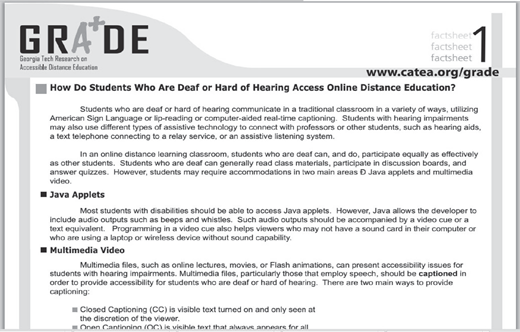
Within the GRADE Project, fact sheets are provided for any individual wanting to learn more about specific disabilities accessing distance education. These fact sheets include deaf or hard of hearing (Figure 1), blind or low vision, and seizure disorders. For course designers and instructors, fact sheets on creating accessible webpages, word documents, e-mail, and Adobe PDF files are also available for free. Each fact sheet lays the foundation for accessibility problems, identifies solutions with examples, and lists additional resources. One reference that course designers and instructors are recommended to access regularly is www.accesslearning.net for a more comprehensive listing of accessibilities issues and the solutions for distance education accessibility.
CATEA encourages the sharing and copying of the fact sheets from their web site for further dissemination to those who are creating accessible distance education programs, courses, and assignments. CATEA’s goal is to minimize the limitations of current technologies by focusing on the design of the learning environment. Working on eliminating barriers is the difference between a disabled individual’s potential and their ability to fully participate in the world around them.
Historical Perspective of Accessibility Law
In the beginning, Section 504 of the Rehabilitation Act of 1973 was a federal law designed to protect the rights of individuals who have disabilities when in programs and activities that receive Federal financial assistance from United States Department of Education (ADA, 1990). In schools, that meant that students were entitled to a free and appropriate education (FAPE) no matter how severe their disabilities may be. Unfortunately FAPE does not pertain to higher education entities.
Another part of the Rehabilitation Act of 1973 is Section 508. Section 508 requires electronic and information technology that is developed, acquired, maintained, or used by the Federal government be accessible to individuals with disabilities (ADA, 1990). States that receive Federal money from the Technology Related Assistance for Individuals with Disabilities Act of 1988 are required by law to act in accordance with Section 508.
The Americans with Disabilities Act (ADA), a ground breaking civil rights law, was passed in 1990 before distance education was accessed through the Internet. Written to prohibit the discrimination of an individual on the basis of a disability, this law covered many areas such as in a place of employment, in local and state government programs, with accommodations, in commercial facilities, the area of transportation, and in telecommunications (United States Department of Justice Civil Rights Division, 1990). The ADA is a powerful instrument in providing access for all individuals with disabilities the same rights and access as nondisabled individuals. In in 2008, the ADA Amendments Act developed from appeals about the ADA law passing and made changes to the term “disability,” which supports individuals if they are seeking protection.
Even though laws exist to prevent discrimination, obstacles are still present for those disabled individuals with a desire to attend a college or university either face to face or using a distance education approach for learning. CATEA is working to remove the obstacles that have been denying students access to education.
Web Content Accessibility Guidelines
Developed by the World Wide Web Consortium, the Web Content Accessibility Guidelines (WCAG) have been adopted as part of the web accessibility policies on college and university campuses (Chisholm, Vanderheiden, & Jacobs, 1999). CATEA references and promotes the WCAG within their research, development, and training. The WCAG guidelines are intended for web developers, site designers, and developers of authoring tools to promote accessibility for those individuals that may pose a problem for specific users with disabilities. These guidelines explain how to best use multimedia content so that it is accessible to a wider audience and is noted that they should not be a hindrance in content development for those course and content developers. CATEA reference these WCAG recommendations within their research and web content.
WCAG Recommendations
The WCAG recommended Web Content Accessibility Guidelines:
Guideline 1 provides equivalent alternatives to auditory and visual content. It is important to provide a text equivalent for every nontext content or element like audio, video, and images. For example a voice synthesizer can be used for text, and verbal descriptions can be provided for those with visual impairments.
Guideline 2 states, do not rely on color alone. Individuals who cannot see in color, differentiate between colors, have noncolored visual displays, or have difficulty with contrasting colors will not be able to understand the texts and graphics when they are viewed with color. Text and graphics should be understandable when visualized without color.
Guideline 3 focuses on marking up documents with style sheets and not presentation elements and attributes. For example using a table to lay out content may cause difficulty in understanding the organization of the page for those who are using specialized software.
Guideline 4 recommends that tables be able to transform when the user is accessing it with another browser or other type of technology.
Guidelines 5 and 6 are similar to the previous guideline, as they recommend that the pages are accessible when new technologies are used and they are not supported or are turned off. This may occur when developers are using newer browsers; webpages still need to work on older browsers or when a user turns off certain elements of the software.
Guideline 7 ensures that user control is given of time-sensitive content changes. This refers to anything that can be paused or stopped like auto-updates of objects or pages.
Guideline 8 recommends that an alternative solution needs to be provided if an embedded object cannot be made accessible. For example, a browser must be accessible within its own interface.
Guideline 9 identifies the need for designing for device independence. Device independence means that an individual who cannot access a control with a certain device like a mouse, for example, can use some other type of input device like shortcut keys voice commands.
Guideline 10 lists using interim solutions for accessibility in order for older browsers or assistive technology tools to operate. An example of an interim solution would be allowing the user to turn off pop-ups or notifying the user that another window will be opening.
Guideline 11 identifies using World Wide Web Consortium technologies and following accessibility guidelines and, if it is not possible to use them, to provide an alternate version.
Guideline 12 encourages the designer or developer to group elements and provide information about the relationships of the elements being shown.
Guideline 13 focuses on the navigation mechanisms within sites. For those users with disabilities, especially cognitive impairments, being clear and remaining consistent in the navigation is important.
Guideline 14 reminds developers and designers to be consistent with page layouts, be clear, and keep it simple and easy to understand.
Second Generation Documents
Although accessibility guidelines have been adopted, the utilization of files that are nonweb formatted are considered “second generation” documents. An example of this would be PowerPoint documents. College and university faculty and staff must be trained on how to include these types of second generation documents into their courses so that all students have the ability to access them without issue.
Working in cooperation with the Multimedia Education Resource for Learning and Online Teaching, the GRADE project developed a set of guidelines for the use of the second generation documents that are included in course instruction. Three categories were identified for these guidelines based on the priority levels found in the WCAG. The first category is Must. The Must category includes critical items that will be used for basic access by any user with disabilities. The second category is Should. Items that make access to online materials much easier would be included under this category. Finally, the third category is May. This category includes items that may provide additional functionality for any user with disabilities. The suggested rule of thumb for all colleges and universities in addressing these categories is that all of the “Must” items need to be addressed while all of the “Should” and “May” items be addressed according to the needs of the student user.
Distance Learning Accessibility Indicators
CATEA has resources that identify Access DL, The Center on Accessible Distance Learning, where 10 Distance Learning Program Accessibility Indicators (DLP Accessibility Indicators) can be referenced as a tool for understanding universal design for distance learning programs. Burgstahler (2015) has updated the checklist written for guidance in designing distance education programs that have a welcoming environment and are accessible to all students.
Using universal design principles while distance education programs and courses are being developed is less expensive and can create courses that are more flexible for all enrolled students, which will result in more successful learning. The following Indicators connect with one of the four participants in the delivery of distance education: students and potential students, distance learning designers, distance learning instructors, and distance learning program evaluators (Burgstahler, 2015).
For students and potential students, Indicators 1–5 refer to students having accessibility to the distance learning program and it content. Indicator 1 refers to accessibility of the distance learning home page. Indicator 2 is a public statement that the distance learning program is committed to accessible design for all students with their distance education program and courses. Indicator 3 is a public statement about how disabled distance learning students can request accommodations in printed text and with webpage access. Indicator 4 is a public statement on how students can obtain alternative forms of the print materials that are included in the course and program. Indicator 5 identifies that course material that is online and other resources are accessible to the disabled distance learning student.
For course designers, Indicators 6 and 7 focus on the accessibility of the design of the program and course. Indicator 6 is a public statement on webpages and print materials that the distance education program is committed to accessible distance education through the implementation of guidelines and standards for accessibility. Indicator 7 stresses that accessibility issues are covered in course designer trainings in order to learn about disabled student needs and how to design for those needs.
For instructors, Indicators 8 and 9 are similar in a public statement that the distance learning program is dedicated and committed to accessibility, guidelines for accessibility, resources, and also training for instructors on accessible content. Indicator 8 stresses that distance learning publications and webpages include a public statement of the program’s commitment to accessibility. Indicator 9 focuses on the instructor and the content of the training sessions. Accessibility training is necessary for all instructors in distance education programs.
Program evaluators have one indicator, Indicator 10. A system must be in place and be monitored for the accessibility of the courses and the program. The goal is to identify and improve any accessibility issues, provide training for students, course designers, and instructors.
With any distance education program, planning and preparation are enormous tasks. Implementation of the Distance Learning Program Accessibility Indicators will entice potential students with disabilities to enroll in a distance education program where faculty and staff are committed to providing accessible education.
COMMITMENT
The Georgia Tech Center for Assistive Technology and Environmental Access has developed a strong foundation in the field of distance education. These individuals understand obstacles that many disabled individuals encounter on a daily basis. Researching accessibility issues in distance education programs and developing training materials has been the mission of CATEA. As technology continues to evolve so will the needs of disabled students in distance education programs. Throughout the article the word “commitment” can be found. When all colleges and universities make a commitment to building accessible distance education programs, only then will the obstacle holding back so many potential scholars vanish.
About the author