

For most of my 33 years in education, I have been involved in some aspect of video production. From that first encounter early in my career with a reel-to-reel portable videotape recorder and its hand-held black-and-white camera to my current familiarity with desktop video editing systems and DV equipment, I have remained fascinated with all things video. For a number of years I taught classes in video production at a major university in Virginia and operated my own production business on the side. Even with such long-term experience, I have always considered myself to be a student of the art and craft of television, albeit an advanced student on occasion. Upon retirement from my university teaching position, I entered government service with the National Aeronautics and Space Administration as a television producer and multimedia specialist. It was in this capacity that I was introduced to videoconferencing and, after years of creating television for passive audiences, the prospect of reaching viewers who could actually interact with presenters renewed my longstanding fascination with video technology.
It became evident early on in my experience with interactive television that the video production conventions and rules I tried hard to follow both in and out of the television studio were not necessarily followed when it comes to videoconferencing. It was clear that many of the people who were using interactive television were not from the video side of things. There seems to be a new breed of video practitioners who have their roots firmly planted in the computer world. Although the video and computer worlds have converged to a great extent, important aspects of television production seem to be left out of the equation. For example, headroom, framing considerations, and even placement of the camera to facilitate normal eye contact are often disregarded. Creative video craftsmanship is standard television practice and can improve interactive television.
I recall a student making this statement after receiving a low grade on a commercial assignment in an advanced video production class many years ago: “You mean we are required to be creative in this television class?” I responded in the affirmative. The student dropped the course shortly thereafter. It also became clear to me after a few years of teaching media arts that just because people watch television for most of their lives, the grammar and syntax of the video craft does not necessarily register in long-term memory. One of the metaphors I used back in those early days to illustrate the need for video craftsmanship was cabinet making. After showing a picture of a well-made chest of drawers, I asked beginning production students what it would take for each of them to make such a piece of fine furniture. Responses generally ranged from selection and use of appropriate tools to years of experience. I tried to make the point that television was just as much a craft as cabinet making, and the best scripts or storyboards were meaningless unless acceptable standards were applied to the process of transforming ideas and words into effective television presentations. I maintain that any videoconferencing environment can be improved with the application of a few simple rules that, in the end, may serve to enhance the communication process and thus provide a more meaningful exchange among the participants.
Camera Placement
Of utmost importance is camera placement. Generally speaking, most videoconferencing systems provide a small, remotely controlled camera with pan and zoom capability. Typically, the camera is either placed to the side or above the television monitor that displays the other site(s). In standard television, if a presenter is not looking directly into the camera, the viewer notices an immediate break in eye contact. Unless a newscaster, for example, looks down at his or her script momentarily, eyes are pointed straight into the lens of the live camera. If the shot is switched to another camera, a well-rehearsed shift to the new live camera occurs immediately and eye contact is reestablished. We are all familiar with the discomfort displayed when a newsperson fails to turn when a new camera angle is presented. We feel the embarrassment of the newscaster when he or she realizes that the wrong camera is being addressed.
So why do we disregard eye contact in videoconferencing? If the main cameras at all sites are not as close as possible to the center of the viewing monitors without obscuring the images on the screen, eye contact is lost or jeopardized. I recently observed a videoconference in which the remote site camera was on a sidewall with a video projector displaying the presenter on the center wall. For almost an hour the presenter watched his class from the side. In Speech 101, we all learned how important eye contact is, and those of us who are experienced workshop presenters or teachers know that effective eye contact is imperative in our presentations. So what is the best camera placement? I typically use a tripod for the main camera and place it in front of the monitor with the camera positioned n the middle and slightly above the bottom of the monitor’s display area. This seems to give the closest approximation of normal eye contact as the session participants look at the people at other locations. Until technology development provides us with a tiny camera embedded in the center of a monitor’s display area without obscuring images on the screen, we will have to work hard to place cameras in locations that minimize eye contact problems.
Long Shot, Medium Shot, Close-Up
Have you ever made a presentation in a videoconference when the lighting was so poor that you could not see the eyes of your audience? Under typical classroom lighting and with a camera zoomed all the way out to show the whole class, it is virtually impossible to distinguish individual faces. They become little ovals punctuated with three dark spots barely recognizable as two eyes and a mouth. When making videoconference presentations, do you have trouble reading audience body language? In normal face-to-face communication with students or workshop participants, we are able to see facial expressions, gestures, and other body language that help us interact more effectively with our audiences. Unless attention is given to overcoming the inherent resolution limitations of videoconferencing technology, we lose the ability to read our audiences. Systems that employ automatic voice-activated cameras that zoom to the person who uses the push-to-talk microphone button help us overcome this problem. In many cases, however— especially in K-12 environments where automatic zooming capabilities do not always exist—operators at remote locations should provide the presenter with appropriate fields of view so that facial expressions and gestures can be seen and accurately interpreted. Or the presenter can also take the initiative to direct operators to provide appropriate shots for this purpose.
In standard television, a long shot is employed to establish the scene, then medium and close-up shots are used to add detail and clarity to the established environment. Television is a close-up medium that holds our attention on what we want to see and need to see during the course of the presentation. This time-honored convention of television should not be ignored, especially in distance learning situations where we are trying to explain, clarify, and guide the learning process.
Effective Graphics
A third problem that seems to be prevalent in videoconferencing deals with the use of graphics. PowerPoint has become the standard presentation program for distance learning sessions, even though there are many other excellent programs available for displaying and controlling graphics. I have seen excellent graphics presentations using word processor-generated documents. The arrangement, clarity, and composition of elements within the visual display make the difference, not the program. We have become used to preparing computer graphics with templates and with default fonts for face-to-face sessions. With the use of a video projector, it is possible to make use of the computer’s highest resolution, which can be 1600 X 1200 pixels or greater. A presenter can usually be confident that slides will be seen by all in attendance. Typically, resolutions used for such presentations are either 800 X 600 or 1024 X 768. It comes as no surprise, therefore, that when such resolutions are squeezed down to the standard 640 X 480 resolution that most closely approximates that which is used in standard television, something is lost in the translation. Add to this the further reduction in resolution experienced as the television signal is reduced to fit the available bandwidth allocated for the videoconferencing connection, usually 384kbs or less.
In preparing graphics for use in videoconferencing, it is helpful to attach a regular television monitor to the output of the computer to test the graphics for videoconferencing. Many laptops these days have a composite or s-video connector for this purpose. In the absence of such a built-in converter, the use of an external scan converter will allow for display of the computer output on a television monitor. By seeing the display in this manner, it is easier to compensate for the reduced resolution that is a standard limitation of videoconferencing systems. There “I hope you can see the slides” during a session. If properly prepared ahead of time, there will be no reason to doubt the legibility of electronic visuals used in videoconferencing. It is inconceivable that a television news or commercial producer would allow the display of graphics that the viewer has difficulty seeing or reading. And yet, all too often, graphics used for videoconferencing contain excessive text, fonts that are not easily read, and insufficient contrast between foreground and background.
Conclusion
I have now been involved in educational videoconferencing (distance education) for more than six years. I suppose I have become a crusader of sorts. I continually insist on using acceptable television production standards in the sessions I present or those that I produce. For the most part, when participants see the results of simple applications of television standards, they get the point. I am sure, however, that there are those who think otherwise, but no crusader has emerged from the pursuit of quality without some dents in his or her armor.
If videoconferencing used for educational purposes is to come of age, we as practitioners in the field need to observe standard television practices. Our viewers are used to high-quality, well-composed video presentations every time they relax in front of their home television sets. It will only add to our credibility as instructional technology and distance education professionals if we follow basic television production conventions that have stood the test of time.
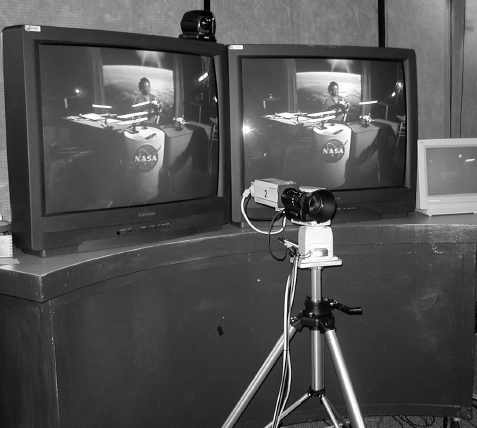
For videoconferening, the main camera should be placed so as to maximize eye contact.
For videoconferening, the main camera should be placed so as to maximize eye contact.
About the author
