Introduction
Scavenger hunts began as traditional activities for fun at family reunions and birthday parties; everyone was provided with a list of objects to find or to acquire within a set limit of time. Progressive educators saw the hidden value in scavenger hunts and began giving students directions and clues to help them explore and, at the same time, enjoy the various aspects of educational inquiry.
Scavenger hunts are only as limited as one’s imagination. Moorefield (2003) used a newspaper scavenger hunt as a method to entice her students to research current events for social studies. Feldman (2004) suggested using a newspaper scavenger hunt for teaching items such as grammar (verbs), math, and events of a scientific nature. Some educators adhere to the traditional mode of using a scavenger hunt by creating a “field trip” within their school grounds to conduct their 100th Day of School celebration (Clark, 2003). Fones (2000) designed a scavenger hunt that encouraged team building while searching the school grounds for science-related data. Other teachers have used scavenger hunts as a fun way to introduce students to different types of reference books such as the almanac (Miller, 2003).
Forward-thinking instructors soon meshed computer technology and the Internet with scavenger hunts. Many educators, such as Chalmers (2003), saw the need to teach students methods for locating Internet resources and found the game of scavenger hunt to be a non-threatening means of developing research skills. These new abilities were honed by a scavenger hunt that challenged students to investigate their local library as well as Internet search engines.
Literacy Quest Meshed with Blackboard Technology
Combining a scavenger hunt with computer technology can be done at all learning levels—elementary through college. The Teaching of Reading in the Elementary School course is designed for junior and senior pre-service teachers. For this instruction, the decision was made that students needed a project in which they would use their Internet research skills to find predetermined criteria that meshed with the course’s content. Because the Internet sites and articles had already been selected by the professor, the scavenger hunt was more appropriately designated as a Literacy Quest. Project goals fit the following criteria: engage and introduce students to specific Internet material that could be used for creating reading unit lesson plans; expose learners to current research and quality children’s literature; review relevant material in their textbooks; and provide them with opportunities for independent work. The most interesting facet of this Literacy Quest was the unique utilization of Blackboard (Bb) technology. The instructors wanted to control the release of each of the three sections of the Literacy Quest, as well as provide a place for the students to submit their material and take online quizzes related to the Literacy Quest.

Instructional Technology Specialist, Instructional Media and Design Center, Bloomsburg University of PA, 400 E. Second Street, Bloomsburg, PA 17815. Telephone: (570) 389-5319.
Instructional Technology Specialist, Instructional Media and Design Center, Bloomsburg University of PA, 400 E. Second Street, Bloomsburg, PA 17815. Telephone: (570) 389-5319.
The Literacy Quest was divided into three sections called tiers: One tier was a web search; a second tier consisted of a search within their textbook; and the final tier provided students with opportunities to search for a specifically assigned journal article. Tier One, the web search, required the students to visit three specific sites: www.readwriteandthink.com, www.proteacher.com, and www.ala.org. At the first two sites, the students had specific options for areas to search for lesson plan ideas and activities. Materials found at these sites were placed into a Word document and submitted as an assignment through Bb. Tier Two, the textbook search, was completed using an online Bb quiz. This tier's quiz contained questions related to information found in their textbook, as well as questions about award-winning children’s literature found at the American Library Association (ALA) site. This inquiry was designed to expose students to the variety of awards given for children’s literature. In Tier Three, the journal article, the students had a choice of searching for their assigned article through Bloomsburg University of Pennsylvania Library’s online research site or actually visiting the library to find and read the hard copy of the article. The report on each student’s selected article was then submitted via Bb’s assignment link.
To reduce sharing of information from the first two tiers (Internet search and textbook quiz), a decision was made to use the adaptive releases available in Bb. To control the adaptive releases, each class (section) was randomly assigned into one of three groups named Group A, Group B, and Group C. Once in these groups, the adaptive releases could be used to control the order in which each group would receive the tiers. Once the students submitted their material for a given tier, they were locked out of that tier and were unable to return to change their submissions. In order to receive their next tier, the students were required to click the “Mark Review” tab. This function would release the next tier’s directions and submission site. An additional control used was an overall time frame. Blackboard controls were set to release the entire project on a given day and time. The entire project was available to the students for one week. At the end of the week, the project’s time-limit parameters made the entire project unavailable. During the week while the students had access to the project, no time limits were placed on any of the individual tiers or quizzes. The students were also able to save their material if they did not have everything prepared for submission. However, saving their material did not mean that it had been submitted for grading; likewise, saving their material also did not make them immune to the project’s due date when the overall project’s time limit expired.
Blackboard Adaptive Release Technology
Figure 1 shows the use of Blackboard’s adaptive release of content, a feature available in versions 7.0 and higher. Adaptive release rules contain criteria that can include availability, date and time, individual users and groups, scores or attempts on any Gradebook item, or review status of another item within the course. The most basic adaptive release involves placing one rule on a content item. The advanced adaptive release allows for multiple rules to be created on a content item. Each rule consists of criteria that define the visibility of the content item to the users.
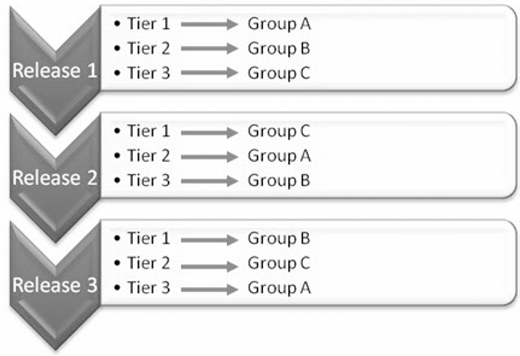
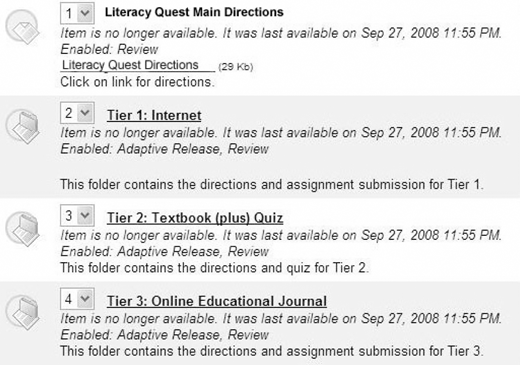
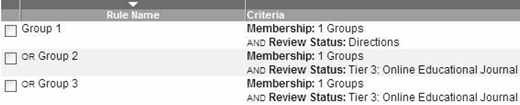
To set up the adaptive release options for the Literacy Quest, a diagram was created to show the relationships of the tiers and groups before setting up the releases in Blackboard. This mode was to ensure accuracy of the releases during development. Figure 2 demonstrates each separate menu item that was created for the Literacy Quest within Blackboard. This design reduced the clicks needed by the students to gain access to the Literacy Quest directions. This also provided the option to make the link unavailable until development was completed. The Literacy Quest content area contained the directions as an item, and each tier had a folder with the appropriate directions and assignments within. Using folders minimized the number of releases needed. Figure 3 shows how each folder received adaptive release rules. The releases were based on dates/time, membership to a group, and mark review of the directions or a tier. As students completed the work, the Bb Gradebook updated. They were able to track their progress as they completed the Literacy Quest.
Student Satisfaction —Survey Results book information, web site selection, and Bb satisfaction.
Once the students completed the Literacy Quest, they received a link to a survey within Bb. The survey results are from all four sections of the course Teaching of Reading in the Elementary School and were anonymous. The survey covered three main areas: locating articles and textbook information, web site selection, and Bb satisfaction.
Students were asked to rate their experiences locating assigned articles and textbook information. Table 1 identified a small number of students who required additional assistance, most notably being able to locate their assigned online article. For many of these undergraduates, this project provided their first experience in utilizing online access to research and reviewing journal articles. If they needed help finding their article, students were informed to contact their instructor to receive assistance via e-mail.
Ability Survey
| Strongly Agree | Agree | Neither | Disagree | Strongly Disagree | |
|---|---|---|---|---|---|
| I was able to locate my assigned article. | 63 | 35 | 3 | 5 | 2 |
| The article I read provided information that will help me as a future teacher. | 66 | 36 | 5 | 1 | 0 |
| I was able to access the quiz for the textbook questions. | 90 | 18 | 0 | 0 | 0 |
| I was able to locate the answers to the quiz questions in the textbook or from other sources. | 53 | 50 | 2 | 2 | 0 |
| I was able to access the web site links. | 65 | 39 | 2 | 1 | 0 |
Student feedback related to web site selection is presented in Table 2. Using this information, a decision was made to modify the second year Literacy Quest by substituting www.fcrr.org for www.ala.org. This will be a more useful web site because of its relation to the Five Pillars of Reading. Future student surveys will determine if this assumption is true.
Rating of the Sites
| Excellent | Very Good | Good | Fair | Poor | |
|---|---|---|---|---|---|
| Rate the web site:www.readwritethink.org. | 43 | 50 | 20 | 4 | 0 |
| Yes | No | Uncertain | |||
| Would you return to the web site:www.readwritethink.org? | 94 | 1 | 11 | ||
| Excellent | Very Good | Good | Fair | Poor | |
| Rate the Web site:www.proteacher.com. | 39 | 41 | 20 | 5 | 2 |
| Yes | No | Uncertain | |||
| Would you return to the web site:www.proteacher.com? | 94 | 3 | 10 | ||
| Excellent | Very Good | Good | Fair | Poor | |
| Rate the Web site:www.ala.org. | 26 | 50 | 31 | 0 | 0 |
| Yes | No | Uncertain | |||
| Would you return to the web site:www.ala.org? | 73 | 3 | 31 |
Student rating of Blackboard technology is located in Table 3. This information confirmed the ease of learning perceived by students in using Blackboard as the primary platform for a variety of academic experiences. Prior to expecting the students to engage in the Literacy Quest, directions were reviewed, and the functionality of each tier was modeled. The aspect of the “Mark Reviewed” button was introduced early in the course; students were required to read both the attendance and academic honesty policies and then activate the first My Education School link by clicking on the “Mark Reviewed” button. Most students did not need to use the Blackboard Help Desk. However, the few who tried to use this resource discovered busy signals or no response to their e-mail pleas.
Satisfaction Ratings
| Extremely Satisfied | Very Satisfied | Satisfied | Somewhat Satisfied | Not Satisfied | |
|---|---|---|---|---|---|
| Rate your satisfaction with the Blackboard item: Completing online quiz. | 43 | 48 | 15 | 1 | 0 |
| Rate your satisfaction with the Blackboard item: Instant quiz score. | 58 | 32 | 12 | 4 | 1 |
| Rate your satisfaction with the Blackboard item: Submitting an assignment. | 55 | 40 | 10 | 2 | 0 |
| Rate your satisfaction with the Blackboard item: “Mark Reviewed” button that released each tier. | 60 | 27 | 16 | 3 | 0 |
| Rate your satisfaction with the Blackboard item: Directions posted in Blackboard. | 56 | 29 | 17 | 2 | 3 |
| Rate your satisfaction with the Blackboard item: Blackboard Help Desk (if you used it). | 29 | 16 | 45 | 0 | 2 |
Conclusion
Through the review of journal articles and exploration of teacher-education web sites, students were provided with current information about means and methods for teaching reading in the elementary schools. Along with these learning opportunities, they also developed timemanagement skills. This project provided many students with an introduction to online journal retrieval and review of current supplementary materials. Fusing a game-like approach with twenty-first century technology within the collegiate classroom motivated the students and developed a new awareness of scholarly growth. Many pupils, in reflecting upon the various web sites’ information, professed that they had “bookmarked” numerous offerings and plan to return to these online resources when they begin their student-teaching experiences. Ohler (2009) notes, “Teachers who are truly digitally fluent will blend creativity and innovation into lesson plans, assignments, and projects” (p. 13). The goal in sharing this project is to inspire more educators to facilitate their students in developing digital fluency using the Literacy Quest approach.
About the authors