


People in society have managed to survive and, often, thrive in a world characterized by ever-increasing technological change. Yet technological transience causes or at least exacerbates challenges faced by teachers and teacher education programs when using technology for educational purposes. This article presents frameworks used to assist in the development of effective technology-based instruction, including instruction developed in a highly technologically transient setting. The article then explores strategies teacher educators may use to help shift the mindset, resources, and approaches surrounding technology-based instruction to better help preservice teachers effectively manage and integrate technology into their teaching.
Setting
A primary goal of teacher education is to develop teachers who can work effectively with increasingly diverse learners in technology-enabled settings. To better prepare teachers for the demands and challenges of today’s classrooms, many educator preparation programs are taking part in reform efforts and updating programs to meet today’s educational needs. An important aspect of these efforts is to address the increasingly critical role of technology in developing 21st century skills, as well as to improve teachers’ use of technology. The American Association of Colleges for Teacher Education states that teacher preparation programs should be encouraged to:
Meet the demands of the global economy by exemplifying, and embedding in instruction, the mastery of 21st century skills such as critical thinking, problem-solving, communication, collaboration and creativity and innovation. This includes the application of technology to support more robust instructional methods and understanding the relationship between content, pedagogy and technology through dissemination of Technological Pedagogical Content Knowledge (TPCK) theory and research. (American Association of Colleges of Teacher Education and the Partnership for 21st Century Skills, 2010, p. 6)
One major challenge that is faced by all teachers, teacher educators, and those who are administering teacher preparation programs is the rapid pace of technological change. The acceleration of technological innovation, coupled with ever-shortening technology lifespans (i.e., technology transience, discussed below), strains the resources of educators who strive to effectively integrate technology to meet learner needs. This chapter explores how teacher preparation programs might respond to the challenges posed by technology transience.
Educators and Technology Transience
“Technology transience” refers to the rapid proliferation of technology tools, the frequent update of such tools, and their ever-shortening lifespans. Keeping up with such technology changes creates an ever-increasing demand on both a user’s personal resources (i.e., time, energy, intellectual capacity, and emotions, etc.) and on a program’s resources (i.e., money, support staff, infrastructure, etc.).
Educators, already pressed for time, have the added challenge of determining the implications of new and updated tools on pedagogy and content-based instruction, and are therefore greatly challenged in integrating innovative technology in transformational ways. Due to teachers’ lack of capacity or inability to manage the pace of technology growth and transience, there is concern that the gap between societal uses of technology and school uses continues to widen (Collins & Halverson, 2009; Zhao & Frank, 2003). It is incumbent upon teacher preparation programs to consider how to build teacher capacity to both integrate technology and manage the challenges brought about by technology transience. We first turn our attention to some background information on distance education, followed by a presentation of some technology integration models that can assist teachers in dealing with technology transience. We conclude with the development of a series of applied strategies that can be effective for teachers working in today’s technology transient world.
Distance Education
Over the past several decades, distance and hybrid education has increasingly been integrated into higher education. Regardless of delivery system, however, the challenges of preparing preservice teachers to effectively use technology remain the same. These include: the steep learning curve, exacerbated by technology transience; the minimal exposure that preservice teachers have had to rich models of technology-enhanced instruction; and a general lack of technical support when attempting to learn how to employ technology in course assignments and practica. While most problems remain the same across modalities, one factor does change when teacher preparation shifts from in-person classroom work to distance or blended learning: more time is needed for preservice teachers to master the same set of skills.
Preparing Teachers to Integrate Technology
Although technology has become ubiquitous and essential in our everyday lives at home and at work, the same cannot yet be said for the K–12 classroom. There are multiple factors that hamper technology integration in schools, including funding, access to technology, availability of support systems, ingrained pedagogical approaches, and attitudes toward the teaching and learning process. Certainly one essential factor is the development of educators who are skilled in integrating technology in ways that improve teaching and learning. To the uninitiated, this seems a relatively straightforward matter; simply demonstrate to preservice teachers how a technology works, and they will then naturally determine how best to teach with that technology. In reality, however, learning how to integrate technology into instruction is a much more complex endeavor that involves not only technology skills, but also knowledge of subject matter, pedagogical practices, and beliefs about teaching and learning. Moving from the use of technology to deliver teacher-centered instruction to the infusion of technology to create transformational learning environments therefore involves a paradigmatic shift. Preparing educators to effectively integrate technology into instruction is a complex undertaking, and researchers and practitioners continue to seek more effective approaches to achieve this goal. Two models provide especially useful frameworks for understanding this process: (1) the Technology Integration Matrix (TIM) (Florida Center for Instructional Technology, 2015a), and (2) the Technological, Pedagogical, and Content Knowledge framework (TPACK) (Koehler, Mishra, Akcaoglu, & Rosenberg, 2013). We now briefly look at each of these models.
Technology Integration Matrix
Many educators mistakenly think that technology integration is somehow synonymous with content delivery. Given this rather limited conception of technology integration, it is not uncommon to see teachers using, say, their new interactive whiteboards in exactly the same manner as they previously used their traditional chalkboards or whiteboards: that is, to deliver text-based content while students take notes. In a similar vein, it is a common misconception that e-learning is the digital equivalent of a correspondence course devoid of meaningful interaction with other learners. Unfortunately, many teachers have not experienced well-designed, student-centered, technologyrich learning environments, so their understanding of the pedagogical possibilities afforded by instructional technologies is somewhat limited. The TIM (Florida Center for Instructional Technology, 2015a) provides a useful framework for building a more nuanced understanding of technology integration for teachers.
The TIM describes five increasingly complex levels of technology integration. At the lowest level of the continuum, instruction is teacher centered, and the teacher employs technology to deliver instructional content. In the midlevel of the continuum, there is a shift toward learner-centered instruction, with the teacher selecting the technology tools and guiding students in their use. At the highest level, technology becomes ubiquitous, and students select and use tools flexibly to achieve their learning goals. Each of the five levels of technology integration is described below (adapted from Florida Center for Instructional Technology, 2015c, slides 8–12):
Entry: The teacher uses technology to deliver content to students.
Adoption: The teacher makes decisions about technology and directs students in the conventional use of individual technology tools in ways that involve procedural understanding.
Adaptation: The teacher incorporates technology tools as an integral part of the lesson and guides the students in the independent use and exploration of technology tools.
Infusion: A range of technology tools is integrated flexibly and seamlessly into the classroom and students make informed decisions about when and how to use them with the teacher’s guidance.
Transformation: Technology is ubiquitous and is often used to facilitate higher order learning activities that would have been difficult or impossible to accomplish without the use of technology.
In addition to the five levels of technology integration, the TIM includes five characteristics of the learning environment (adapted from Florida Center for Instructional Technology, 2015c, slides 3–7):
Active: The level of student engagement, from passive receipt of information to active discovery, processing, and application of learning
Collaborative: The extent of technology use to facilitate, enable, or enhance opportunities for students to work together with peers or experts.
Constructive: The extent to which students use technology to build knowledge in the modality that is most effective for each student.
Authentic: The extent to which technology is used to link learning to meaningful contexts outside the classroom to increase relevance and motivation.
Goal-directed: The degree of technology use to set goals, plan, monitor and evaluate progress, and support metacognition.
The TIM (Florida Center for Instructional Technology, 2015a) is a five-by-five matrix that examines the five levels of technology integration across the five characteristics of the learning environment. The 25-cell matrix describes the range of complexity over which technology can be integrated into the curriculum. The TIM website offers multiple videos of lessons from real K12 classrooms that exemplify each of the 25 cells in the matrix. Careful review of these videos and the accompanying explanations can assist educators in developing a more elaborated and nuanced understanding of technology integration.
Technology Integration Matrix Digital Tools Index
|
|
Technology integration can be viewed on the TIM website through a second lens called the Digital Tools Index (Florida Center for Instructional Technology, 2015b). Videos are sorted by the categories in the index (see Table 1), which provides insight into the ways particular groups of technologies can be used to support student-centered, collaborative learning environments.
Tpack
Technology integration requires a complex set of skills involving technological, pedagogical, and content knowledge, along with the intersections among these. TPACK has been used over the past decade to describe various aspects of technology integration in curriculum and as a framework for exploring teachers’ skill sets required for teaching with technology. Taken together within the various contexts in which teachers teach, the task of effectively using technology in an ever-changing technological environment can be seen to be quite complex (Niess, 2011).
In Figure 1, there are seven factors theorized to be needed for a teacher to successfully integrate technology into their teaching (Koh, Chai, & Tay, 2014; Mishra & Koehler, 2006). Three of these features are conceptually relatively straightforward:
Content knowledge (i.e., subject matter)
Pedagogical knowledge (i.e., the knowledge of the processes involved in teaching)
Technological knowledge (i.e., knowledge of various technologies along with each of their features) [It is important to note for our discussion here that technology knowledge is the skill teachers must possess be able to quickly adapt to changes brought about by technology transience processes (cf., Mishra, Koehler & Kereluik, 2009).]
The TPACK framework also accounts for three, two-way interactions of factors:
4. Pedagogical content knowledge (which asserts that, to be efficient and effective, different content requires different teaching methods)
5. Technological content knowledge (new technologies can allow content to be presented and explored by learners in ways not previously possible and/or practical)
6. Technological pedagogical knowledge (which recognizes that technology allows new venues for teaching, potentially making it easier to implement certain classroom activities)
Finally, the seventh factor in the TPACK framework is a three-way interaction:
7. Technological pedagogical content knowledge (which focuses on how technology can be used take advantage of specific teaching opportunities, or to overcome challenges within a given teaching context)
Note, too, that the context or teaching environment often changes, calling for a shift in how the seven TPACK elements are applied within a given instructional context.
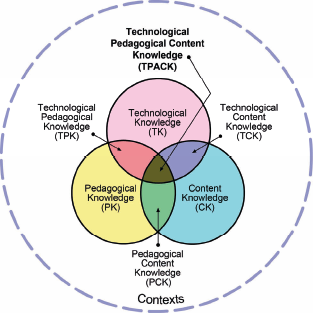
TPACK Framework
TPACK Framework
Contextual Factors Influencing TPACK. Contextual factors affect teachers’ technology integration. The TPACK-in-Action framework (Koh, Chai, & Tay, 2014) outlines four contextual variables that teachers need to manage as they enact their TPACK during the design of technology-enhanced lessons.
The physical/technological dimension refers to issues related to the availability and efficacy of resources to support teachers’ integration of information and communication technologies. These could be resources such as hardware, software, and technology support staff (Koh et al., 2014). Technology transience plays a significant role in this factor because rapid changes in technology add to the strain on schools to provide these resources. The physical and technological contextual dimension can present challenges in preparing teachers to use a broad range of technologies in their future classrooms. For example, if one is teaching interns how to use a SMART Board, but the mentor teacher’s classroom doesn’t possess a SMART Board, interns can become frustrated, and feel that the lesson was largely pointless. There are many other potential issues that can arise: too few computing devices in the classroom, overbooked computer labs, bans on the use of personal computing devices such as cell phones, and tightly controlled access to websites (e.g., blocking social media sites such as YouTube, Instagram, Twitter, etc.).
The cultural/institutional factor deals with the institutional influences of society and culture, educational policies, school leadership, school policies, and curriculum on teachers’ teaching practice (Koh et al., 2014). The school may not have a culture that embraces technology and there may be pressure to conform to more traditional styles of teaching, particularly in schools narrowly focused on standardized assessments. Policies and curricular decisions can impact teachers’ ability to cope with technology transience. For example, a bring-your-own-device policy promotes access to a greater number of updated devices than most schools can maintain, and the changing nature of these student-owned devices, which are likely to be updated with much greater frequency than any school’s technology equipment, can impact the instructional setting.
The intrapersonal factor refers to teacher beliefs about “teaching, learning, pedagogy, students, technology, as well as the interaction of these aspects within the myriad of pedagogical situations they experience in classrooms” (Koh et al., 2014, p. 21), and how these influence their technology integration. Building teachers’ knowledge base and self-efficacy regarding technology integration is critical to their navigating the additional personal resource demands imposed by technology transience.
The interpersonal factor involves collaboration among teachers to problem solve and innovate. Technology transience adds to the challenges of collaborative planning because groups that become mired in discussions of logistical concerns and barriers are less effective. Koh et al. (2014) suggest that the TPACK of design groups may be improved by the presence of a strong facilitator or promoter of technology.
TPACK Development Model. Building the complex, integrated knowledge base involved in TPACK is a developmental and ongoing process. Experience with design, implementation, and evaluation of technologyenhanced lessons plays an important role in building the knowledge base. Interestingly, even experienced educators with extensive TPACK must continually renegotiate the interactions among the TPACK factors to integrate new learning and experiences. In an effort to explain this process, “Niess, Sadri, and Lee (2007) proposed a developmental model for TPACK emanating from Everett Rogers’ (1995) model of the innovation-decision process” (Neiss et al., 2009, p. 9). Through observations of classroom teachers who were learning how to integrate a new technology into their mathematics lessons, Niess et al. identified five levels of TPACK development:
Recognizing (knowledge), where teachers are able to use the technology and recognize the alignment of the technology with mathematics content yet do not integrate the technology in teaching and learning of mathematics.
Accepting (persuasion), where teachers form a favorable or unfavorable attitude toward teaching and learning mathematics with an appropriate technology.
Adapting (decision), where teachers engage in activities that lead to a choice to adopt or reject teaching and learning mathematics with an appropriate technology.
Exploring (implementation), where teachers actively integrate teaching and learning of mathematics with an appropriate technology.
Advancing (confirmation), where teachers evaluate the results of the decision to integrate teaching and learning mathematics with an appropriate technology (Neiss et al., 2009, p. 9).
Frameworks for Instructional Planning
Teacher preparation programs need to implement strategies that are consistent with the developmental nature of TPACK, and that can help preservice teachers integrate their technological knowledge with their pedagogical content knowledge. When faced with authentic instructional problems in real classrooms, teachers need to be able to apply their knowledge flexibly to determine how learning can be facilitated with instructional technology. Two instructional planning frameworks that are particularly helpful in this regard are learning activity types (Harris, Mishra & Koehler, 2009) and universal design for learning (Meyer, Rose & Gordon, 2014).
Learning Activity Types. To date, technology use in education has been criticized for remaining at a relatively low level of sophistication. That is, the prevalent use for educational technology has remained largely aimed at increasing efficiency or extending existing applications, rather than helping attain the vision of educational transformation that many educators have desired. Recognizing the dynamic and complex relationships among content, technology, pedagogy, and context, Harris et al. (2009) point to the fact that, depending upon the characteristics of the technology, not every technology works for use with every learning activity type. While not transformative in the sense of educational reform, their work does go beyond simply describing the TPACK framework to shed light on how teacher educators can match learning activity types, content, and technologies for a more sophisticated approach to technology integration. The learning activity types taxonomies (Harris & Hofer, n.d.) that have been developed for each content area can serve as a menu of options while planning instruction. For each learning activity, a list of appropriate technology tools for facilitating the learning activity is provided.
Universal Design for Learning. Teacher preparation coursework that includes technology-enhanced, collaborative learning experiences along with universal design for learning (UDL) learning activities has been shown to promote preservice teachers’ TPACK development (Haley-Mize & Walker, 2014). UDL (Meyer, Rose & Gordon, 2014) focuses on improving access to education for all learners by removing barriers in the curriculum. Because learning is context-specific, and because there exists variability among learners, one approach cannot meet the needs of all learners. The UDL framework guides the “design, selection, and application of learning tools, methods, and environments” (Meyer et al., p. 51). The three core principles of UDL are to provide multiple means of engagement, provide multiple means of representation, and provide multiple means for action and expression. Each of these core principles is further explained through guidelines and checkpoints. The UDL framework guides teachers through the process of designing a learning environment and choosing appropriate instructional materials and methods that will meet the spectrum of student needs.
Technology plays a valuable role in UDL. Digital technologies enable educators to more easily, effectively, and affordably customize and individualize curricula for all learners to create flexible learning environments. UDL provides a valuable lens through which educators can consider why and how to effectively integrate technology. The design principles help teachers design instructional materials, learning experiences, and learning environments that provide access to all learners. In a learning environment in which the teacher provides students with appropriate choice and autonomy, the personalized learning described in Level 5 of the TIM is achieved.
Developing Resource Fluency
While the literature supports learning technology through the lens of learning activity types (Harris & Hofer, 2009), teachers do not necessarily begin by thinking about learning activity types when designing instruction to solve authentic problems of practice. Contextual factors influence design thinking and may constrain an educator’s options. For example, the school principal may require teachers to utilize recently installed interactive whiteboards. This forces teachers to begin thinking from a tool-based perspective: “How can I use this SMART Board in my lesson?” Alternatively, meeting the needs of a specific struggling learner, or a diverse group of learners, may be weighing heavily on a teacher’s mind. In this scenario, considering technology through the lens of UDL is appropriate. Given that instructional design thinking is iterative and nonlinear, flexibility and fluency are important when considering technology integration. Teachers should be able to switch fluidly among a variety of perspectives for considering technology integration including learning activity types, UDL, and a tool-based approach. This flexible, multifaceted approach to technology can be termed “resource fluency.” Building a substantial resource base from which to draw is a critical component of resource fluency.
Teacher Preparation Programs and Technology Transience
The strategies above are suggested to be effective in developing and supporting the integration of preservice teachers’ TPACK, but they do not specifically address how to manage the challenges and frustrations caused by technology transience. The sheer number of educational technology tools grows daily and it seems overwhelming to learn how to use them all. With the introduction of each new technological tool or upgrade, a teacher must negotiate the process of learning how to use its features, determine the tool’s pedagogical applications, ascertain the tool’s relevance in solving content-specific learning problems, and navigate all of the contextual challenges of implementation in the real-world setting. We developed the Technology Fluency and Integration Model (TFIM), shown in Figure 2, to describe the process of learning to integrate a new technology in terms of the developmental stages of TPACK, resource fluency, and the levels of technology integration in the TIM. The TFIM will then be used to as a basis to make recommendations for managing technology transience.
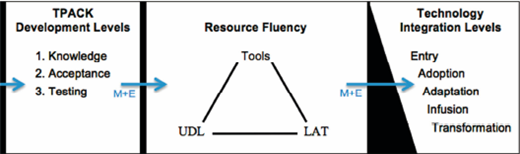
The Technology Fluency and Integration Model
The Technology Fluency and Integration Model
Consider the stages outlined in the developmental model of TPACK (Niess et al., 2009) as they relate to the introduction of a new technology tool. In Stage 1, the teacher becomes aware of the technology tool, learns its basic features, and considers its potential educational applications. In Stage 2, the teacher develops an attitude toward the technology and accepts or rejects its use. If the technology tool is accepted at Stage 2, then in Stage 3 the teacher conducts limited classroom testing to decide whether or not to fully adopt the tool. These first three stages are depicted in the first column of Figure 2. [Note that in the Niess et al. model this stage was called adapting, but the name was changed to testing in the TFIM to differentiate it from the adapting level of technology integration in Column 3.]
The decision at Stage 3 determines whether or not the tool will be incorporated into the teacher’s resource toolbox for future use. This decision to adopt the new tool is represented by the arrow crossing the barrier between Columns 1 and 2. The teacher’s resource fluency (shown in Column 2) grows through the addition of new tools; by considering the tool through a variety of lenses such as LAT, UDL, and the digital tools index; and through lessons learned from actual implementation experiences.
Stages 4 and 5 of TPACK development both deal with actual implementation of the new technological tool. Yet these two stages are insufficient to describe the complex and nuanced ways that technology can actually be integrated. For a more comprehensive explanation, the TFIM uses the five levels of technology integration described in the TIM; these are shown in Column 3. Integrating technology at progressively higher levels requires additional skill and experience, and involves overcoming greater contextual challenges, depicted by the black triangular barrier between Columns 2 and 3.
The arrows crossing barriers in Figure 2 represent the teacher’s decisions to move to a more challenging level and overcoming any barriers in doing so. That process is influenced by mindset and experience. A positive mindset enables one to be more open to change and resilient in the face of challenges. With each successful experience integrating technology, the mental path through the technology integration process becomes more familiar, making subsequent adoption cycles easier. Positive experiences also feed into a positive mindset. As experience and resource fluency increase, it becomes easier to recognize similarities among tools and determine their potential applications. Of course, a negative mindset and negative experiences hamper this process, making it much more difficult to manage technology transience. Therefore, it is very important for teacher preparation programs to employ strategies that promote a positive mindset, build resource fluency, and foster positive experience with technology integration.
Strategies to Address Technology Transience in Teacher Preparation
As a result of examining the relevant literature, and comparing that literature with the authors’ own experiences in teacher preparation, we offer the following set of strategies to help prepare teachers for managing technology transience:
Mindset: Inculcate a Fundamental Shift in Thinking about Technology.
Make “Learn how to learn technology” both a course goal and a mantra.
Be an explorer. “Just poke around—you aren’t going to break it.”
Be resourceful. “How did I learn to do this? Google it!” “Can any of you show us how to …”
Be a trouble-shooter. “My computer is not working with the SMART Board. Let’s walk through the troubleshooting steps together.”
Accept the ephemeral nature of technology tools.
Model a positive attitude about change.
Discuss technology transience. Every lesson, give examples of tools that were last used that may now be gone, as well as tools being used for the first time.
Show how easy it is to find alternatives (ex. http://alternativeto.net).
Be willing to try (and try again).
Accept that technology-based lessons will not always go smoothly. Technology failure is not the end of the world: it’s a learning opportunity.
Learning to integrate technology is a process. Grading policies should encourage growth: “Revise and resubmit.”
Have a back-up plan or alternative activity for when technology does fail.
Develop life-long learning habits to remain current with technology in your content area
Follow, and require students to follow, edtech blogs or Twitter feeds.
Ask students and alums to share new tools that they find.
Try a new tool and ask the class to help critique that tool for strengths and weaknesses.
Resource Fluency: Build fluency and adaptability with regard to technology tools.
Focus on learning activities and UDL strategies; introduce many different tools that can be used to accomplish each one.
Tools will come and go (transience) and contextual factors may limit availability.
Teachers can find new/replacement tools online to accomplish a learning activity. (See for example, alternativeto.net)
Practice shifting among the lenses such as learning activity types (LAT), UDL, and the tool index.
Examine how each new tool or activity could be categorized or utilized. It becomes easier to adopt new tools and strategies to the resource bank, and apply them appropriately, as the resource bank gets larger.
Allow choice in tools and platforms to accomplish a task (e.g., “Create a digital story with iMovie, Windows Movie Maker, or WeVideo.
If you know of another tool you want to try, show it to me and we can decide if it will work.”).
Have interns present projects or activities created using different tools and discuss the strengths and weaknesses of each tool.
Explicitly teach about user interface metaphors (Barr, 2003) to enhance transfer of skills across tools.
As an example, SMART Notebook uses a similar organizational metaphor to PowerPoint. In both programs, a linear series of slides may be created and edited in design mode, and projects played in linear order in slideshow mode. (In design mode the screen is divided into two parts: a slide sorter panel used to organize and select slides, and a design panel used to add content to the active slide with a palette of design tools.)
These programs also share many commonly used structural metaphors that represent actions such the “add a slide” icon that looks like a slide with a plus sign on it. User interface metaphors are helpful for dealing with technology transience because the learning curve for a new tool is much smaller when one recognizes the organizational patterns and recognizes what capabilities can be expected.
Integration: Integrate TPACK development across courses and throughout the program (Mouza, Karchmer-Klein, Nandakumar, Ozden, & Hu, 2014).
Avoid silos. Technology is not just for tech courses, but it doesn’t have to be isolated in methods courses either.
Interdisciplinary technology courses can broaden interns’ understanding of technologyenhanced learning and spur creativity. Some learning activities and technologies are relevant for educators in all content areas.
Methods courses can focus on content-specific applications of technology.
Practicum courses provide essential opportunities to design, implement, and evaluate real-world technology-enhanced lessons.
Create threads (or spirals) that run throughout the teacher preparation program, allowing interns to learn the basics, have guided practice, and then implement in the K–12 classroom.
It is ideal if this can occur across courses and instructors to demonstrate a programwide commitment to technology-enhanced instruction.
Developmental Approach: Utilize a developmental approach to TPACK.
Design the program to include iterative cycles of learning, application, and reflection, and gradually increase the complexity of design challenges and authentic problems of practice (Koehler et al.,2013).
Make explicit how the program moves preservice teachers through the developmental stages of TPACK and the TIM levels through purposefully designed curriculum, learning activities, and assignments.
Model how to teach in a technology rich environment (Voogt, Fisser, Pareja Roblin, Tondeur, & van Braak,2013).
Use ePortfolios for reflection on and documentation of developmental growth throughout the program.
The additional benefit is that teachers understand how to use ePortfolios for assessment in their own courses.
Conclusion
Technology transience means that the number of instructional technology tools is proliferating, existing tools are frequently updated, and tool lifespans are shorter. Keeping pace with such changes causes an ever-increasing demand on teachers’ and teacher educators’ personal resources: that is, their time, energy, intellectual capacity, and emotions. New technology must be viewed by teachers using a perspective that considers how each technology change will impact content and pedagogy, thereby affecting technology integration and the ability to meet students’ needs. Teacher preparation programs should therefore adjust their approaches to assist teachers in more easily navigating changes caused by technology transience. Although these challenges remain regardless of any professional development, it should be noted that when professional development is conducted at a distance and/or a blended modality, the technology-mediated format adds an additional layer of complexity, usually resulting in increased time for learning to occur.
There are several reasons why teachers are overwhelmed with their own technology integration efforts. The TPACK framework presents three of the main factors (and their interactions) when considering the necessary but not sufficient skill set that teachers at any level of experience must master to successfully integrate technology into their teaching. In addition to the complex skills needed, we argue that teachers must experience learning in a technology-rich environment where teaching with technology is modeled during professional development. By incorporating TPACK with the Technology Integration Matrix, the Technology Fluency and Integration Model provides a useful framework to develop strategies to support technology implementation, thereby helping mitigate the impact of technology transience on teacher candidates.

