

Introduction
An east coast institute will open a new English language program (ELP). It will have two campuses located in the same state. An effective learning management system is urgently needed to meet their instructional needs.
At present, they are not using a learning management system (LMS). Instead, they are using various other technologies offered by the university to generate grade reports and track class attendance. Their current process is time consuming, repetitive, cost-ineffective, and at various times inconsistent. Another complaint is that students are not able to assess their school performance with real-time teacher feedback. Additionally, in order to comply with immigration laws, international students must adhere to a strict attendance policy. There have been reports of students being counted as absent for a whole day when they may have been only late. This can be very problematic. With increasing enrollment, these issues are becoming more complicated. They desire a system that offers greater grading flexibility, allows for ease of communication and collaboration among teachers and administration, reports and tracks student progress efficiently, and offers methods for course control.
Although many commercial LMSs are available, such as “Blackboard,” they are very costly. More and more institutions chose to use open-source systems to take the advantages of cost efficiency and functionality (Wheeler, 2004). Similarly, Moodle was adopted by ELP to solve the problems mentioned above as well as meet the requirements. The word “Moodle” is the short form of modular object-oriented dynamic learning environment. It is a free, open source, online LMS. There are no associated license fees and the content, design, and tools provided are driven by the needs of Moodle user community (Moodle, 2010).
Description of the Study
The primary goal of the ELP is to prepare international students for university admission through a rigorous and progressive series of intensive English courses. They desire a system that enhances communication, collaboration and across the board consistency of processes.
In this mixed-method study, the researchers intended to evaluate the use of Moodle in ELP. Many studies have been conducted to explore students’ opinions of using Moodle (e.g., Carvalho, Areal, & Silva, 2010; Wood, 2010). We addressed the use of Moodle from a different perspective; that is, from opinions of faculty and administrative staff.
Research Questions
The purpose of this study was to find out what were the perceptions and experiences of teachers and administrators in their use of Moodle and to assess the technological affordances of Moodle. The results were used as part of the decision to determine whether Moodle would be implemented as their learning management system. More specifically, this study answered the following questions:
What are the ELP instructors’ needs in terms of a learning management system?
What are the technological affordances of Moodle, particularly in light of ELP instructors’ needs?
To what extent does Moodle meet the identified learning management system needs of ELP instructors?
Methodology
Sample
The ELP consisted of the director, two associate directors (one for each ELP location), one ELP administrator and seven instructors. To obtain a sample that is representative of the entire group, all of them were given the survey and encouraged to fill it out. All key stakeholders (director and associate director of the ELP) were invited to participate in the focus group interview. The formative interview was conducted with the site contact and one of the instructors at the ELP.
Data Collection
Data collection methods used in this study were the formative interview with two ELP representatives, an e-mail interview with a current Moodle user, a survey, a focus group interview with ELP administers and instructors, and a Moodle assessment rubric.
Data Analysis
Qualitative data were coded and integrated by three of four researchers in two rounds. The first round was individual coding, and the second round was collaboratively reviewing the codes of each other to reach a consensus. Quantitative data were statistically analyzed by calculating means, frequencies, and standard deviation.
Results
Results of the Formative Interview
Two representatives from the ELP program described their current process of administrating students as time-consuming, repetitive, cost-ineffective, and at times inconsistent, since they were not using any LMS. Another complaint was that students were not able to assess their school performance with real-time teacher feedback. They expressed that they needed a tool that offered flexibility in grading, allowed for ease of communication and collaboration among instructors and administration, reported and tracked student attendance and progress efficiently, and offered methods for course control.
Results of E-Mail Interview With a Current Moodle User
The participant had approximately a year of experience with using Moodle. She referred to Moodle as a user-friendly learning management system, capable of addressing a variety of instructional needs. She preferred the feature of private grades checking, the capacity to handle large files, and collaborative learning. She also raised some minor concerns. First, the Moodle user must create their own database of students’ IDs. Second, the instructor needs special training to use it proficiently.
Results of the ELP LMS Selection Survey
The survey (Appendix A) included five parts: basic demographics, basic LMS functionality, advanced LMS functionality, system usability and technical support, and open-ended questions. For Parts 2 to 4, a Likert scale was used. The Likert scale had five levels; with 1 being not important, while 5 is extremely important. The index of mean was used to analyze data.
Part 1: Basic Demographics
Eight of 11 participants filled out the survey and the response rate was 73%. Two of the respondents were administrators, and the remaining six were instructors. All of the instructors had at least a graduate education. They all had at least 3-5 years’ experience with computing/web. Forty-four percent of the respondents had more than 10 years’ experience with computing/web. In addition, they all had some LMS experience. Half of the respondents felt comfortable with LMS.
Part 2: Basic LMS Functionality
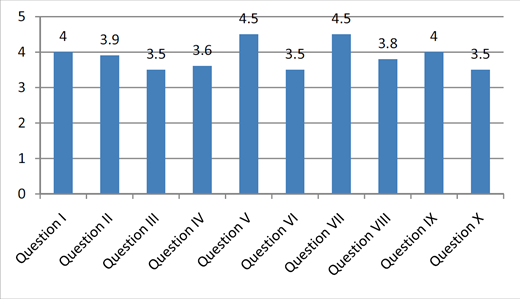
Of the 10 survey questions in this part, two questions received the mean score of 4.5 or higher. The mean score for monitoring course progress and effectiveness (Question V) was 4.5. The mean response for providing feedback on assignments (Question VII) was 4.5. The ability to track and facilitate individual participation (Question IX) received a mean response of 4. The results of this part indicated that, in the stakeholders’ minds, monitoring course progress, providing feedback on assignment, and tracking individual participants were the most important functionalities that an LMS should possess.
Part 3: Advanced LMS Functionality
A mean of 4.5 was the response given for requiring the LMS to have contents that are protected with a password and other security protocols (Question VII), and for allowing the user to update and redesign assessment rubrics received a mean response of 4 (Question V). The results indicated that security protocol was a major concern of using an LMS. Allowing the users to update and redesign assessment rubric was also an important factor of choosing an LMS.
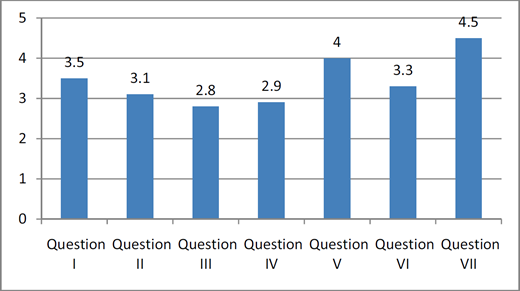
Advanced LMS functionality.
Note: One participant missed Question VI and the results were calculated based on 7 responses.
Advanced LMS functionality.
Note: One participant missed Question VI and the results were calculated based on 7 responses.
Close modal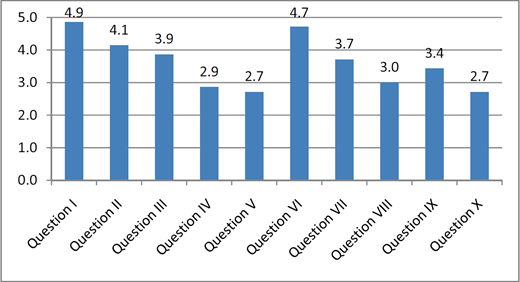
System usability and technical support.
Note: One participant missed this section and the results were calculated based on 7 responses.
System usability and technical support.
Note: One participant missed this section and the results were calculated based on 7 responses.
Close modalPart 4: System Usability and Technical Support
Having an LMS that has a simple layout that is relatively easy to navigate (Question I) received a mean response from the participants of 4.9, while providing users with basic online support (Question VI) received the mean score of 4.7. The use of icons and other graphics to provide cues regarding usage (Question II) received a mean response of 4.1, and the mean response for requiring screen contents and labels that can be modified (Question III) was 3.9. The results indicated that a simple layout was an important feature of an LMS, and basic online support was important to the client.
Part 5: Open-Ended Questions
The participants expressed their needs for an LMS in aspects of document storage capacity, student progress monitor, automatic weighting of grades, students’ access to their own grades, low instructor's workload in administration, and ease of instructor/faculty collaboration. Most of them perceived that an LMS would be highly valuable in fulfill their needs mentioned above.
Results of ELP LMS Focus Group Interview
Based on the survey results, the researchers designed the focus group interview protocol. Ten people participated in the interview, yielding a participation rate of 91%. The purpose of the interview was to have the participants agree on the group's most important needs, as well as to get more in-depth information beyond the data collected through survey.
Regarding the Question 1, participants were asked to name three most important learning management issues they were struggling as a group. First, they stated that they needed a flexible grading system; currently they gave many tests that require a flexible system. The system should work accurately and could calculate averages, weight grades, keep running calculation of grades, and allow for real-time reporting. Second, they indicated that in order to monitor their progresses, students should be able to access to their grades. Third, they needed a way to allow students to submit assignments by specific due dates.
Regarding Question 2, participants were asked to list top three most important instructional needs that they would like Moodle to address. They mentioned that
Moodle should be able to back up everything; the evaluators thought this was not a Moodle issue but a server issue. They wanted Moodle to handle large audio and video files, generate student proficiency reports, and allow instructors to track attendance and student to access to their attendance.
Regarding Question 3, the group was asked to what extent must Moodle meet their priority needs to be the desired LMS option. They said Moodle should meet 98% of their instructional needs.
Results of Moodle Assessment Rubric
Based on the results of formative review, e-mail review, survey results, and the focus group interview, the evaluators created a Moodle assessment rubric (Table 1). For the purpose of this research, Moodle version 1.9 was assessed.
Moodle Assessment Rubric With Results
| Areas of Consideration | Don't Meet | Meets | Exceeds | Note |
|---|---|---|---|---|
| 1 Sufficient audio file capacity/storage | x | |||
| 2 Allow flexibility in grading | x | |||
| 3 Support for electronic communication/collaboration | x | |||
| 4 Student attendance tracking | x | |||
| 5 Allow posting of assignments | x | |||
| 6 Contents are protected with security protocols | x | |||
| 7 Can generate grade reports | x | |||
| 8 Monitor course progress | x | |||
| 9 Provide feedback on assignments | x | |||
| 10 Layout that is relatively simple to navigate | x |
Note: Don't Meet–Moodle does not address the needs as specifically request by the client; Meet–Moodle addresses the needs as specifically request by the client; Exceed–Moodle address the needs as specifically request by the client and beyond.
Sufficient File Capacity. Moodle has a basic storage file capacity of 5MB. This can be adjusted to the maximum file upload size capacity of 50 MB. It also accommodates video files.
Allow Flexibility of Grading. In Moodle, grades can be calculated, aggregated, and displayed in a variety of ways. Many settings have been designed to suit the needs of a great variety of organizations.
Electronic Communication/Collaboration. Moodle has a variety of communication affordances. It has an internal e-mail application as well as a forum for posting messages. It also has a Chat feature which allows for synchronous text interaction and collaboration.
Student Attendance Tracking. Moodle allows attendance to be added as an activity to each course the instructor desires. There are four status features the instructor can select: present, absent, late, and excused. The instructor may prefer to change the descriptions (e.g. change the word “late” to “tardy”), change the order, or change the way points are counted so as to make appropriate changes here to the names, order, and grades. The instructor can export attendance reports for every day, every week, or every month.
Allow Posting of Assignments. The assignment activity module in Moodle allows teachers to collect work from students, review it, and provide feedback—including grades. There is also an offline activity option that can be used to remind students of assignments they need to complete, and to record grades in Moodle for activities that don't have an online component. In addition, Moodle allows resubmission and regrading of the assignment.
Security Protocols. Moodle affords strong security protocols. The system is password protected and the client's designated administrator can set permissions for access.
Grade Reports. Moodle affords instructors the ability to create grade book for each course. The instructor and administrator also can track grade history, as well as import and export grades in spreadsheet or webpage format.
Monitor Course Progress. In Moodle, there is course-based progress tracking or competency-based progress tracking. In course-based progress tracking, students can check which of their assignments have and have not been completed, and check the grade and feedback they've received for each assignment. Competency-based progress tracking lists all the outcomes with a required level of competency for that outcome. For example, ELP instructors could track the progress of a student's listening ability, and set different levels (e.g., low, intermediate, or high) for that ability. Whenever the leaner logs into the Moodle system, he or she is able to see the progress monitoring block on the course site.
Feedback Features. Moodle has an assignment module that allows teachers to provide feedback to students. The system also records the last modification time of the assignment by the student as well as by the teacher. The system automatically notifies the student via e-mail once the instructor finishes grading, updating, or commenting on student assignments.
Layout and Navigation. The layout of Moodle is relatively simple and easy to navigate. However, this determination is based on the user's technical experience and computing skills.
Based on the above evidence, the researchers think Moodle is able to fulfill the client's instructional needs (Table 1).
Discussion
Both qualitative and quantitative data revealed positive results in the experience of using Moodle. The results suggested that Moodle met the requirements of ELP for a LMS that allowed for grading flexibility, ease of communication, teacher collaboration, and attendance tracking. In addition, Moodle was secure, had a large file capacity for audio/video recordings, and allowed for posting assignments and monitoring student progress. More importantly, since Moodle was designed based on a socioconstructivist pedagogical philosophy, it provided a platform for social negotiation in the process of knowledge building (Doolittle, 1999; Zakaria & Daud, 2008). Teachers were able to provide timely formative feedback via Moodle.
Although Moodle was able to address most current problems of ELP, like any new application there is a learning curve for its users. A considerable time investment for integrating student information, setting up courses, and orientating new instructors and students to the new LMS must be taken into account.
Conclusion
This study found out that Moodle was able to address most of ELP's needs quite well. Moodle was highly recommended to be adopted as a LMS to the faculty and administrative staff in the ELP program. To maximize its usage, certain types of training and orientation sessions would be required.
About the authors




Appendix A: Virginia Tech's Elplms Selection Survey
In an effort to include all stakeholders’ thoughts and perceptions regarding the selection of an appropriate learning management system (LMS) such as WebCT, Blackboard, Sakai, or Moodle for Virginia Tech's ELP, your participation is needed.
We have developed the survey below to capture this information. The questions for the survey are grouped in five parts: demographics, open-ended, basic LMS functionality, advanced LMS functionality, and system usability and technical support.
Please spend a few minutes answering the questions developed for the survey. Your input in this endeavor is well-appreciated.
Part 1: Basic Demographics
User Category
___ administrator;
___ staff
___ instructor
Years of experience with computing/web
___ 0-2
___ 3-5
___ 6-9
___ 10+
Your education level
___ Prebaccalaureate
___ Some undergraduate
___ Postbaccalaureate
___ Some graduate
___ Graduate and above
LMS Experience
___ None
___ Beginner
___ Comfortable
___ Advanced
What, if any, learning management system have you used? (Choose all that applied)
___ Blackboard
___ Moodle
___ Scholar
___ WebCT
___ Sakai
___ Other: (Please indicate name)
__________________________________
Contact information (For clarification and/or follow-up)
E-mail: __________________________;
Phone: ___________________________
Part 2: Basic LMS Functionality
1 (not important), 2 (somewhat important), 3 (important), 4 (very important), 5= (Extremely Important)
| Item | Importance (1 – 5) | |
|---|---|---|
| I. | Allow creation/posting of assignments: tests, projects etc. online | |
| II. | Provide criteria and procedures to automatically grade assignments | |
| III. | Include means to write objectives and learning outcomes | |
| IV. | Maintain records of communication with other users | |
| V. | Post/monitor course progress and effectiveness | |
| VI. | Track registration records | |
| VII. | Provide feedback on assignments | |
| VIII. | Allow chats and asynchronous communications: postings, forum, etc. | |
| IX. | Track and facilitate individual participation | |
| X. | Support for electronic communications such as e-mail, posts, etc. |
Part 3: Advanced LMS Functionality
1 (not important), 2 (somewhat important), 3 (important), 4 (very important), 5= (Extremely Important)
| Item | Importance (1 – 5) | |
|---|---|---|
| I. | Support use of external resources e.g., web links, podcast | |
| II. | Can incorporate multimedia resources: movies, Flash, PowerPoint | |
| III. | Facilitate collaborative learning tools such as wikis | |
| IV. | Support virtual community building | |
| V. | Allow update and redesign of assessment rubrics | |
| VI. | Provide means to create multiple roles in the system | |
| VII. | Contents are protected with password and other security protocols |
Part 4: System Usability & Technical Support
1 (not important), 2 (somewhat important), 3 (important), 4 (very important), 5= (Extremely Important)
| Item | Importance (1 – 5) | |
|---|---|---|
| I. | Has a simple layout that's relatively easy to navigate | |
| II. | Use of icons and other graphics provide cues regarding usage | |
| III. | Screen contents and labels can be modified | |
| IV. | Allow multimedia and visual resources into an online module | |
| V. | Support moving courses to other categories | |
| VI. | Provide users with basic online support | |
| VII. | Provide users with advanced online support | |
| VIII. | Refer users to other sources for tech support | |
| IX. | Supports open Source | |
| X. | Allow use of HTML |
Part 5: Open-Ended (Should be at the End of the Survey)
List and discuss other items that you think would be important for us to consider in the LMS evaluation.
____________________________________________________________
____________________________________________________________
____________________________________________________________
____________________________________________________________
____________________________________________________________
____________________________________________________________
Discuss your thoughts about online learning and use of LMS in general.
____________________________________________________________
____________________________________________________________
____________________________________________________________
____________________________________________________________
____________________________________________________________
____________________________________________________________
Thank you for your input!
